NVIDIA HGX B300 is an eight-GPU accelerated computing platform built around Blackwell Ultra SXM GPUs. It combines 2,304 GB of HBM3e memory, fifth-generation NVLink and NVSwitch connectivity, and eight ConnectX-8 SuperNICs in a design intended for large AI training, inference, and high-performance computing clusters.
The platform is more than a faster GPU baseboard. Its memory capacity and network interface design change how a server must be integrated into the rack. Host architecture, cooling, power delivery, east-west network bandwidth, switch port allocation, optics, and cabling all need to be planned as one system.
This guide explains the verified HGX B300 specifications, how it differs from HGX B200, and what the 800G network architecture means for deployment.
What Is NVIDIA HGX B300?
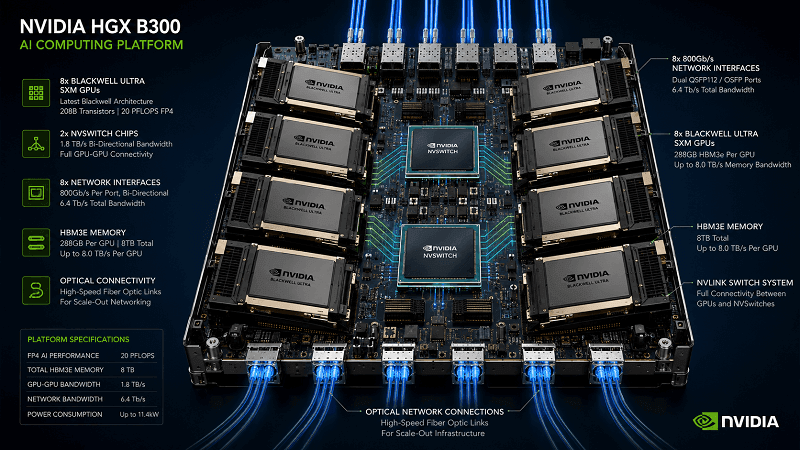
HGX is NVIDIA’s platform for OEM and cloud-system builders that need a multi-GPU baseboard with a high-bandwidth scale-up fabric. A complete HGX B300 server adds host CPUs, system memory, storage, power supplies, cooling, management, and network-facing components around that baseboard. The exact chassis and host configuration therefore depend on the certified server vendor.
The current NVIDIA HGX AI Factory reference architecture specifies:
- Eight NVIDIA B300 Blackwell Ultra SXM GPUs
- 288 GB of HBM3e per GPU
- Up to 2,304 GB of GPU memory per eight-GPU node
- Up to 8 TB/s of memory bandwidth per GPU
- Fifth-generation NVLink and NVSwitch
- Eight ConnectX-8 SuperNICs, each rated for up to 800 Gb/s
NVIDIA launch material has also used the name HGX B300 NVL16. That label should not be read as 16 removable B300 SXM GPU modules. Current NVIDIA technical documentation consistently describes an HGX B300 baseboard with eight GPUs.
HGX B300 is also different from two similarly named systems:
- DGX B300 is NVIDIA’s complete, integrated eight-GPU server based on B300. NVIDIA defines its CPUs, storage, network ports, power, cooling, and software stack.
- GB300 NVL72 is a rack-scale Grace Blackwell system with a different compute-tray and scale-up architecture. Its configuration should not be used as an HGX B300 server specification.
This distinction matters during procurement. An HGX B300 baseboard tells you which GPU and scale-up fabric are present, but the OEM system data sheet determines the final rack units, power inputs, cooling method, host CPU configuration, storage, and front-panel port layout.
HGX B300 Specifications at a Glance
The following table uses NVIDIA’s current platform and Enterprise Reference Architecture documentation. Compute values are theoretical peak figures and can depend on precision, sparsity, software, and workload behavior.
| Specification | HGX B300 |
| GPU configuration | 8 × NVIDIA B300 Blackwell Ultra SXM GPUs |
| HBM3e per GPU | 288 GB |
| Total GPU memory | Up to 2,304 GB, or 2.3 TB, per node |
| Memory bandwidth | Up to 8 TB/s per GPU; up to 64 TB/s aggregate per node |
| FP4 Tensor Core performance | 144 PFLOPS sparse; 108 PFLOPS dense |
| FP8/FP6 Tensor Core performance | 72 PFLOPS with sparsity |
| FP16/BF16 Tensor Core performance | 36 PFLOPS with sparsity |
| NVLink generation | Fifth generation |
| NVSwitch | 2 × fifth-generation NVSwitch chips on the eight-GPU baseboard |
| GPU-to-GPU NVLink bandwidth | 1,800 GB/s |
| Aggregate NVLink bandwidth | 14.4 TB/s |
| East-west network adapters | 8 × NVIDIA ConnectX-8 SuperNICs |
| Maximum adapter rate | Up to 800 Gb/s per ConnectX-8 adapter |
| Reference Ethernet presentation | 2 × 400 Gb/s Ethernet per GPU |
| Reference DPU | One BlueField-3 DPU per server in NVIDIA’s Enterprise Reference Architecture |
Two details deserve careful interpretation. First, NVIDIA pages may round memory totals differently. The configuration-specific reference architecture gives the clearest calculation: 8 × 288 GB equals 2,304 GB.
Second, TB/s and Gb/s are different units. NVLink figures describe the internal GPU scale-up fabric in terabytes per second, while ConnectX-8 port rates describe external network links in gigabits per second.
HGX B300 vs. HGX B200
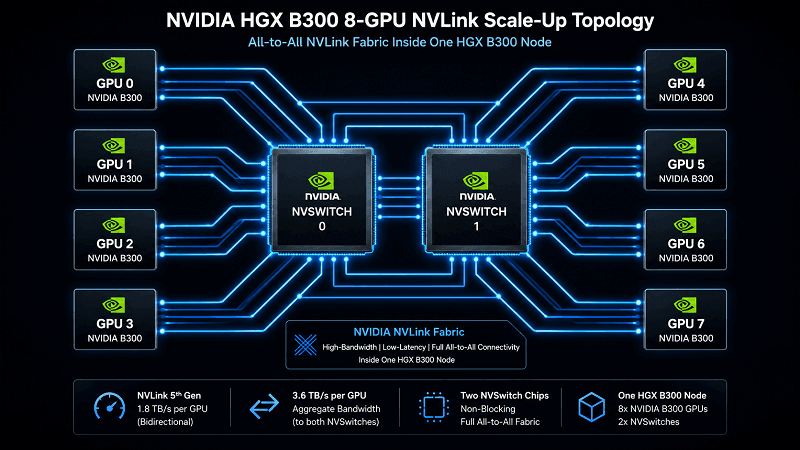
HGX B300 is an evolution of the eight-GPU HGX B200 platform, not a change from eight GPUs to 16. The largest practical upgrades are higher HBM capacity, stronger dense FP4 throughput, and more external network bandwidth.
| Area | HGX B300 | HGX B200 | Planning impact |
| GPUs per baseboard | 8 | 8 | The basic eight-GPU node model remains intact. |
| HBM3e per GPU | 288 GB | 180 GB | Larger models and KV caches can remain on GPU memory. |
| HBM3e per node | 2,304 GB | 1,440 GB | B300 provides 60% more GPU memory capacity. |
| Dense FP4 | 108 PFLOPS | 72 PFLOPS | B300 increases theoretical dense FP4 throughput by 50%. |
| Sparse FP4 | 144 PFLOPS | 144 PFLOPS | Do not assume every precision mode increases equally. |
| GPU-to-GPU NVLink bandwidth | 1,800 GB/s | 1,800 GB/s | The scale-up bandwidth headline remains the same. |
| Aggregate NVLink bandwidth | 14.4 TB/s | 14.4 TB/s | The main inter-node planning change is outside the NVLink domain. |
| Platform networking | 1.6 TB/s | 0.8 TB/s | B300 doubles the platform network-bandwidth figure in NVIDIA’s comparison. |
| Relative attention performance | 2× | 1× baseline | NVIDIA positions B300 for more demanding inference and reasoning workloads. |
The memory increase is often the decisive difference. More HBM can reduce model partitioning, support larger inference batches, expand KV-cache capacity, and improve the chances that a memory-bound workload remains within one eight-GPU node. Actual gains still depend on model architecture, sequence length, precision, parallelism, and software optimization.
An upgrade decision should start with measured bottlenecks:
- If the workload is limited by HBM capacity, B300’s 288 GB per GPU may materially change model placement.
- If the workload is limited by dense low-precision compute, the dense FP4 increase may help.
- If the workload scales across many nodes, the higher network interface capacity is valuable only when the fabric, optics, cabling, and collective-communication stack can sustain it.
- If the workload is limited by storage, CPU memory, power, cooling, or software, a GPU-only comparison will overstate the benefit.
How Eight GPUs Communicate on the HGX B300 Baseboard
The eight B300 GPUs form a scale-up domain through fifth-generation NVLink and two NVSwitch chips. NVIDIA’s Fabric Manager documentation shows that each GPU connects to both NVSwitches on HGX B200 and B300 baseboards.
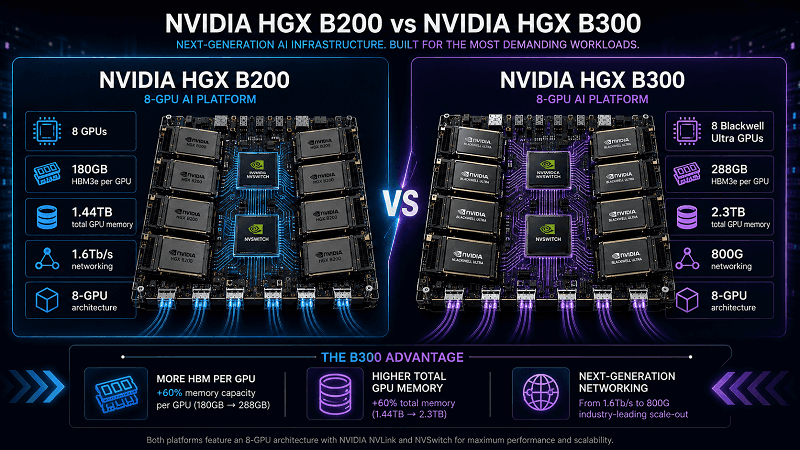
This topology provides all-to-all GPU communication within the node. NVIDIA specifies 1,800 GB/s of GPU-to-GPU NVLink bandwidth and 14.4 TB/s of total aggregate NVLink bandwidth for the platform. Fabric Manager and the NVIDIA software stack configure and monitor this NVLink domain.
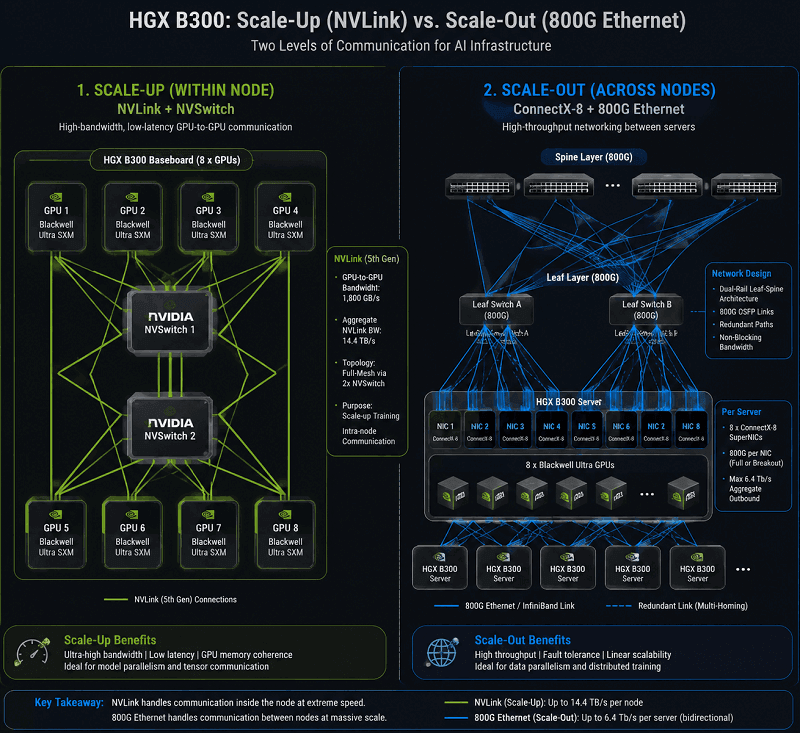
NVLink does not replace the data-center network. It handles scale-up traffic among the eight local GPUs. ConnectX-8 handles scale-out traffic between HGX nodes, storage systems, and other resources. A cluster design must therefore solve two different communication problems:
- Inside the node: NVLink and NVSwitch move data among the eight GPUs.
- Between nodes: ConnectX-8, switches, transceivers, and fiber or copper assemblies carry RDMA traffic across the cluster.
The difference explains why an HGX B300 specification can cite 14.4 TB/s of aggregate NVLink bandwidth while also listing eight network adapters at up to 800 Gb/s each. These are separate fabrics with separate performance constraints.
ConnectX-8 and 800G Network Design
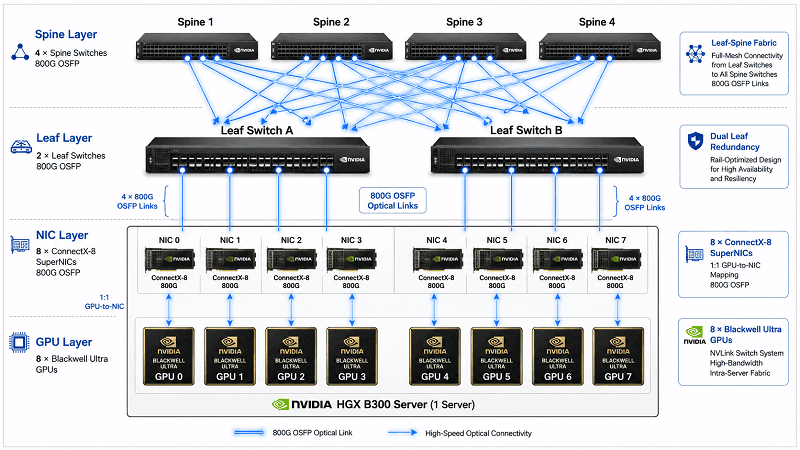
NVIDIA’s Enterprise Reference Architecture maps one ConnectX-8 SuperNIC to each GPU, creating a 1:1 GPU-to-NIC relationship. Each adapter supports up to 800 Gb/s. In the reference Ethernet design, that connection is expressed as two 400 Gb/s links per GPU.
This rail-oriented approach gives each GPU a predictable path into the scale-out fabric. NVIDIA’s physical topology guidance calls for an RDMA-capable, rail-optimized leaf-spine design with a full, non-blocking fat-tree topology for the compute network. The goal is to keep collective communication from being constrained by oversubscribed links.
What eight ConnectX-8 adapters mean for ports
One HGX B300 node can present eight 800G OSFP-facing network connections, depending on the certified server implementation. The switch-side design may use native 800G links or breakouts, but port arithmetic must follow the exact NIC, switch, and optic mode.
A current Supermicro HGX B300 deployment example uses eight ConnectX-8 NICs per node and dual-homes traffic across two leaf switches. Each 800G connection is handled through 2 × 400G breakout behavior in that design. Supermicro allocates four physical OSFP ports per leaf switch for one eight-NIC HGX B300 server because each switch port serves two 400G breakout lanes.
That is a useful port-planning example, not a universal wiring rule. Another certified system or switch may expose ports differently. Always validate the full link definition before ordering optics or cables.
Ethernet, InfiniBand, optics, and cabling checks
ConnectX-8 can be deployed in Ethernet or InfiniBand environments, subject to the exact adapter, firmware, switch, and software configuration. Selecting an “800G OSFP” product by speed alone is not enough.
Confirm all of the following:
- Ethernet or InfiniBand operating mode
- Native 800G or 2 × 400G breakout behavior
- NIC and switch port form factor
- OSFP flat-top or finned-top thermal requirement
- Module power and the airflow available at the port
- Single-mode or multimode fiber
- MPO or LC connector and polarity
- Required reach and loss budget
- Optical specification at both ends of the link
- Firmware, coding, and management compatibility
- Breakout lane mapping on both NIC and switch
FiberMall’s ConnectX-8 SuperNIC guide provides more background on adapter modes and OSFP connectivity. For component research, the 800G OSFP and QSFP-DD category can be used to compare form factors and reaches. Product compatibility must still be verified against the complete system and switch bill of materials.
Server Integration, Power, and Cooling
HGX B300 is sold through complete systems from NVIDIA and certified OEM partners. The baseboard specification does not define one universal chassis.
For example, NVIDIA’s DGX B300 user guide describes a complete DGX system with eight B300 GPUs, 2.3 TB of GPU memory, eight 800 Gb/s ConnectX-8 connections, defined CPUs and storage, and a maximum system power figure of 14.5 kW. Those figures describe DGX B300, not every HGX B300 server.
Before selecting a third-party HGX B300 system, verify:
- Chassis height, rack depth, weight, and service clearance
- Air cooling, direct liquid cooling, or facility-water requirements
- Nominal and maximum system power
- Input voltage, connector type, and feed redundancy
- Heat rejection and rack-level cooling capacity
- Host CPU model, socket count, core count, and PCIe topology
- System-memory capacity, bandwidth, and population rules
- Local boot, cache, and data-storage configuration
- BlueField DPU and management-network design
- Front-panel OSFP placement, airflow direction, and cable bend radius
- Supported NVIDIA software, firmware, and certified operating systems
NVIDIA’s Enterprise Reference Architecture recommends two host CPU sockets, at least 2 TB of system memory, a balanced PCIe topology, and workload-specific NVMe capacity. Treat these as reference-architecture inputs; the certified OEM data sheet and NVIDIA certification matrix remain the controlling documents for a purchased system.
Which Workloads Benefit Most?
HGX B300 targets large language models, deep-learning inference, training, and HPC. It is most compelling when the workload can use its higher HBM capacity, low-precision compute, or scale-out network bandwidth.
Potential fits include:
- Reasoning and inference workloads with large models or long contexts
- High-throughput inference where KV-cache capacity limits batch size
- Training jobs that benefit from larger per-node model partitions
- Retrieval, ranking, recommendation, and multimodal pipelines with heavy GPU communication
- HPC applications that fit NVIDIA’s supported precision and software stack
- Multi-node AI clusters designed around RDMA and rail-optimized networking
The platform is not automatically the best choice for every deployment. A smaller GPU system may be more economical when utilization is low, models fit comfortably in less memory, or the surrounding power and network infrastructure cannot support an eight-GPU node. Benchmark the actual model and end-to-end pipeline before committing to a cluster architecture.
HGX B300 Deployment Checklist
Use this checklist before freezing the server and network bill of materials.
- Profile the workload. Record model size, precision, sequence length, batch size, HBM use, storage throughput, and collective-communication patterns.
- Choose the system, not only the baseboard. Compare certified OEM configurations for CPU, memory, storage, cooling, power, serviceability, and port layout.
- Confirm rack capacity. Calculate power, heat, weight, liquid-cooling requirements, clearance, and failure-domain limits at the rack level.
- Define the scale-out fabric. Select Ethernet or InfiniBand, blocking or non-blocking design targets, rail count, switch radix, oversubscription, and redundancy.
- Calculate ports at full scale. Start with eight ConnectX-8 adapters per node, then apply the actual native or breakout mode and dual-homing design.
- Validate every physical link. Match speed, lane mode, host and switch form factor, reach, fiber, connector, polarity, power, and thermal class.
- Budget for storage and management networks. Do not mix their requirements with the east-west GPU fabric without an explicit architecture.
- Test software and firmware. Align NVIDIA drivers, CUDA, Fabric Manager, NCCL, NIC firmware, switch software, and the certified OS image.
- Run acceptance tests. Measure GPU health, HBM, NVLink, RDMA, collective bandwidth, storage, thermal behavior, and failover before production use.
- Keep an auditable BOM. Record manufacturer part numbers, firmware versions, fiber maps, switch-port configuration, spares, and compatibility evidence.
For broader network planning, see FiberMall’s guide to 800G and 400G AI data-center architecture and its overview of large-scale GPU clusters.
Frequently Asked Questions
How many GPUs are in NVIDIA HGX B300?
The current NVIDIA Enterprise Reference Architecture specifies eight B300 Blackwell Ultra SXM GPUs on one HGX B300 baseboard. The HGX B300 NVL16 name used in launch material does not mean the baseboard has 16 removable B300 SXM GPU modules.
How much GPU memory does HGX B300 have?
Each B300 GPU has 288 GB of HBM3e. An eight-GPU HGX B300 node therefore provides up to 2,304 GB, commonly described as 2.3 TB, of GPU memory.
What is the difference between HGX B300 and DGX B300?
HGX B300 is the GPU baseboard platform used by certified system builders. DGX B300 is NVIDIA’s complete server with a defined host, storage, networking, power, cooling, and software configuration built around eight B300 GPUs.
What is the difference between HGX B300 and GB300 NVL72?
HGX B300 is an eight-GPU OEM server platform. GB300 NVL72 is a rack-scale Grace Blackwell system with a different architecture and a much larger NVLink domain. Their component counts and physical designs are not interchangeable.
Does HGX B300 require 800G networking?
The NVIDIA reference architecture equips the baseboard with eight ConnectX-8 SuperNICs at up to 800 Gb/s per adapter. The production network should be sized to the workload and scale target, but deploying slower or oversubscribed links can prevent the cluster from using the available scale-out capacity.
Which 800G optic works with an HGX B300 server?
There is no universal answer based only on the HGX B300 name. Compatibility depends on the exact certified server, ConnectX-8 port, Ethernet or InfiniBand mode, switch, native or breakout configuration, OSFP thermal design, optical specification, connector, fiber, reach, and firmware coding.
Plan the HGX B300 Network as Part of the System
HGX B300 combines eight Blackwell Ultra GPUs, 2.3 TB of HBM3e, fifth-generation NVLink, and eight ConnectX-8 network interfaces in one platform. Its strongest advantage appears when the full system can feed, cool, and connect those GPUs without shifting the bottleneck elsewhere.
Start with the certified server configuration and measured workload. Then design the scale-out fabric, switch ports, optics, and cabling around the actual adapter mode and cluster topology. If you need help checking an HGX B300 optical-interconnect bill of materials, send FiberMall the server model, NIC part number, switch model, port mode, reach, and fiber plan through the FiberMall contact page. Compatibility should be confirmed before purchase.
Related Products:
-
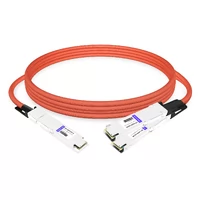
 NVIDIA MCA7K10-X002 Compatible ACC 2m (7ft) Twin-port 2x800Gb/s OSFP224 IHS/Finned Top to 2x800Gb/s OSFP224 RHS/ Flat Top InfiniBand XDR Active Copper Splitter Cabl
$1159.00
NVIDIA MCA7K10-X002 Compatible ACC 2m (7ft) Twin-port 2x800Gb/s OSFP224 IHS/Finned Top to 2x800Gb/s OSFP224 RHS/ Flat Top InfiniBand XDR Active Copper Splitter Cabl
$1159.00
-
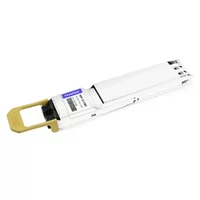
NVIDIA MMS4A20-XM800 Compatible 800G DR4 OSFP224 4x200G-PAM4 1311nm 500m RHS/Flat Top DOM MTP/MPO-12 APC InfiniBand XDR Transceiver Module
$1300.00
-
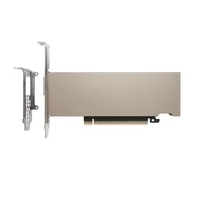
NVIDIA ConnectX-8 C8180 (900-9X81E-00EX-ST0) HHHL SuperNIC, 800Gbs XDR IB & Ethernet, Single-cage OSFP, PCIe 6 x16 with x16 PCIe Socket Direct,Tall bracket
$1980.00
-
NVIDIA MMS4A00 (980-9IAH1-00XM00) Compatible 1.6T 2 x DR4/DR8 OSFP224 PAM4 1311nm 500m IHS/Finned Top Dual MPO-12 SMF Optical Transceiver Module
$1500.00