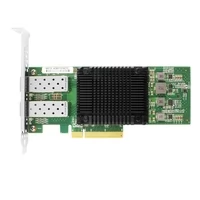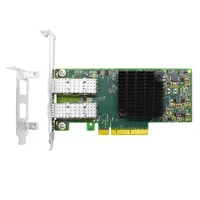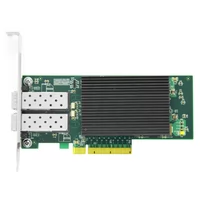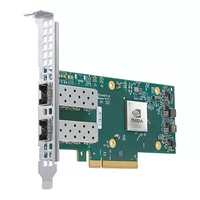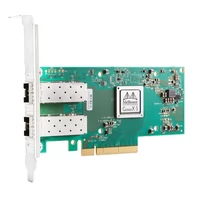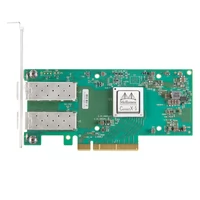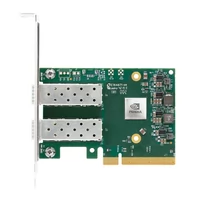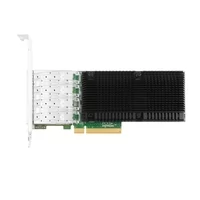

A 25GbE server NIC is typically a dual- or quad-port SFP28 adapter that delivers 25 Gb/s per port. A dual-port card needs 50 Gb/s of host bandwidth per direction, which a PCIe 3.0 x8 or PCIe 4.0 x4 connection can theoretically provide. A quad-port card needs 100 Gb/s per direction, requiring PCIe 4.0 x8 or PCIe 3.0 x16 for sufficient theoretical bandwidth. Actual compatibility also depends on the card’s electrical interface and the server’s physical slot configuration.
In FiberMall’s catalog, the least expensive option is also the newer controller: the Intel E810 dual-port adapter at $209, below the older XXV710 at $269.
That price order is the first thing to unlearn. For fifteen years, the rule was simple. Newer silicon cost more, more ports cost less per port, and the card was the biggest line item. At 25G, all three assumptions start to break down.
A dual-port 25G card costs just $30 more than a dual-port 10G card and delivers 2.5 times the bandwidth. Two dual-port 25G cards cost $418, which is $77 less than the quad-port x8 card and $171 less than the quad-port x16 card. However, the optics, cables, and host interfaces also determine whether the connection works as intended.
This guide works through the purchase order: slot, port count, optic, and cable. Prices are FiberMall list prices checked on 2026-11-26. Every card in the table is an SFP28 server adapter, not a 2.5GbE desktop card with a similar product name.
Key Takeaways
- A dual-port 25G card needs 50 Gb/s of host bandwidth per direction. A PCIe 3.0 x8 connection provides approximately 63 Gb/s, leaving about 26% theoretical bandwidth headroom. A quad-port card needs 100 Gb/s and therefore PCIe 4.0 x8 or PCIe 3.0 x16.
- In the Intel E810 family, the quad-port x8 card costs $123.75 per port, about 18% more than the dual-port card. The x16 version costs $147.25 per port, about 41% more.
- Two E810 dual-port cards cost $418 and provide four 25G ports. That is $77 less than the $495 quad-port x8 card and $171 less than the $589 quad-port x16 card. The trade-off is the need for a second PCIe slot.
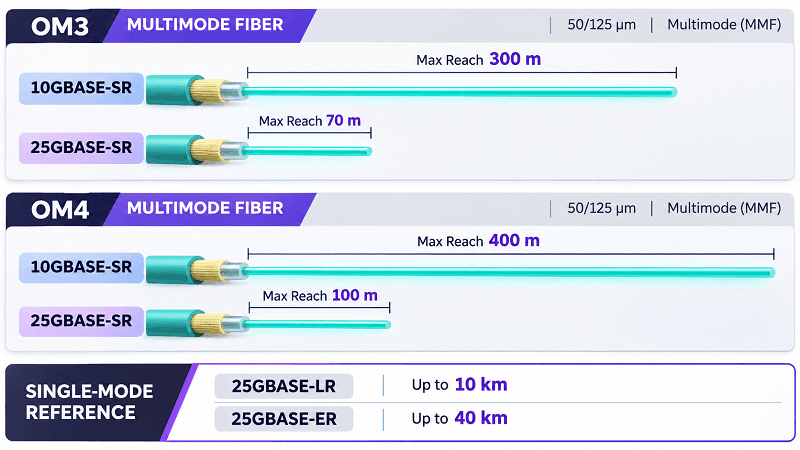
- 25GBASE-SR reaches 100 m on OM4 and 70 m on OM3. A building full of OM3 is a 25G design constraint, not a footnote.
- At 1 m, a 25G DAC costs $18, while two SR modules cost $50 for one optical link, excluding the patch cord. At 3 m, the DAC costs $30 and a 3 m AOC costs $40. The available price data does not establish an exact cost crossover at 5 m.
What a 25GbE Server NIC Is, and What It Is Not
A 25GbE NIC is typically built around an SFP28 cage. The SFP28 form factor is mechanically compatible with SFP+ and SFP modules, but physical compatibility does not guarantee operational compatibility. The NIC, transceiver, firmware, and connected switch must all support the selected data rate.
A 25G SFP28 port may support 25G, 10G, or 1G operation, depending on the adapter and its configuration. A compatible 10G SFP+ module can therefore operate in some SFP28 ports at 10G. However, a 25G-only SFP28 module does not automatically operate at 10G just because it fits into a 10G SFP+ cage.
The reverse never works. A 25G SFP28 module seats in a 10G SFP+ port and does nothing, because the port’s lane tops out around 10.3 Gb/s. That one-way compatibility is documented in the SFF specs and summarized in the SFP28 vs SFP+ comparison.
Three adapter families matter in this catalog.
Intel’s XXV710 is the Gen3 workhorse: two SFP28 ports, PCIe 3.0 x8, and 25/10/1GbE support per port. Intel’s E810 is the Gen4 generation: the dual-port adapter uses PCIe 4.0 x8, while the quad-port adapters in FiberMall’s lineup are available in x8 and x16 versions. NVIDIA’s ConnectX-4 Lx, ConnectX-5, ConnectX-6 Dx, and ConnectX-6 Lx adapters fill out the range, with dual-port SFP28 configurations across PCIe Gen3 and Gen4.
One naming trap first. A 25GbE NIC is not a 2.5GbE NIC, and Google search results sometimes mix the two. The “25gb network card” SERP returns 2.5GbE desktop adapters in several top positions, and FiberMall’s highest-impression page at a 25gb URL is a 2.5GbE consumer guide. If you need 2.5 Gb/s, stop here. If you need 25 Gb/s, read on.
Shopping for a server adapter now? The network adapter category lists every 25G SFP28 card with its lane width and listed price.
Does a 25GbE NIC Fit Your PCIe Slot?
The slot question has an exact answer, and it is one of the most common reasons a 25G card underperforms after installation.
Two 25G ports carry 50 Gb/s in each direction. PCIe 3.0 moves approximately 7.88 Gb/s per lane after encoding, so eight lanes provide approximately 63 Gb/s in each direction. That leaves about 26% theoretical bandwidth headroom over the two ports’ combined 50 Gb/s data rate. This is why Intel specifies a PCIe 3.0 x8 interface for the XXV710-DA2.
Four 25G ports carry 100 Gb/s in each direction. PCIe 3.0 x8 cannot provide enough theoretical bandwidth for that configuration. The card needs PCIe 4.0 x8 or PCIe 3.0 x16, both of which provide approximately 126 Gb/s per direction after encoding. FiberMall’s quad-port E810 adapters are listed in both configurations, at different prices and with different slot requirements.
| Port configuration | Aggregate | Gen3 x4 | Gen3 x8 | Gen3 x16 | Gen4 x4 | Gen4 x8 |
| 2 x 25G | 50 Gb/s | no | yes (63) | yes | yes (63) | yes |
| 4 x 25G | 100 Gb/s | no | no | yes (126) | no | yes (126) |
Note: These figures represent theoretical PCIe bandwidth per direction after encoding. Actual throughput is lower because of protocol overhead and platform-level limitations. The table compares bandwidth capacity, not guaranteed physical slot compatibility. Always check the adapter’s connector width, electrical lane width, and motherboard slot configuration.
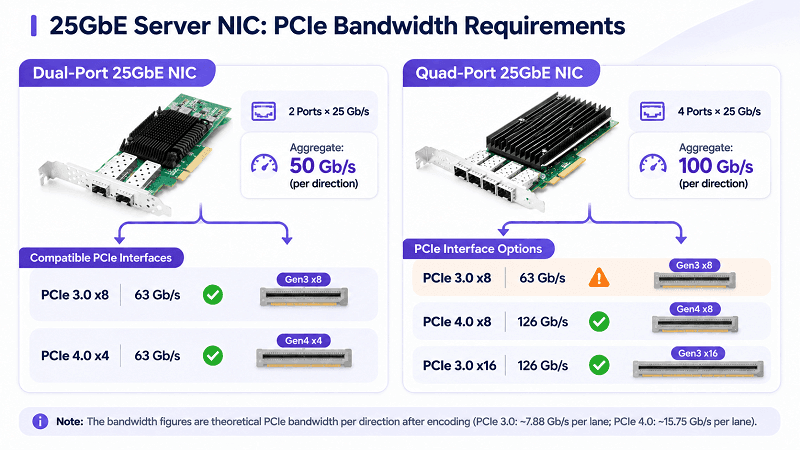
If the only free slot is a Gen3 x16 riser, the x16 listing is an option. If the chassis has a free Gen4 x8 slot, the x8 listing provides the same four ports while leaving an x16 slot available. The wider interface is not automatically an upgrade unless the chassis can use it.
The deeper arithmetic is in the PCIe lanes guide, which explains how PCIe generation and lane width determine available host bandwidth and why a Gen3 x8 connection can become a bottleneck for a four-port 25G adapter.
Two Dual-Port Cards vs. One Quad-Port Card
Here is where 25G stops behaving like 10G.
At 10G, four ports are cheaper per port than two. The X710-BM2 DA2 lists at $179, or $89.50 per port. The XL710-BM1 DA4 lists at $309 for four ports, or $77.25 per port. Higher port density saves approximately 14% per port.
At 25G, the economics change. The E810 dual-port card costs $209, or $104.50 per port. The quad-port x8 version costs $495, or $123.75 per port, approximately 18% more per port. The quad-port x16 version costs $589, or $147.25 per port, approximately 41% more per port.
The difference reflects the cost and design of a quad-port adapter, including its controller and host interface. The two quad-port listings also differ in PCIe lane width, so the correct comparison depends on the server chassis.
Now run the alternative. Two E810 dual-port cards cost $418 and provide four 25G ports. That is $77 less than the quad-port x8 adapter and $171 less than the quad-port x16 adapter. The catch is real: two cards need two free PCIe slots, sufficient lane availability, and adequate chassis airflow.
The same comparison holds lower down the range. Two XXV710 DA2 cards cost $538, while two ConnectX-4 Lx adapters cost $498. Both pairs cost less than the $589 quad-port x16 adapter, but more than the $495 quad-port x8 adapter. At the top of the range, two ConnectX-6 Dx cards cost $630, and two ConnectX-6 Lx cards cost $770, both above the price of either quad-port E810 option.
A colocation customer faced exactly this situation: one free Gen4 x8 slot and a four-port requirement. The quad-port x8 adapter fit at $495. Two dual-port cards would have cost $418, but there was nowhere to install the second card. They paid the $77 premium for a single-slot solution.
That’s the rule: slots first, then ports, then price. A per-port table means nothing until you know how many usable slots the chassis provides.
10G, 25G, or 100G: The Cost-per-Bit Decision
The card price jump from 10G to 25G is smaller than most buyers expect. A dual-port 10G X710-BM2 DA2 lists at $179. The dual-port 25G E810 lists at $209. That is just $30, or approximately 17% more, for 2.5 times the per-port data rate.
The optics push the same way once you divide by bandwidth.
| Item | 10G Price | 25G Price | 100G Price |
| Dual-port card | $179 (X710) | $209 (E810) | Not compared |
| SR module | $12 | $25 | $40 (SR4) |
| Cost per Gb/s of module | $1.20 | $1.00 | $0.40 |
| Card + 4 SR modules | $227 | $309 | Not compared |
| Cost per Gb/s of two-port access | $11.35 | $6.18 | Not compared |
Cost assumptions: The dual-port optical configuration uses four SR modules in total, with one module at each end of each point-to-point link. The calculation excludes fiber patch cords, switch hardware, and installation costs. The 100G figure is the price per Gb/s of one SR4 module, not the cost of a complete link.
Read the last row. A dual-10G server configuration costs $11.35 for every Gb/s of two-port access. A dual-25G configuration costs $6.18. The 25G configuration costs $82 more per server and buys 30 Gb/s more aggregate port bandwidth, reducing the cost per Gb/s by approximately 46%.
With DAC instead of optics, the pattern is similar. Two 1 m DAC cables bring the dual-10G configuration to $195, compared with $245 for dual 25G. That works out to $9.75 versus $4.90 per Gb/s, respectively. These figures include two complete DAC assemblies, one for each server port.
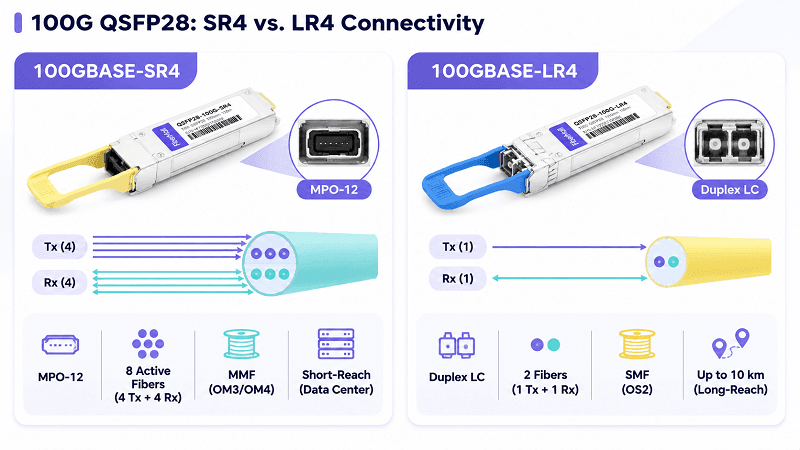
100G is cheaper per bit again at $0.40 per Gb/s for the SR4 module itself, but the physical interface and fiber connection depend on the transceiver type. A 100GBASE-SR4 module uses a QSFP28 interface and an MPO-12 connector with eight active fibers, while a 100GBASE-LR4 module uses duplex LC connectivity over single-mode fiber. The NIC also needs sufficient PCIe bandwidth; PCIe 4.0 x8 or PCIe 3.0 x16 can theoretically provide approximately 126 Gb/s per direction, although the actual adapter specification must be checked.
So the rule is short. Servers connected to an existing 10G SFP+ switch can stay at 10G if the ports are already paid for and no upgrade is planned. For a new access layer or storage refresh, 25G offers substantially lower cost per Gb/s. For rack uplinks or high-throughput storage fabrics, 100G may be the better choice, depending on the switch architecture, fiber plant, and host interface.
None of this works if the far-end switch cannot support the intended speed. A 25G NIC connected to a 10G switch port can operate at 10G only when the NIC, transceiver, and switch port all support 10G operation. Otherwise, the link may fail to establish. Confirm the port rate and match the transceiver on both ends before ordering.
25G Optics: 100 m on OM4, 70 m on OM3
The reach table is where 25G differs most from 10G, and where the most expensive mistake lives.
| Interface | Speed | Reach | Fiber / Connector | Listed Price |
| 25GBASE-SR | 25G | 100 m OM4, 70 m OM3 | Duplex LC, MMF | $25.00 |
| 25GBASE-LR | 25G | 10 km | Duplex LC, SMF | $45.00 |
| 25GBASE-ER | 25G | Up to 40 km | Duplex LC, SMF | $125.00 |
25GBASE-ER links beyond 30 km should be treated as engineered links. Verify the optical power budget, channel insertion loss, and equipment compatibility.
FiberMall’s SFP28-25G-SR description states the reach directly: up to 100 m on OM4 and 70 m on OM3, compliant with IEEE 802.3by, SFF-8402, and SFF-8432. The IEEE 802.3by amendment defines the 25GBASE-SR physical-layer specifications.
Compare that with 10GBASE-SR, which reaches 300 m on OM3 and 400 m on OM4. Moving a server from 10G to 25G over multimode fiber does not simply double the data rate. It reduces the maximum SR reach to approximately 23% of the 10G reach on OM3 and 25% on OM4.
A colocation customer encountered this during a live migration. Every datasheet they reviewed showed a 100 m reach, so the team specified 25GBASE-SR over the existing OM3 plant. One run measured 85 m and would not maintain a clean link. The module’s own datasheet specified a maximum of 70 m on OM3. They rerouted that link over single-mode fiber and used 25GBASE-LR at $45 per end, leaving the remaining links on SR.
The lesson is not “avoid OM3.” It is “measure the longest run before choosing the optic.” For the standard 25GBASE-SR modules covered here, the maximum reach is 70 m on OM3 and 100 m on OM4. Beyond those distances, consider a single-mode solution such as 25GBASE-LR. LR requires single-mode fiber, so it cannot simply replace SR over the same multimode link. Other extended-reach multimode options may also be available, depending on the transceiver and host platform.
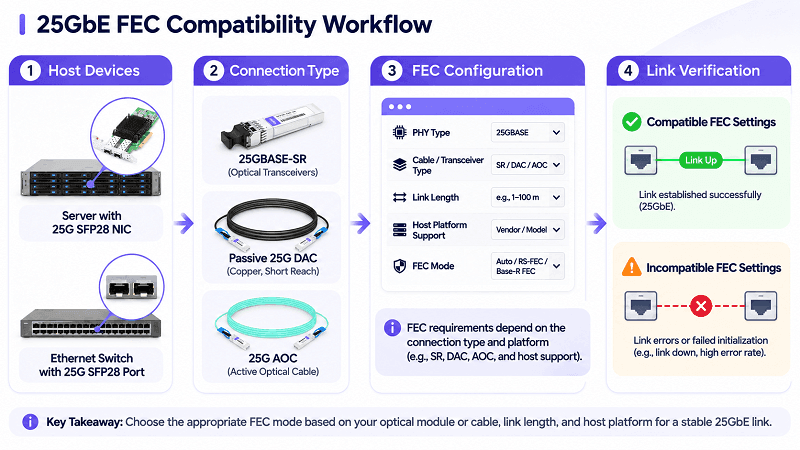
There is a second 25G-specific detail: FEC requirements depend on the physical-layer type, transceiver or cable, link length, and host platform. Some 25GBASE-SR and 25GBASE-LR modules require RS-FEC on the host ports, while passive DAC and AOC connections may require no FEC, BASE-R FEC, or RS-FEC depending on their specifications.
For example, some short passive 25G DAC cables do not require FEC, while longer passive DAC cables may require BASE-R FEC or RS-FEC. AOC requirements also vary by product and platform. A FEC mismatch may allow optical signal to be present while preventing a reliable data link or causing link errors. Both ends must use compatible FEC settings.
Building the optical side? The 25G SFP28 module category lists SR, LR, ER, and BiDi variants with current prices.
DAC, AOC, or Optic at 25G
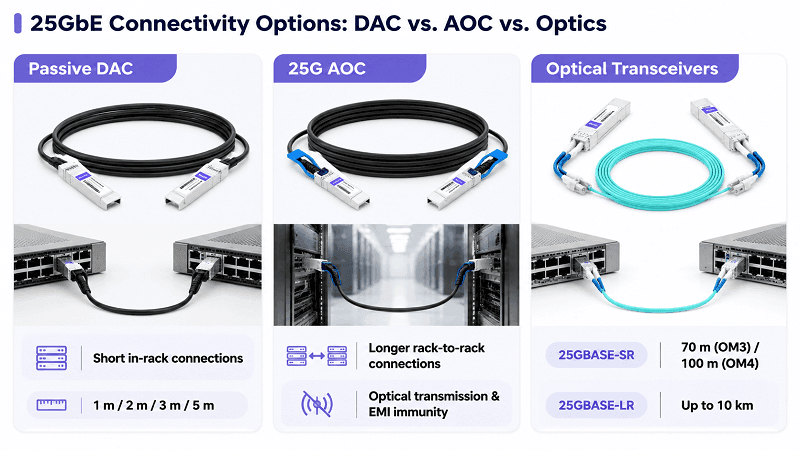
There are three ways to connect two SFP28 cages, and the choice becomes much easier once you know the run length and the host compatibility requirements.
| Option | Best Distance / Use | 25G Price |
| Passive DAC, 1 m | In-rack | $18.00 |
| Passive DAC, 2 m | In-rack | $23.00 |
| Passive DAC, 3 m | Adjacent racks | $30.00 |
| Passive DAC, 5 m | Longest length in FiberMall’s listed passive range | $45.00 |
| AOC, 3 m | Across a rack or aisle | $40.00 |
| 2 x SR modules + patch cord | 3 m to 100 m on OM4; up to 70 m on OM3 | $50.00 + cord |
At 1 m, the DAC costs $18, while two SR modules cost $50 for one optical link, excluding the patch cord. The DAC wins by more than $30 and eliminates the need for separate optical transceivers and fiber patch cords. However, host compatibility and cable coding should still be verified.
At 3 m, the DAC costs $30, and the AOC costs $40. Copper still wins on listed price. The AOC is a better choice when the run leaves the cabinet, crosses an aisle, or passes close to power equipment, because it uses optical transmission and is immune to electromagnetic interference along the cable.
At 5 m, the DAC costs $45. The listed 3 m AOC costs $40, but these are different lengths and cannot be used as a direct price comparison. FiberMall’s listed passive 25G DAC range tops out at 5 m. For longer runs, choose an AOC of the required length or use optical transceivers with the appropriate fiber. The available prices do not establish an exact point at which AOC becomes cheaper than DAC.
Beyond the passive DAC range, two SR modules at $50 per optical link, plus a patch cord, remain a practical choice for runs up to 100 m on OM4 or 70 m on OM3. For longer single-mode links, two LR modules cost $90 per link and support distances up to 10 km.
Pricing a rack build? The DAC and AEC cable category lists passive 25G assemblies from 0.5 m up, with length and data rate reflected in the part number.
The FiberMall 25GbE Server NIC Lineup, Priced
Nine SFP28 server NICs, four Intel and five NVIDIA. Listed prices checked on 2026-11-26.
| Card | Controller | Ports | PCIe | Price | Per Port |
| E810 25G dual | Intel E810 | 2 | 4.0 x8 | $209 | $104.50 |
| MCX4121A-ACAT | ConnectX-4 Lx | 2 | 3.0 x8 | $249 | $124.50 |
| XXV710 DA2 | Intel XXV710 | 2 | 3.0 x8 | $269 | $134.50 |
| MCX621102AN-ADAT | ConnectX-6 Dx | 2 | 4.0 x8 | $315 | $157.50 |
| MCX512A-ACAT | ConnectX-5 EN | 2 | 3.0 x8 | $318 | $159.00 |
| MCX512A-ACUT | ConnectX-5 EN | 2 | 3.0 x8 | $318 | $159.00 |
| MCX631102AN-ADAT | ConnectX-6 Lx | 2 | 4.0 x8 | $385 | $192.50 |
| E810 25G quad (x8) | Intel E810-CAM1 | 4 | 4.0 x8 | $495 | $123.75 |
| E810 25G quad (x16) | Intel E810-CAM1 | 4 | 4.0 x16 | $589 | $147.25 |
Read the per-port column twice. The E810 dual-port adapter is the value point at $104.50 per port. The quad-port x8 version comes to $123.75 per port, slightly below the ConnectX-4 Lx at $124.50. The quad-port x16 version costs $147.25 per port, above every dual-port Intel card and the ConnectX-4 Lx. Only the newer ConnectX-6 models cost more per port.
Which card for which job:
- Two ports, lowest cost, Gen4 slot: E810 dual at $209.
- Two ports, RDMA listed, Gen3 chassis: MCX4121A-ACAT at $249. The listing carries an RDMA specification; treat it as a vendor feature claim, not a performance benchmark.
- Two ports, Intel Gen3, existing XXV710 fleet: XXV710 DA2 at $269, especially when standardizing spare cards.
- Two ports, newer ConnectX feature set: ConnectX-6 Dx at $315 or ConnectX-6 Lx at $385.
- Four ports in one slot: E810 quad at $495 for the x8 version or $589 for the x16 version, depending on the chassis.
Three catalog details to check before you order:
- The dual-port E810 adapter page identifies E810-XXVAM2 in its controller specification, while the adapter model is E810-XXVDA2. These refer to the Ethernet controller and the complete adapter, respectively. Confirm the complete adapter part number on the quotation.
- The two quad-port E810 listings use the same E810-CAM1 controller and provide four ports, but differ in PCIe lane width and listed price. Confirm the available slot and the exact adapter part number rather than assuming the x16 version is newer.
- Every NIC page reports “OutOfStock” in its structured product data, including cards that may ship normally. Treat the displayed prices as list prices and confirm stock and lead time before ordering.
The single-port question
FiberMall’s 25G range has no single-port card. Every listed SKU is dual- or quad-port. That matters because “single port 25GbE Ethernet adapter” is a real query with real search impressions behind it, and the catalog cannot serve it directly.
The practical answer is a dual-port card running one port. An E810 dual-port adapter at $209 is still the cheapest route to a single 25G uplink, and the second cage can remain empty until you need it. You cannot pay a single-port premium because there is no single-port part to buy in this lineup.
Five Questions Before You Buy a 25GbE NIC
1. Which slot is free, and what are its generation and electrical lane width?
A Gen3 x8 slot provides enough theoretical bandwidth for dual 25G. Quad 25G requires Gen4 x8 or Gen3 x16 for the listed adapters. Check the electrical width, not just the physical slot length.
2. Do you need two ports or four?
Two dual-port cards can cost less than one quad-port card if you have two available slots. One quad-port card is the better choice when PCIe slots are scarce.
3. How far is the longest run, and which fiber will it use?
25GBASE-SR supports 100 m on OM4 and 70 m on OM3. 25GBASE-LR supports up to 10 km on single-mode fiber, while 25GBASE-ER supports up to 40 km under the specified link conditions. Measure the longest run before selecting the optic.
4. Should you use DAC, AOC, or optical transceivers?
For short in-rack connections, passive DAC is usually the most economical choice. AOC is useful when optical isolation or immunity to electromagnetic interference matters. For longer runs, use an AOC of the required length or separate optical transceivers and fiber. Always verify the cable length, host compatibility, and FEC requirements.
5. Is the module coded for your switch vendor?
Confirm the pairing before placing the order. FiberMall’s coding and recoding service can configure compatible modules for supported switch vendors. The NIC itself does not automatically resolve module coding compatibility.
FAQ
Is 25GbE worth it over 10GbE?
For a new access layer or network refresh, usually yes. A dual-port 25G card costs about $30 more than a dual-port 10G card, while delivering 2.5 times the bandwidth. When comparing the NIC and four optical modules for two complete links, the 25G configuration costs $82 more but reduces the cost per Gb/s by approximately 46%. The exception is a server already connected to 10G switch ports that you have paid for and do not plan to upgrade.
Can I use a 10G SFP+ module in a 25G SFP28 port?
In many cases, yes. SFP+ and SFP28 share a compatible physical form factor, but the NIC, module, firmware, and host configuration must support 10G operation. You may need to configure the port manually to 10G if automatic negotiation is not supported. Check the required FEC settings for the selected 10G module and platform.
Do I need a 25G switch as well?
Yes, if you want 25G end-to-end. A 25G NIC connected to a 10G switch port can operate at 10G only when the NIC, transceiver, and switch port all support that rate. Check the switch port speed and the transceiver on both ends before ordering.
What is the difference between 25GBASE-SR and 25GBASE-LR?
SR operates at 850 nm over multimode fiber, reaching 100 m on OM4 and 70 m on OM3. LR operates at 1310 nm over single-mode fiber and supports up to 10 km. FiberMall’s listed prices are $25 for SR and $45 for LR. For longer single-mode links, 25GBASE-ER supports up to 40 km, subject to the specified optical link budget and engineering requirements.
Is there a single-port 25GbE NIC?
Not in FiberMall’s current catalog lineup. Buy a dual-port card and leave one cage empty. The E810 dual-port adapter at $209 is the cheapest way to get a single 25G connection.
The Slot Comes First, the Optic Comes Second
A 25GbE server NIC decision comes down to three checks, in order. The slot determines whether the card has enough host bandwidth. The port count determines whether one card or two offers better value. The optic determines whether the link can reach its destination over the installed fiber.
Get the slot wrong, and a quad-port 25G card running through a Gen3 x8 connection may be limited to approximately 63 Gb/s of theoretical host bandwidth before protocol overhead. Choose the wrong optic, and the $209 card may fail to establish a stable link even when optical signal is present. Get both right, and the NIC becomes only one part of the total deployment cost.
If you’re sizing a 25G refresh across a rack or matching modules to a switch you already own, send the server and switch models to our engineers. We’ll confirm the slot, cage, coding, FEC configuration, and transmission distance before anything ships.
For the port taxonomy behind these numbers, the Network Interface Card Guide covers speeds and port types from 1GbE to 800GbE. For the cage and coding layer in more depth, the Fiber Network Card Guide takes the optic-first view.
Related Products:
-
 Intel® E810-XXVDA2 25G Ethernet Network Adapter PCI Express v4.0 X8 Dual-port SFP28
$209.00
-
NVIDIA (Mellanox) MCX4121A-ACAT Compatible ConnectX-4 Lx EN Network Adapter, 25GbE Dual-Port SFP28, PCIe3.0 x 8, Tall&Short Bracket
$249.00
-
Intel® XXV710 DA2 Dual Port 25 Gigabit SFP28 PCI Express x8 Ethernet Network Interface Card PCIe v3.0
$269.00
-
NVIDIA (Mellanox) MCX621102AN-ADAT SmartNIC ConnectX®-6 Dx Ethernet Network Interface Card, 1/10/25GbE Dual-Port SFP28, Gen 4.0 x8, Tall&Short Bracket
$315.00
-
NVIDIA (Mellanox) MCX512A-ACUT SmartNIC UEFI Enabled (x86/Arm) ConnectX®-5 EN Network Interface Card, 10/25GbE Dual-Port SFP28, PCIe 3.0 x 8, Tall&Short Bracket
$318.00
-
NVIDIA (Mellanox) MCX512A-ACAT SmartNIC ConnectX®-5 EN Network Interface Card, 10/25GbE Dual-Port SFP28, PCIe 3.0 x 8, Tall&Short Bracket
$318.00
-
NVIDIA (Mellanox) MCX631102AN-ADAT SmartNIC ConnectX®-6 Lx Ethernet Network Interface Card, 1/10/25GbE Dual-Port SFP28, Gen 4.0 x8, Tall&Short Bracket
$385.00
-
Intel® E810-CAM1 Controller PCI Express v4.0 X8 25G Quad-port Ethernet Server Adapter
$589.00