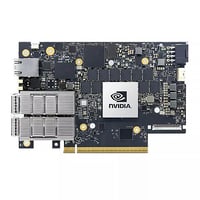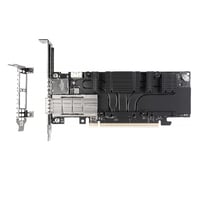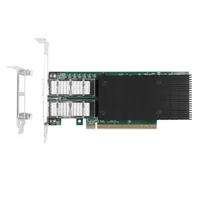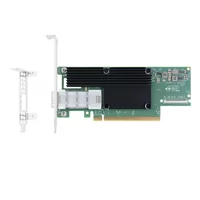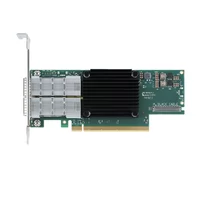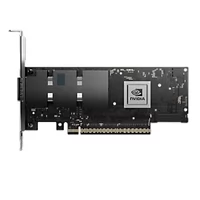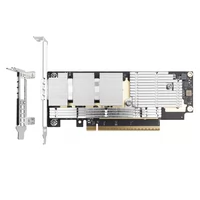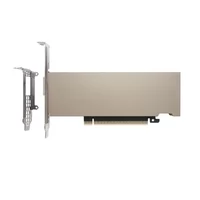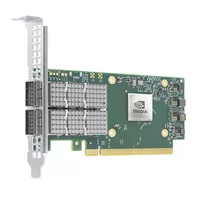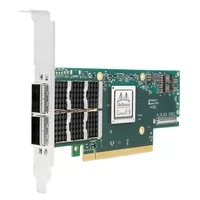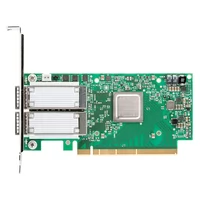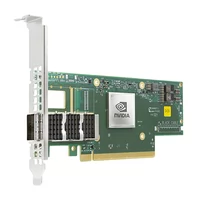

A single 100G NIC port needs sufficient PCIe host bandwidth, typically PCIe Gen3 x16 or Gen4 x8, to support 100GbE throughput. However, the required lane width and physical port type depend on the specific adapter model. A 100G NIC may use a QSFP28 or QSFP56 port. Beyond bandwidth, the card you buy is decided by three things, in this order: what your switch vendor supports, what slot your server actually has available, and what the optics cost at the reach you need.
All eight 100G NICs in FiberMall’s lineup reviewed here use PCIe x16 host interfaces. However, this is not a universal requirement for 100G networking. Some 100G adapters, including NVIDIA’s single-port ConnectX-6 VPI model MCX651105A-EDAT, use PCIe Gen4 x8. The distinction between a card’s physical interface and the bandwidth its network ports actually require is where many 100GbE network card buying mistakes begin.
We sell eight 100G NICs at FiberMall and answer this question most weeks. The pattern is consistent. The card is rarely the problem. The slot, the module coding, or a 25G assumption that turned out to be false is.
So this guide does the arithmetic a spec sheet leaves out: how much PCIe bandwidth each port configuration needs, which QSFP modules your port will and won’t accept, and what a 100G port costs in optics compared with four 25G ports.
Key Takeaways
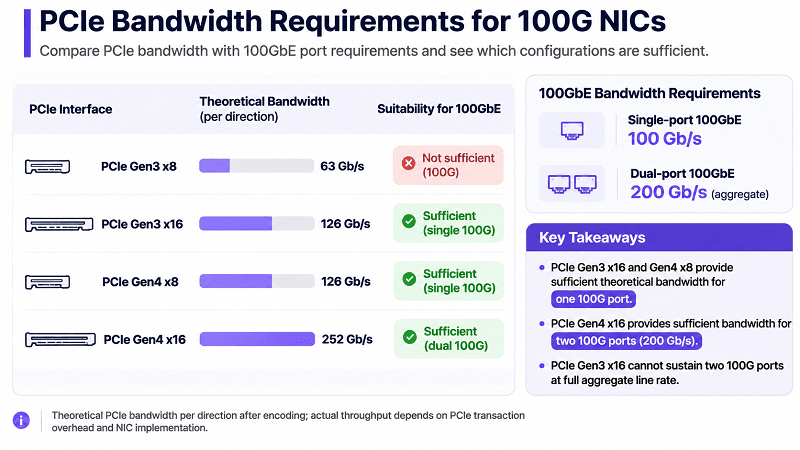
- A single 100G port needs approximately 126 Gb/s of theoretical PCIe host bandwidth per direction, available through Gen3 x16 or Gen4 x8. The required interface width depends on the NIC model.
- A dual-port 100G card needs PCIe Gen4 x16 to support both ports at full line rate. On Gen3 x16, the aggregate host bandwidth is limited to approximately 126 Gb/s, below the combined 200 Gb/s port capacity.
- A 100G QSFP28 port uses four 25G electrical lanes. It can break out to 4x25G only when the NIC or switch, firmware, port configuration, and transceiver or cable support that mode. A QSFP-DD module cannot be inserted into a QSFP28 port.
- At 100 m, one QSFP28-SR4 module costs $40, compared with $100 for four SFP28-SR modules per endpoint. For equivalent two-ended links, the 100G optics cost $80 versus $200 for four parallel 25G links.
- FiberMall’s listed 100G NIC prices range from $699 (FME810-100G-Q2, dual QSFP28) to $1,200 (ConnectX-6 Dx).
Is PCIe 3.0 x16 Enough for a 100G NIC?
Yes, for a single 100G port. This one question decides half the deployments, so here’s the number.
PCIe 3.0 carries approximately 984.6 MB/s per lane in one direction after 128b/130b encoding. Sixteen lanes deliver approximately 15.75 GB/s, or 126 Gb/s. A single 100GbE port carries 100 Gb/s of nominal Ethernet line rate. That leaves approximately 26% of theoretical PCIe bandwidth above the nominal port rate.
This is sufficient for a single 100G port in typical configurations, although actual usable bandwidth is affected by PCIe transaction overhead, DMA efficiency, packet size, and NIC implementation.
The minimum theoretical PCIe bandwidth that supports a single 100G port is also available through Gen4 x8, which delivers approximately 15.75 GB/s per direction. Gen3 x8 provides approximately 7.88 GB/s, or 63 Gb/s. That is not enough host-side bandwidth to sustain a 100G port at full throughput. The NIC may still establish a 100GbE link, but its actual throughput will be constrained by the PCIe connection.
That’s the arithmetic behind the old rule that 100G cards need an x16 slot. A Gen3 x16 interface or Gen4 x8 interface provides sufficient theoretical bandwidth for one 100G port, but the actual adapter must support the corresponding lane configuration.
If the slot question is already settled for you, the 40G/100G QSFP NIC category lists all eight cards with current prices, and you can skip ahead to the optic comparison.
Now the part datasheets skip. A dual-port 100G card carries 200 Gb/s of aggregate network port capacity. Gen4 x16 provides approximately 252 Gb/s of theoretical PCIe bandwidth, leaving around 26% headroom above the combined nominal port rate.
Put that same dual-port card in a Gen3 x16 slot and you have 200 Gb/s of network port capacity behind approximately 126 Gb/s of theoretical host bandwidth. The slot is oversubscribed when both ports operate at full rate. If traffic is distributed evenly, each port may average roughly 63 Gb/s, although actual throughput distribution depends on traffic patterns and adapter implementation.
That’s why a dual-port 100G card intended to deliver full line rate on both ports should use PCIe Gen4 x16 or an equivalent host interface. It is not true that every dual-port 100G card is a Gen4 x16 part: the ConnectX-5 MCX516A-CCAT, for example, is a Gen3 x16 adapter and cannot sustain 200 Gb/s when both ports run at 100 Gb/s.
Why the cards still ship x16
The PCIe lane count is an adapter design decision, not a direct reflection of the number of network ports. The controller’s capabilities and the adapter board design together determine the host interface.
Intel’s E810-CAM2 controller supports multiple Ethernet port configurations, including 2x100G, 2x50G, 4x25G, and 8x10G. The reference adapter based on this controller, the E810-CQDA2, uses PCIe 4.0 x16, as documented in the Intel E810-CQDA2 product brief.
The same controller family can support different port configurations, but that does not mean every adapter exposes the same number of physical ports. The actual PCIe width and external port count depend on the adapter implementation.
That has a practical consequence which costs money. A single-port 100G card and a dual-port 100G card may both occupy an x16 PCIe slot, even though the dual-port version can provide twice the network port capacity. The difference is not that the single-port card physically uses only eight lanes; it is that the additional network capacity of the second port is unavailable.
You can see it in the pricing. FiberMall’s single-port E810 lists at $709. The dual-port FME810-100G-Q2 lists at $699, while another dual-port E810-CAM2 listing is $719.
Same controller family, same listed port count, and similar host interface specifications. The $699 two-port card is $10 cheaper than the single-port version. If you need two ports and the specifications, firmware, warranty, and accessories are equivalent, the dual-port card offers better port-per-dollar value.
However, the two dual-port E810 listings appear similar in their published specifications. Confirm the exact part number and hardware configuration with sales rather than assuming that the $20 price difference represents a technical upgrade.
E810 vs ConnectX-6 vs ConnectX-5: What Actually Differs
Three adapter families cover many of the common 100G server NIC choices. The specification differences are smaller than the support differences, and the support differences are what break deployments.
| Specification | Intel E810 (CQDA2 / CAM2) | NVIDIA ConnectX-6 Dx | NVIDIA ConnectX-5 EN |
| Ports on FiberMall cards | 2 x QSFP28 | 2 x QSFP56 | 1 or 2 x QSFP28 |
| Per-port rates | 100/50/25/10 GbE | 1/10/25/40/50/100 GbE | 1/10/25/40/50/100 GbE |
| Host interface | PCIe 4.0 x16 | PCIe 4.0 x16 | PCIe 3.0 x16 |
| RDMA | iWARP and RoCEv2 | RoCEv2 | RoCEv2 |
| Storage offload | iSCSI, NFS | NVMe-oF target offload | NVMe-oF target offload |
| Launched | Q3 2020 | 2020 | 2016 |
The E810 is the only one of these three adapter families that supports both iWARP and RoCEv2. Most 100G Ethernet fabrics use RoCEv2, so this rarely decides anything. It matters in storage designs built around iWARP that are not being rebuilt.
Intel’s official E810-CQDA2 specifications confirm support for both iWARP/RDMA and RoCEv2/RDMA, as well as iSCSI and NFS storage networking.
ConnectX-5 is a Gen3 part for the specific MCX515A-CCAT and MCX516A-CCAT models listed here. NVIDIA’s official adapter manual specifies PCIe Gen3 x16 for these models.
Some reseller listings call these adapters PCIe 4.0 x16, and FiberMall’s own product table has previously carried a PCIe 4.0 x16 entry alongside an 8.0 GT/s link rate. Those specifications disagree. For the exact MCX515A-CCAT and MCX516A-CCAT models, NVIDIA’s official specifications identify the interface as PCIe Gen3 x16. Always verify the exact ordering part number rather than relying on the ConnectX-5 family name alone.
That doesn’t disqualify it. On a Gen3 x16 slot, a single-port ConnectX-5 can support one 100G port with approximately 26% theoretical PCIe bandwidth headroom. What it won’t do is sustain two 100G ports simultaneously at full line rate through the same Gen3 x16 interface.
Read the table one way and the choice looks technical. Read it the way a deployment actually goes and it isn’t.
Elena, a virtualization lead we worked with on a 2022 VDI rollout, had already standardized on Mellanox drivers across 40 hosts before anyone priced the cards. The E810 was cheaper per port. Re-certifying 40 hosts against a new driver stack would have eaten the difference twice over, so the ConnectX cards won.
Her reasoning is the common one. RoCE depends on appropriate end-to-end congestion management. Traditional lossless RoCE deployments commonly use PFC and ECN, while supported lossy configurations can use ECN without PFC. NVIDIA documents all three approaches in its recommended RoCE deployment configurations.
Many switch vendors also publish lists of adapters and configurations they have tested. Start from that list. A card that is technically capable but untested against your ToR switch may require additional interoperability testing and configuration work before deployment.
The Port Is QSFP28: What Fits, What Breaks Out, What Never Fits
A 100G QSFP28 port uses four 25G electrical lanes in one cage. That single fact explains many compatibility questions about 100G optics and cabling.
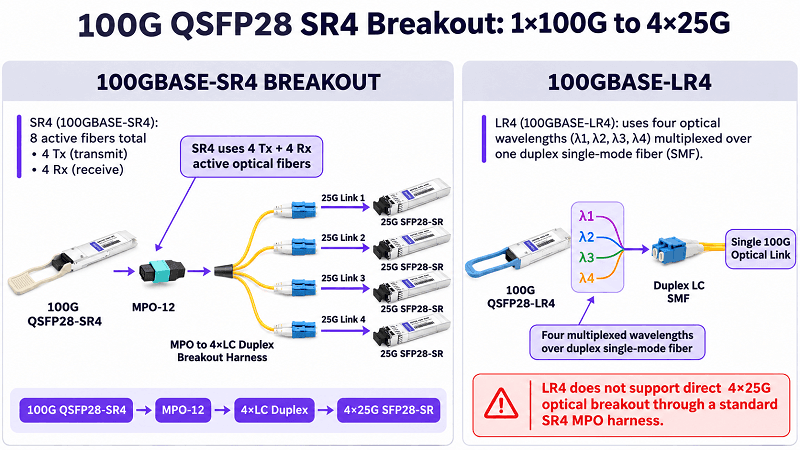
Because the port uses four lanes, some platforms can configure it for 4x25G breakout. A common example is a 100G QSFP28-SR4 connection split into four 25G links using an MPO-to-4xLC breakout harness.
However, breakout is not automatically supported by every 100G NIC or switch port. The NIC or switch hardware, firmware, software configuration, and optical or cable type must all support the intended breakout mode.
The optical interface also matters. A 100GBASE-SR4 module uses four parallel transmit and four parallel receive optical lanes, making it suitable for 4x25G breakout with the correct MPO-to-LC harness. By contrast, a 100GBASE-LR4 module multiplexes four wavelengths over duplex single-mode fiber. It cannot be split into four independent 25G links using an ordinary SR4-style MPO breakout harness.
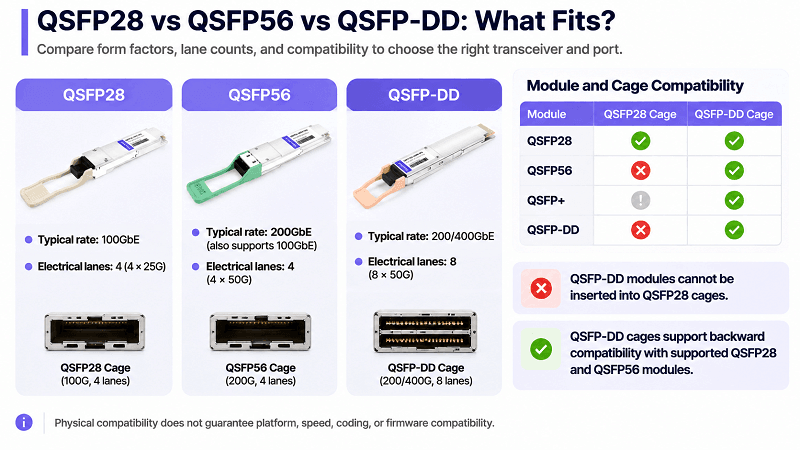
The module fit is where people get caught.
| Module in the port | QSFP28 port | QSFP-DD port |
| QSFP28 (100G) | Yes | Yes |
| QSFP56 (typically 200G) | No | Yes |
| QSFP+ (40G) | Platform-dependent | Yes |
| QSFP-DD (200G/400G) | No | Yes |
The last row is the one that matters. A QSFP-DD module won’t seat in a QSFP28 port. The QSFP-DD package adds a second row of contacts and a longer connector paddle, so the geometry prevents it from mating with a standard QSFP28 cage.
HPE’s QSFP-DD compatibility guide confirms that QSFP-DD ports can accommodate QSFP-DD, QSFP56, QSFP28, and QSFP+ products, while QSFP-DD modules cannot be used in QSFP56, QSFP28, or QSFP+ ports.
The direction works one way. A QSFP-DD port on a 400G switch can accept a QSFP28 module and operate at 100G when the platform supports it and the port is configured for the corresponding speed. Your 100G NIC’s QSFP28 port won’t accept the 400G QSFP-DD module you were planning to reuse.
There’s a second trap in the same territory. Some 100G NICs, including the ConnectX-6 Dx cards FiberMall stocks, have QSFP56 cages rather than QSFP28.
A QSFP56 cage can accept a QSFP28 module and operate at 100G when the platform supports that configuration. NVIDIA’s LinkX cable and transceiver guide documents this backward compatibility.
The important distinction is the direction of compatibility: a newer QSFP56 cage can accept supported QSFP28 modules, but a 200G QSFP56 module should not be assumed to work in an older QSFP28 port. The physical form factor, electrical lane rate, module coding, and platform support all matter.
The FEC detail nobody mentions until it fails
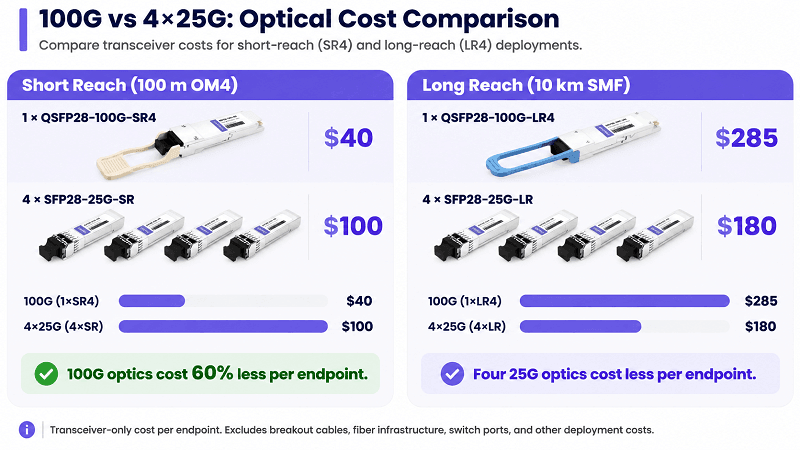
100GBASE-SR4 typically uses RS(528,514) forward error correction, while standard 100GBASE-LR4 operates without host-side FEC.
FEC is primarily configured and processed by the host-side PHY/PCS at the NIC and switch. When the two endpoints use incompatible FEC settings, the link may fail to establish properly or experience increasing error counters.
Cisco’s FEC implementation guide explains why standard 100GBASE-LR4 and 100GBASE-ER4 are exceptions to the host-side RS(528,514) FEC requirement used by many other 100G optical interfaces.
Marco, a field engineer on one of our metro accounts, spent two days troubleshooting exactly this type of issue. Light was present on both ends, but traffic was not passing cleanly and error counters continued to climb. The problem was an incompatibility between the host-side FEC configuration and the LR4 link’s expected operating mode.
Verify the supported FEC mode on both ends before you start replacing hardware.
Optic Cost per Port: 100G Is Cheaper Than 25G
This is the comparison that changes budgets, and almost nobody runs it.
FiberMall’s 100G QSFP28 list prices, checked on 2026-11-23:
| Module | Reach | Price |
| QSFP28-100G-SR4 | 100 m OM4 | $40 |
| QSFP28-100G-eSR4 | 300 m OM4 | $75 |
| QSFP28-100G-IR4 / CWDM4 | 2 km SMF | $110 |
| QSFP28-100G-LR4 | 10 km SMF | $285 |
| QSFP28-100G-LR4 (extended-reach variant) | 20 km SMF | $300 |
And the 25G comparison set:
| Module | Reach | Price |
| SFP28-25G-SR | 100 m OM4 | $25 |
| SFP28-25G-LR | 10 km SMF | $45 |
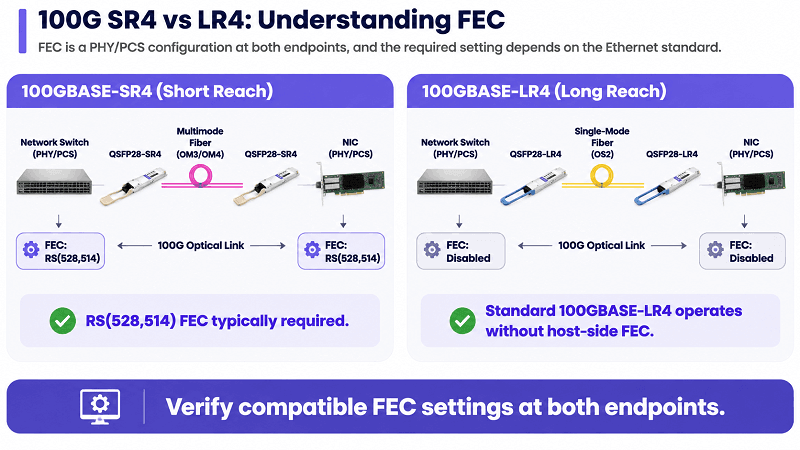
Run the short-reach case. One SFP28-SR costs $25, so four cost $100 per endpoint and provide the same aggregate 100 Gb/s capacity as one QSFP28-SR4 at $40 per endpoint.
For a complete two-ended connection, one 100G link requires two QSFP28-SR4 modules, costing $80 in total. Four independent 25G links require eight SFP28-SR modules, costing $200 in total.
The 100G optical solution is therefore 60% cheaper in this comparison, based on the listed module prices and equivalent aggregate capacity.
For a 100G-to-4x25G breakout connection, the calculation is different. One QSFP28-SR4 at the 100G end and four SFP28-SR modules at the 25G end cost $140 in total, excluding the breakout harness.
This runs against the instinct that lower speed is always cheaper. In this particular short-reach comparison, the 100G optical solution is cheaper per unit of aggregate bandwidth because fewer transceiver modules are needed. The result depends on the actual module prices and network topology, not simply on the nominal speed of each module.
At 10 km the answer flips. One LR4 costs $285 per endpoint. Four SFP28-LR modules cost $180 per endpoint. For a complete two-ended connection, the 100G LR4 solution costs $570, while four independent 25G LR links cost $360.
If your links are long and you’re choosing between one 100G port and four 25G ports, the 25G optics are cheaper, and the switch port count is what you’re really buying.
A cluster team at a research institute we supply ran the numbers the other way round. They’d split a 100G spine link into four 25G server links on the reasoning that 25G optics were cheaper.
Then they priced the optics at one endpoint: four SFP28-SR modules at $25 each cost $100, while one QSFP28-SR4 costs $40. The team kept the 25G links, but for the right reason, which was a four-port NIC already in the chassis, not the module price.
Matching modules to a card you already own? The 100G QSFP28 category lists coded and generic modules by reach, and our fiber NIC guide covers the coding question in detail.
What the $40 optic doesn’t tell you
Two things offset the module saving.
- Connector and fiber plant. A QSFP28-SR4 uses an MPO-12 connector with eight active fibers: four transmit and four receive. Four SFP28-SR links use four LC duplex pairs, also requiring eight fibers in total. The strand count is the same, but the connectors and patch-panel requirements are different. If your fiber plant is built around LC, adding MPO connections may require new trunks, breakout harnesses, or cassettes.
- Breakout cabling. A 100G-to-4x25G breakout harness is a separate component, and we haven’t included its price here. At 100 m, the module comparison is useful, but the complete solution must include the correct MPO-to-4xLC harness and supported port configuration. At 3 m inside a rack, a DAC breakout cable may be more economical, and it changes the calculation again.
The FiberMall 100G NIC Lineup, Priced and Verified
Eight cards, with specifications and prices taken from the product pages on 2026-11-23. Prices and availability may change.
| SKU | Controller | Ports | Host interface | Price |
| FME810-100G-Q2 | Intel E810-CAM2 | 2 x QSFP28 | PCIe 4.0 x16 | $699 |
| E810 single-port | Intel E810-CAM1 | 1 x QSFP28 | PCIe 4.0 x16 | $709 |
| E810 dual-port | Intel E810-CAM2 | 2 x QSFP28 | PCIe 4.0 x16 | $719 |
| MCX515A-CCAT | ConnectX-5 EN | 1 x QSFP28 | PCIe 3.0 x16 | $715 |
| MCX516A-CCAT | ConnectX-5 EN | 2 x QSFP28 | PCIe 3.0 x16 | $985 |
| MCX653105A-ECAT-SP | ConnectX-6 VPI | 1 x QSFP56 | PCIe 3.0/4.0 x16 | $965 |
| MCX653106A-ECAT-SP | ConnectX-6 VPI | 2 x QSFP56 | PCIe 3.0/4.0 x16 | $1,100 |
| MCX623106AN-CDAT | ConnectX-6 Dx | 2 x QSFP56 | PCIe 4.0 x16 | $1,200 |
Three notes on reading that table honestly.
The E810 rows aren’t a technical ladder. The $699 FME810-100G-Q2 and the $719 dual-port E810 both list an E810-CAM2 controller with two QSFP28 ports. Their published specifications appear similar. Confirm the exact part number, hardware revision, firmware, bracket, warranty, and included accessories with sales rather than assuming the $20 difference represents a technical advantage.
The ConnectX-6 VPI cards were marked out of stock on their product pages at the time of this review. They’re InfiniBand/Ethernet dual-protocol cards, supporting HDR100 on the InfiniBand side and up to 100GbE on the Ethernet side for these specific models. They’re the right answer when one server has to support both protocols. They aren’t the default 100G Ethernet pick.
One important detail: the dual-port ConnectX-6 VPI model listed here supports PCIe Gen3/4 x16. If it operates at Gen3 x16, its theoretical host bandwidth is insufficient to sustain both 100G Ethernet ports at full line rate simultaneously. Check the negotiated PCIe generation on the target server before deployment.
The ConnectX-5 prices are close to the E810 prices, but the listed ConnectX-5 models use PCIe Gen3 x16 rather than Gen4 x16. For a single 100G port, that is still sufficient host bandwidth. For two simultaneous 100G ports, however, the Gen3 x16 interface becomes the bottleneck.
A single-port ConnectX-5 at $715 against a dual-port E810 at $699 isn’t a close call on port count and host bandwidth alone. The ConnectX-5 may still be the right choice if your environment is already standardized on Mellanox drivers or your switch vendor’s compatibility list favors that adapter family.
If your server refresh is heading to 200G or 400G within two years, read the 400G NIC guide before you standardize on 100G. The port-fit rules change at QSFP-DD, and the optics do too.
How to Choose: A Five-Step Gate
Work through these in order. The first one that fails means you need to revisit the card or deployment configuration.
- Slot. Does the server have a suitable PCIe slot? For one 100G port, the theoretical bandwidth of Gen3 x16 or Gen4 x8 is generally sufficient. If the available connection is only Gen3 x8, the NIC’s host-side throughput will be constrained to approximately 63 Gb/s of theoretical bandwidth, even if the Ethernet port establishes a 100G link. If you need two 100G ports at full line rate, look for Gen4 x16 or an equivalent host interface. Also check whether the physical slot can accommodate the card and whether the card supports the slot’s electrical lane width.
- Switch. Which adapter families has your ToR vendor tested for RoCE, congestion management, and PFC? Start there. A 100G card that isn’t on the list may still work, but you’ll need to validate interoperability and configuration rather than assuming it will operate optimally out of the box.
- Ports. One 100G port, two, or one 100G port running as 4x25G? If the answer is breakout, check that the switch or NIC supports the breakout mode you intend to use. A 100G port that supports only 2x50G cannot be used with a 4x25G breakout configuration. Also confirm that the selected transceiver and cable support the required optical or electrical breakout.
- Optic. Reach first, then coding. For the listed FiberMall prices, 100 m is SR4 at $40; 2 km is CWDM4 at $110; and 10 km is LR4 at $285. Confirm module compatibility and coding requirements at both endpoints, or buy from a supplier who can code modules to the target platform.
- Lifecycle. Check driver support for your OS version, the firmware update path, and the availability of spare transceivers. A 100G link without a compatible spare module is one hardware failure away from a service downgrade.
One more thing worth checking before you commit: the slot’s electrical width. A physical x16 slot may be wired for only x4 or x8 lanes. The card fits, the link trains at a reduced width, and throughput falls below expectations, with no obvious hardware error to explain it.
Need a card matched to a specific server and switch pair? Send the chassis model and switch model to FiberMall’s engineers, and we’ll confirm the PCIe slot, the module coding, and the breakout support before you order.
FAQ
Is PCIe 3.0 x16 enough for 100G?
Yes, for one 100G port in a typical configuration. Gen3 x16 delivers approximately 126 Gb/s of theoretical bandwidth per direction, compared with a nominal 100 Gb/s Ethernet port rate. It is not enough to sustain two 100G ports at full line rate simultaneously.
Can I put a 100G NIC in a PCIe 4.0 x8 slot?
Yes, if the adapter supports an x8 PCIe link and the physical slot can accommodate the card. Gen4 x8 delivers approximately 15.75 GB/s, or 126 Gb/s, per direction, the same theoretical bandwidth as Gen3 x16. This is sufficient for one 100G port. A dual-port 100G card in a Gen4 x8 connection will be oversubscribed if both ports run at full line rate.
Will a QSFP-DD module work in a 100G QSFP28 port?
No. QSFP-DD modules have an additional row of contacts and a longer connector paddle, so they cannot be inserted into a QSFP28 cage. The reverse works: a QSFP-DD port can accept a supported QSFP28 module and operate at 100G when configured for the appropriate speed.
Is 100G overkill compared with 4x25G?
For short-reach optics, not necessarily. One QSFP28-SR4 module at $40 provides 100G capacity, compared with four SFP28-SR modules at $100 per endpoint. For a complete two-ended connection, that is $80 for one 100G link versus $200 for four parallel 25G links.
At 10 km, the 25G modules are cheaper: four SFP28-LR modules cost $180 per endpoint, compared with $285 for one QSFP28-LR4. The rest of the decision comes down to switch port count, NIC port availability, fiber infrastructure, and cabling.
What’s the cheapest way to get 100G into a server?
It depends on the server’s available PCIe slot and the card’s price. For one 100G port, a single-port adapter with sufficient host bandwidth is enough. A Gen4 x8 or Gen3 x16 connection provides the required theoretical bandwidth in typical configurations.
If the chassis has a suitable Gen4 x16 slot and a dual-port card costs about the same as a single-port model, the dual-port card may provide better long-term value by leaving a second 100G port available.
Does a 100G NIC need a specific transceiver coding?
It depends on both endpoints, not just the switch at the far end. The NIC, its firmware and driver, the switch, and the transceiver’s EEPROM coding can all affect compatibility.
Many 100G NICs accept a wide range of compatible modules, but this should not be assumed for every adapter. Check the supported transceiver list and coding requirements for both the NIC and switch before ordering. If necessary, choose a supplier that can provide modules coded for the target platform.
The Short Version
A 100G NIC is a slot decision before it’s a card decision. One 100G port generally needs the theoretical bandwidth of Gen3 x16 or Gen4 x8. Two 100G ports need Gen4 x16 to sustain full aggregate line rate. All eight FiberMall cards listed here use x16 host interfaces, but that is not a universal requirement: some single-port 100G adapters are available with PCIe Gen4 x8.
Then the port. QSFP28 accepts supported QSFP28 modules and, on some platforms, QSFP+ modules. It does not accept 200G QSFP56 or QSFP-DD modules. A QSFP56 cage can accept supported QSFP28 modules, while a QSFP-DD cage can accommodate supported QSFP56, QSFP28, and QSFP+ modules. Check the platform compatibility list before ordering.
Then the optic. At 100 m, a 100G QSFP28-SR4 solution can be cheaper per unit of aggregate capacity than four independent 25G SR links. At 10 km, four 25G LR modules can cost less than one 100G LR4 module per endpoint. Run the comparison using the complete link topology, including the number of modules, cables, and switch ports required.
Most of the 100G questions we get are answered by one of those three. The card is almost never the interesting part.
Ready to price a 100G deployment? Browse the network adapter category or start with the network interface card guide if you’re still choosing the form factor. If port count is the open question rather than host bandwidth, the NIC port speeds and counts breakdown is the one to read next.
Related Products:
-
 Intel® I210 F1 Single Port Gigabit SFP PCI Express x1 Ethernet Network Interface Card PCIe v2.1
$60.00
-
Intel® 82576 F2 Dual Port Gigabit SFP PCI Express x4 Ethernet Network Interface Card PCIe v2.0
$68.00
-
Intel® I350 F4 Quad Port Gigabit SFP PCI Express x4 Ethernet Network Interface Card PCIe v2.1
$180.00
-
NVIDIA B3220 BlueField-3 DPU, P-Series FHHL, 200GbE (Default Mode)/NDR200 lB, Dual-port QSFP112, PCle Gen5.0x16 with x 16 PCle Extension Option ,16 Arm Cores, 32GB Onboard DDR, Integrated BMC, Crypto Disabled, Tall Bracket
$4490.00
-
NVIDIA B3140H BlueField-3 8 Arm-Cores SuperNIC, E-series HHHL, 400GbE (Default Mode)/NDR IB, Single-port QSFP112, PCle Gen5.0 x16, 16GB Onboard DDR, Integrated BMC, Crypto Disabled
$4390.00
-
Intel® E830CCAM1 200G Ethernet Network Adapter Configurable as 1x200Gb or 2x100Gb connections,PCle5.0x8 or PCle 4.0x l6 Dual port QSFP56
$1250.00
-
NVIDIA NVIDIA(Mellanox) MCX653105A-HDAT-SP ConnectX-6 InfiniBand/VPI Adapter Card, HDR/200GbE, Single-Port QSFP56, PCIe3.0/4.0 x16, Tall Bracket
$1400.00
-
NVIDIA NVIDIA(Mellanox) MCX653106A-HDAT-SP ConnectX-6 InfiniBand/VPI Adapter Card, HDR/200GbE, Dual-Port QSFP56, PCIe3.0/4.0 x16, Tall Bracket
$1600.00
-
NVIDIA NVIDIA(Mellanox) MCX75510AAS-NEAT ConnectX-7 InfiniBand/VPI Adapter Card, NDR/400G, Single-port OSFP, PCIe 5.0x 16, Tall Bracket
$1650.00
-
NVIDIA NVIDIA(Mellanox) MCX75310AAS-NEAT ConnectX-7 InfiniBand/VPI Adapter Card, NDR/400G, Single-port OSFP, PCIe 5.0x 16, Tall Bracket
$2200.00
-
NVIDIA ConnectX-8 C8180 (900-9X81E-00EX-ST0) HHHL SuperNIC, 800Gbs XDR IB & Ethernet, Single-cage OSFP, PCIe 6 x16 with x16 PCIe Socket Direct,Tall bracket
$1980.00
-
NVIDIA MCX623106AN-CDAT SmartNIC ConnectX®-6 Dx EN Network Interface Card, 100GbE Dual-Port QSFP56, PCIe4.0 x 16, Tall&Short Bracket
$1200.00
-
NVIDIA NVIDIA(Mellanox) MCX653106A-ECAT-SP ConnectX-6 InfiniBand/VPI Adapter Card, HDR100/EDR/100G, Dual-Port QSFP56, PCIe3.0/4.0 x16, Tall Bracket
$1100.00
-
NVIDIA NVIDIA(Mellanox) MCX516A-CCAT SmartNIC ConnectX®-5 EN Network Interface Card, 100GbE Dual-Port QSFP28, PCIe3.0 x 16, Tall&Short Bracket
$985.00
-
NVIDIA NVIDIA(Mellanox) MCX653105A-ECAT-SP ConnectX-6 InfiniBand/VPI Adapter Card, HDR100/EDR/100G, Single-Port QSFP56, PCIe3.0/4.0 x16, Tall bracket
$965.00
-
Intel® E810-CQDA2 100G Ethernet Network Adapter PCIe v4.0 x16 Dual port QSFP28
$719.00