Every DWDM OADM a wavelength passes through introduces some optical loss. Across five cascaded nodes, that loss can consume a substantial share of the link budget—potentially comparable to tens of kilometers of fiber, depending on the OADM design.
That is a detail an initial network plan can easily overlook. It may also determine whether a metro ring has enough optical margin to operate reliably.
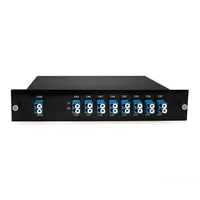
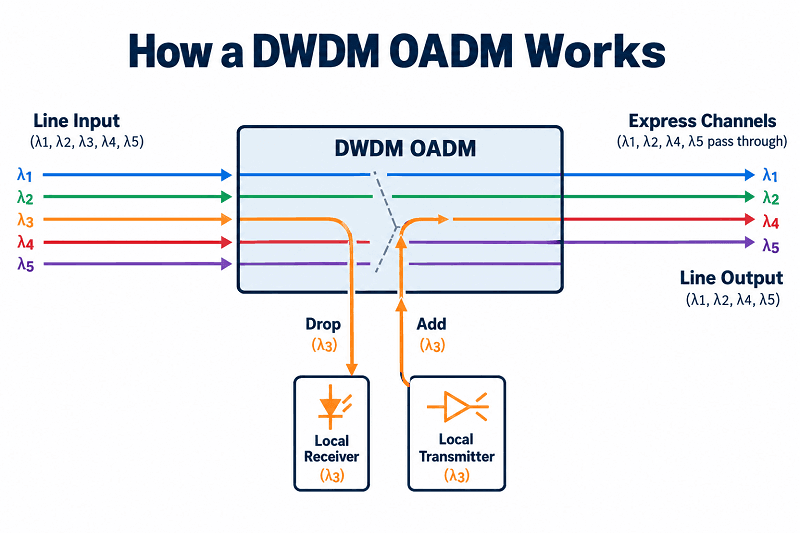
A DWDM OADM is a passive module that allows an intermediate site to add and drop selected wavelengths while leaving the other channels on their optical paths. In a 40-channel system, for example, a node that drops one channel can let the other 39 continue through the express path. It is cost-effective, requires no electrical power or software, and introduces insertion loss that accumulates across nodes. This guide explains how the module works, what East and West mean, how to budget express-path loss across a ring, and how to specify the right unit the first time.
If you already have a ring topology and a channel plan, send both to FiberMall’s optical transport engineers. We can review the proposed module configuration against your optical loss budget before you order.
What Is a DWDM OADM?
A DWDM OADM is a passive optical module at an intermediate network node that drops selected ITU-grid wavelengths for local traffic, adds wavelengths at the corresponding channel frequencies, and allows other channels to continue along the optical line.
The acronym stands for optical add-drop multiplexer. The key concept is intermediate wavelength access. A terminal node commonly uses a MUX/DEMUX to combine or separate its planned channels, while an intermediate node uses an OADM when only some channels need local access and the others must continue through the network.
Add, Drop, and Express
A passive OADM performs three key functions.
• Drop. Selected wavelengths are separated from the line and directed to local optical receivers or transmission equipment.
• Add. Local optical transmitters inject wavelengths into the appropriate frequency slots on the outgoing line.
• Express. Other wavelengths remain in the optical domain and pass through the node without optical-electrical-optical conversion or electronic regeneration.
The express function is a central reason to use an OADM. Those channels remain optical as they traverse the passive module, although they still experience propagation delay and may incur insertion loss and filtering effects.
OADM vs Mux/Demux vs ROADM
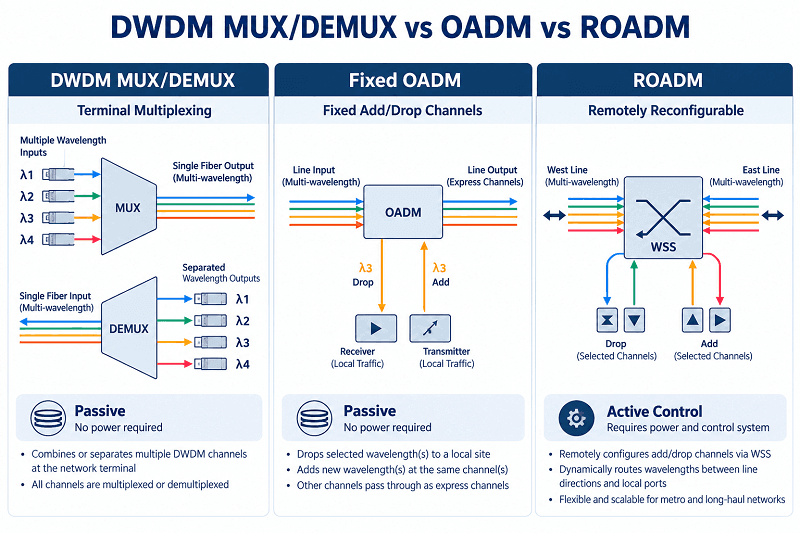
These optical networking devices are often confused. They differ in both their optical functions and their typical network applications.
| Device | Typical network position | What it does | Channel flexibility | Electrical power |
| DWDM MUX/DEMUX | Terminal node | Combines or separates a planned channel set | Determined by the unit | None for passive units |
| DWDM OADM (FOADM) | Intermediate node | Adds/drops selected channels and passes others through | Fixed add/drop channel plan | None for passive units |
| ROADM | Reconfigurable node | Remotely configures add/drop and wavelength routing according to its architecture | Software-controlled, subject to design capabilities | Yes for active ROADM systems |
A fixed OADM uses predetermined add/drop wavelengths. Changing the channel assignment generally requires replacing or reconfiguring the passive filter arrangement and associated patching. A ROADM typically uses wavelength-selective switches (WSSs) to change wavelength routing remotely. Its capabilities depend on the particular ROADM architecture, and its cost and operational complexity are different. For ROADM architecture, see our DWDM complete guide.
Many straightforward metro rings do not require that level of flexibility. A fixed design may be sufficient when four sites each need to drop one predetermined wavelength for years of stable operation.
The Four Configuration Choices That Define Your Order
Every DWDM OADM order involves four main configuration choices. An incorrect specification can result in incompatible hardware, additional rework, and deployment delays.
Channel Count: 1, 2, 4, 8, or 16
Channel count can affect insertion loss. In many cascaded thin-film-filter (TFF) designs, adding more filter stages increases the loss of certain optical paths. The exact relationship depends on the internal architecture, channel arrangement, and whether the measured path is Add, Drop, or Express.
| Channel count | Illustrative add/drop insertion-loss limit* | Typical use |
| 1 CH | ≤1.0 dB | Single wavelength at a small spur site |
| 2 CH | ≤1.5 dB | Two services or appropriately designed working/protection channels |
| 4 CH | ≤2.5 dB | Small metro node |
| 8 CH | ≤3.5 dB | Larger aggregation site |
| 16 CH | Model-specific; confirm datasheet | High-capacity intermediate node |
The figures shown for 1–8 CH are representative limits from selected FiberMall product families, not guaranteed values for every configuration. Verify the exact SKU, connector configuration, and specified measurement path. Add loss, Drop loss, and Express loss can differ and must be checked separately.
More channels are not automatically better. If a site needs only one wavelength, choosing a 16-channel unit without a capacity requirement can introduce avoidable cost and optical loss. The actual difference must be established from the two specific models’ datasheets rather than inferred from channel count alone.
Single Fiber vs Dual Fiber
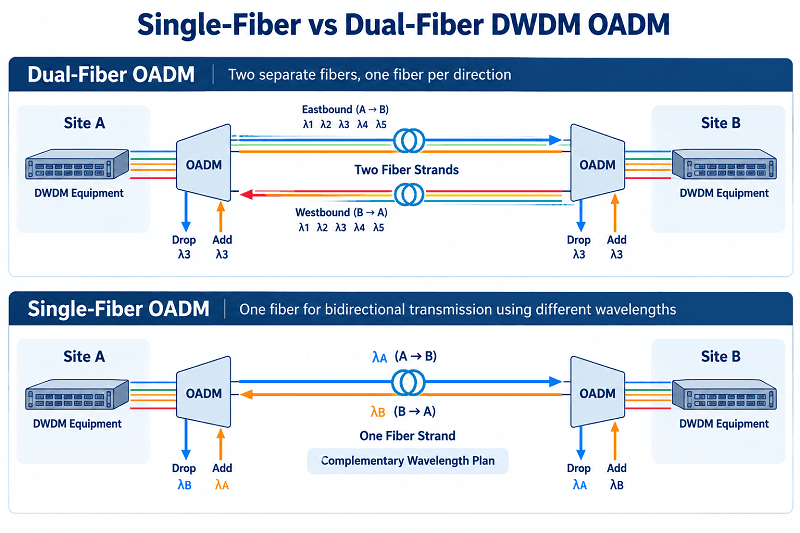
Dual fiber generally uses one fiber strand for each transmission direction. Single-fiber bidirectional designs carry both directions over the same strand, normally using different wavelength sets to separate opposite-direction traffic.
The trade-off is straightforward. A single-fiber configuration can reduce required strand count, which matters on leased or congested metro routes. Dual fiber is generally simpler to plan and troubleshoot and may use the same nominal channel frequencies in opposite directions because the directions use separate fibers. Single-fiber links require compatible equipment at both ends and a coordinated transmit/receive wavelength plan, often with complementary A/B configurations.
East, West, and East-and-West
This distinction is easy to overlook when ordering and is important for ring or linear network design.
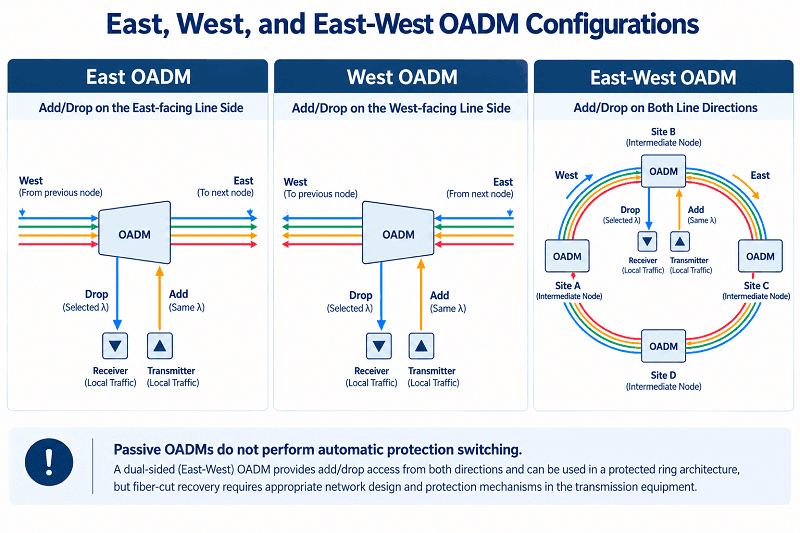
In a ring, an intermediate node connects toward two sides of the network. East and West identify those line-facing sides or directions. They are logical labels on the network diagram and do not necessarily correspond to geographic east and west.
A single-sided OADM (East only or West only) provides local wavelength access from one side of the route. It can suit a spur, a simple linear add/drop arrangement, or a node designed to access only one neighboring span, depending on its port diagram.
A dual-sided OADM (East and West) provides wavelength access toward both sides of the network. Depending on the port arrangement, it can support separate add/drop paths toward either direction. This makes it suitable for certain protected-ring designs, but the passive OADM does not detect fiber cuts, switch traffic, or guarantee that an interrupted wavelength will arrive from the opposite direction. Recovery requires redundant paths, compatible terminal equipment, and an appropriate protection-switching mechanism.
If your site is part of a ring that must survive a fiber cut, consider an East-and-West configuration together with a validated protection design. If the site accesses only one side of a spur or linear route, a single-sided OADM may be simpler and less expensive.
Housing, Connectors, and Ports
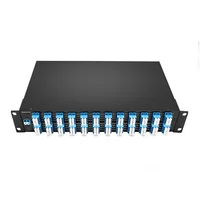
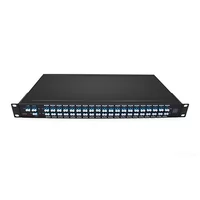
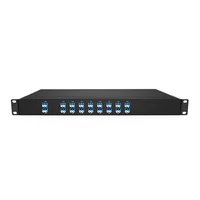
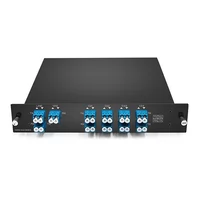
Housing options include LGX cassettes for chassis-mounted installations, 1U 19-inch rack units, and compact ABS or plug-in modules for locations with limited space.
Connectors commonly use LC/UPC. LC/APC may be required in reflection-sensitive systems, such as certain CATV or PON applications, but the connector polish must match the connected equipment. Never mate UPC and APC connectors directly: the mismatch can increase insertion loss, return reflections, and the risk of connector damage.
Optional ports can affect optical performance and planning. A monitor port may tap 1% or 2% of the line signal for optical power measurements and, with suitable test equipment and signal levels, OSNR analysis. The tap ratio alone does not represent the complete component insertion loss. An express or upgrade port may provide a route for future channel expansion, subject to the module’s supported architecture and channel plan. A 1310 nm passband port may allow compatible legacy traffic to coexist with C-band DWDM channels, provided the full optical system supports that wavelength.
Browse the FiberMall DWDM OADM catalog to review available 1-, 2-, 4-, 8-, and 16-channel options, single- and dual-fiber configurations, and East, West, or East-and-West arrangements.
How a DWDM OADM Costs You Light
The complete link-loss calculation is critical to OADM network design. A product datasheet gives device-level specifications; the end-to-end budget must account for every device and fiber segment along the actual optical route.
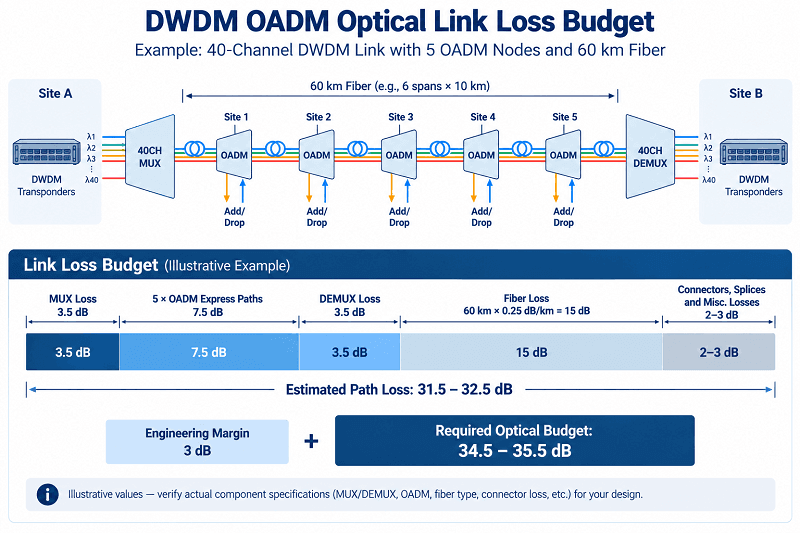
Every OADM on a wavelength’s express route introduces some insertion loss. A wavelength passing through five intermediate OADMs incurs the sum of those five devices’ Express losses. Add the relevant MUX/DEMUX losses, fiber attenuation, and other passive components, and the optical margin can shrink quickly. For wavelengths added or dropped locally, use the applicable Add and Drop losses rather than substituting Express loss.
Illustrative scenario (not a documented customer incident): Consider a six-node municipal ring outside Leeds. In this example, Priya’s team initially calculated 8 dB of passive-component loss and believed the selected 10G optics had adequate margin. The first calculation omitted express-path loss at several OADM sites and the insertion loss of 2% monitor taps specified at four locations. During commissioning, the far-end received power measured −24.7 dBm, below the receiver’s −23 dBm sensitivity limit. Bypassing an unnecessary intermediate loss element and adding a suitably engineered line amplifier restored the link, but an unexpected $4,000 change order increased the project cost. The values are illustrative; amplifier selection must also consider OSNR and total system performance.
Now consider a simplified metro link: a 40-channel MUX at the hub with 3.5 dB insertion loss, five OADM nodes each assumed to contribute 1.5 dB of Express loss, and a far-end DEMUX with 3.5 dB insertion loss. These are design assumptions, not universal OADM specifications.
That is 14.5 dB before any fiber loss is added.
Add 60 km of G.652.D fiber at an assumed 0.25 dB/km, contributing 15 dB. Allow another 2–3 dB for connector pairs, splices, monitor components, and other miscellaneous losses, taking care not to count the same connector loss twice.
The resulting estimated path loss is 31.5–32.5 dB, before engineering margin. With a 3 dB design margin, the required minimum optical power budget would be approximately 34.5–35.5 dB. Whether a particular 10G DWDM transceiver can support the link depends on its specified minimum transmit power, receiver sensitivity, dispersion tolerance, and other system limits. This is why a link that looks acceptable in an incomplete spreadsheet may fail during commissioning.
The Hidden Losses
Four factors frequently get left out of early link-budget calculations:
• Monitor taps. A 1% or 2% tap removes a small fraction of the main-path power, but the full monitor-component insertion loss—including excess loss—must be counted at every applicable node.
• Connector pairs. Include all relevant mated connections, patch panels, and splices. Check whether the equipment’s published insertion loss already includes connector contributions to avoid double-counting.
• Polish mismatches. Directly mating UPC and APC connectors can increase both loss and reflections and may damage the interface.
• Filter narrowing. Depending on filter design and wavelength position, cascaded OADMs may introduce cumulative passband distortion or narrowing. Adequate received power does not always guarantee an acceptable signal spectrum.
When the link budget or signal performance is insufficient, consider four options:
• Remove or bypass an unnecessary loss element or network hop where topology permits.
• Specify a compatible, lower-loss OADM or other passive-component design.
• Add properly engineered optical amplification, as discussed in our EDFA in DWDM systems guide, while verifying OSNR and power levels.
• Evaluate a different optical transmission approach, including suitable coherent optics where justified, based on receiver sensitivity, OSNR requirements, dispersion tolerance, and filter compatibility—not an assumed coherent-optics power advantage.
One useful distinction appears in Cisco’s NCS 2000 node documentation. In that specific architecture, an express path carries wavelengths through reflected OADM bands, while an optical pass-through can use an external optical connection between OADM cards. Cisco notes that a pass-through channel can later be reconfigured as an add/drop channel without affecting neighboring channels. These terms describe that platform’s implementation and should not be treated as universal port definitions for every passive OADM.
Matching the OADM to Your Channel Plan
The OADM must follow the network’s channel plan; it does not define that plan by itself.
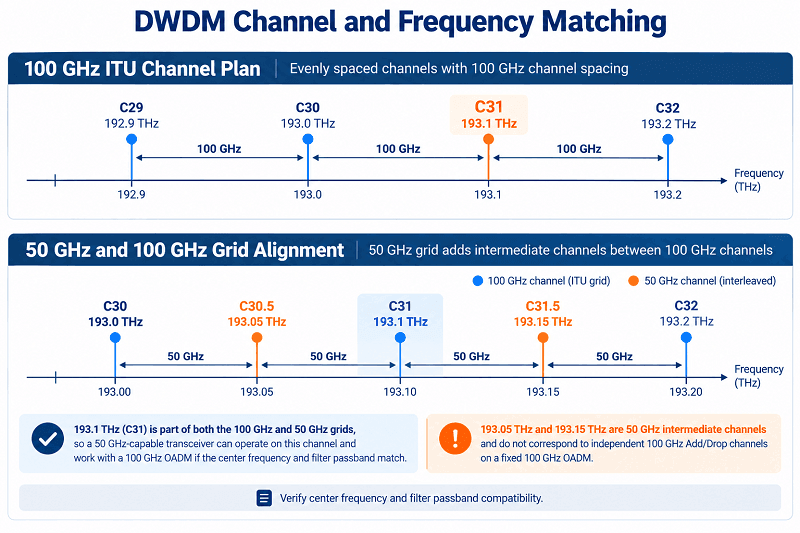
A frequent deployment error is a mismatch between the OADM’s add/drop filter frequencies and the transceivers or terminal MUX/DEMUX. The intended Add or Drop channel must match the transceiver’s nominal center frequency and the other components’ channel assignments. For example, a C29 Drop port cannot correctly extract a C30 wavelength, even though that C30 wavelength may still be able to pass through the OADM’s Express path.
Illustrative scenario (not a documented customer incident): On a 38 km metro span linking two hospitals, Marcus’s team specified 193.1 THz, commonly labeled C31 in a 100 GHz channel plan. The delivered OADM also carried a C31 label, but its actual filter frequency was 192.2 THz (commonly C22) because of an incorrect label or order mapping. The link failed until the mismatch was identified and the module replaced, causing an illustrative two-week delay. The lesson is to specify and verify the actual optical center frequency, not just a channel label.
A common 100 GHz C-band plan runs from C21 through C60 and follows the fixed-frequency grid defined by ITU-T G.694.1. FiberMall may also supply 50 GHz configurations for suitable projects; confirm availability and the exact channel plan before ordering.
Channel spacing matters at the filter level, but a 50 GHz-capable transceiver is not automatically incompatible with a 100 GHz OADM. Frequencies on the 100 GHz grid also appear on the 50 GHz grid. Such a transceiver may operate through a 100 GHz OADM if its selected center frequency matches the OADM port and the optical signal fits within the filter passband. However, an ordinary 100 GHz Add/Drop port does not independently separate two interleaved 50 GHz channels.
Passband characteristics also matter for high-baud-rate signals. Some TFF-based OADMs specify nominal passbands around ±0.11 nm, but the actual usable bandwidth and the insertion-loss criterion must be checked in the relevant datasheet. Compatibility with 10G or 25G direct-detect signals, or 400G/800G coherent or PAM4 signals, depends on occupied signal bandwidth, modulation format, laser-frequency tolerance, and cumulative filter effects. Do not assume that a high-speed signal can traverse multiple OADMs solely because the center frequency matches.
Corning’s optical terminology resources can help clarify specification terms. When comparing insertion-loss values, check whether the figures include connector contributions; inclusion varies by manufacturer, model, and test method.
For channel planning, see our DWDM vs CWDM guide and the grid section of the DWDM complete guide.
On the optics side, our fixed vs tunable DWDM transceiver guide covers channel mapping and spare strategy.
Choosing and Deploying a DWDM OADM
A Seven-Step Selection Checklist
1. Map the topology. Identify intermediate nodes and the wavelengths each site must add or drop.
2. Confirm the terminal channel plan and grid. Record the 100 GHz or 50 GHz spacing and exact center frequencies.
3. Choose sidedness. Consider single-sided access for suitable spur or linear sites, or East-and-West access for ring designs that require both sides; plan protection separately.
4. Choose the fiber arrangement. Use single fiber when strand availability is the main constraint and wavelength pairing is supported; otherwise, dual fiber may simplify operation.
5. Size the channel count with growth headroom. Check the Add, Drop, and Express insertion-loss specifications for the exact design, not just the smallest channel-count model.
6. Budget the whole path. Sum the loss of each applicable optical path, fiber segment, connector pair, splice, and monitor element, then add appropriate engineering margin.
7. Specify housing, connectors, polish, monitor ports, and temperature grade. Confirm the operating-temperature rating for the ordered SKU; a −40 to +85 °C rating applies only to models explicitly specified for that range.
Commissioning Checks
Six checks can help detect common OADM installation problems:
1. Verify channel frequencies and port labels against the channel plan before making connections.
2. Confirm direction: connect Drop ports to the appropriate receivers and Add ports to the corresponding transmitters.
3. Measure Add/Drop insertion loss on the relevant paths and compare the results with the correct datasheet limits.
4. Measure end-to-end optical loss, accounting separately for any OADM Express paths; perform component-level Express measurements if required for troubleshooting.
5. Use an optical spectrum analyzer (OSA), when appropriate, to check channel center frequencies and optical powers and to assess spectral performance.
6. Record the as-built channel assignments, directions, and fiber connections for future maintenance.
Our DWDM MUX/DEMUX selection guide covers the terminal end of the same link, including insertion loss and port options.
Common DWDM OADM Mistakes
These are among the configuration errors that recur in passive DWDM deployments.
Ordering an OADM whose Add/Drop channels do not match the terminal MUX/DEMUX and transceiver frequencies. Assuming a passive OADM provides protection switching when it does not: optical filters alone cannot perform fault detection or rerouting, which requires a suitable network architecture and active protection mechanism. Pairing single-fiber modules without verifying the transmit/receive wavelength assignments in each direction.
Other frequent mistakes include assuming that every 50 GHz-capable transceiver is incompatible with a 100 GHz OADM, or overlooking the need for alignment and passband checks. Directly mating UPC and APC connectors. Forgetting the cumulative Express loss across several nodes, monitor-component insertion loss, or connector pairs. Assuming every nominal ITU-grid channel is supported near the edge of a specific module’s operating band. Deploying 400G or 800G optical signals without verifying passband and system-level performance.
These errors may appear minor, but they can cause substantial deployment delays.
FAQ
What is a DWDM OADM?
A DWDM OADM is a passive optical module at an intermediate node that drops selected ITU-grid wavelengths for local traffic, adds wavelengths at the designated frequencies, and allows other channels to pass through optically.
How does an optical add-drop multiplexer work?
Optical filters separate the selected Drop wavelengths from the line and combine locally generated Add wavelengths with the outgoing channels. A passive OADM needs no electrical power, and its Express channels remain in the optical domain.
What is the difference between an OADM and a mux/demux?
A MUX/DEMUX combines or separates a planned set of wavelengths, commonly at a terminal node. An OADM provides selective wavelength access at an intermediate node while allowing other wavelengths to continue through the network.
What is the difference between an OADM and a ROADM?
A fixed OADM uses predetermined Add/Drop channels that generally require physical changes to reassign. A ROADM uses remotely controlled optical switching to reconfigure wavelength routing, subject to the capabilities of its architecture.
What do East and West mean on an OADM?
East and West identify the two line-facing sides or directions of an intermediate node. A single-sided module provides access from one side, while an East-and-West OADM supports access from both sides. The latter can be part of a protected ring, but the passive module itself does not switch traffic after a fiber cut.
What is the difference between single-fiber and dual-fiber OADM?
Dual-fiber systems generally use one strand per transmission direction. Single-fiber bidirectional systems use one strand for both directions, normally with different wavelength sets and appropriately paired or configured equipment.
Does an OADM need power?
A passive OADM does not need electrical power, active cooling, or software control. This makes it useful at remote or space-constrained intermediate sites, although normal fiber and connector maintenance is still necessary.
How many channels can a DWDM OADM add and drop?
FiberMall offers 1-, 2-, 4-, 8-, and 16-channel configurations, subject to the product family, with customization available for suitable projects. Add/Drop loss depends on channel count and internal design, so check the exact product datasheet.
What is OADM insertion loss?
Insertion loss is the optical power reduction along a specified path through the module. Add, Drop, and Express paths may have different insertion-loss limits. Selected low-channel-count FiberMall configurations specify around 1.0 dB or less, while higher-count designs can incur several decibels; the guaranteed limits are model-specific.
Can an OADM provide protection switching?
No. A passive OADM does not detect faults, switch optical paths, or reroute traffic. Protection depends on the redundant network topology and the active transmission or switching equipment and protocols used with it.
Conclusion
A DWDM OADM is a compact passive component that allows intermediate network sites to access selected wavelengths while other channels remain in the optical domain. Careful specification is what makes the resulting network reliable.
Four choices define the order:
• Channel count, which affects capacity and the insertion-loss characteristics of the selected design.
• Single or dual fiber, which determines strand usage and wavelength-planning complexity.
• East, West, or East-and-West, which determines available line-side access; fault recovery still requires a separate protection design.
• Housing, connectors, and optional ports, which can affect installation requirements and the optical budget.
Then run the calculations. Add the relevant Add, Drop, and Express losses for the actual signal route, along with fiber attenuation, connectors, splices, and monitor components. Maintain an appropriate engineering margin—often 2–3 dB in illustrative planning examples, but ultimately determined by the system specification, aging allowances, and operating conditions.
Remember the principle that prevents many deployment errors: the OADM must match your channel plan. It cannot correct a frequency mismatch on its own.
Planning a ring upgrade or metro Add/Drop site? Send your topology and channel plan to FiberMall. We can review the proposed module, its Add/Drop and Express paths, the channel mapping, and the optical link budget, then quote a suitable 1-, 2-, 4-, 8-, or 16-channel configuration.
Related Products:
-
 DWDM MUX DEMUX 50GHZ 96CH (C15-C62) LC/UPC Dual Fiber 2U Rack
$6000.00
DWDM MUX DEMUX 50GHZ 96CH (C15-C62) LC/UPC Dual Fiber 2U Rack
$6000.00
-
DWDM MUX DEMUX 40CH (C21-C60) LC/UPC Dual Fiber 1U Rack
$1100.00
-
DWDM MUX DEMUX 16CH (C21-C36) with Monitor Port LC/UPC Dual Fiber 1U Rack
$800.00
-
DWDM MUX DEMUX 8CH (C21-C28) with Express Port LC/UPC Dual Fiber LGX BOX
$500.00
-
DWDM MUX 8CH 16 Wavlengths (TX: C43/C45/C47/C49/C51/C53/C55/C57 RX: C44/C46/C48/C50/C52/C54/C56/C58) with MON Port LC/UPC Single Fiber LGX BOX
$450.00
-
SFP-DW10G17-40C 10G DWDM SFP+ C17 100GHz 1563.86nm 40km LC SMF DDM Transceiver Module
$155.00
-
SFP-DW10G17-80C 10G DWDM SFP+ C17 100GHz 1563.86nm 80km LC SMF DDM Transceiver Module
$175.00
-
SFP-DW10G17-100C 10G DWDM SFP+ C17 100GHz 1563.86nm 100km LC SMF DDM Transceiver Module
$235.00
-
SFP-DW10GTU-40C 10G DWDM Tunable SFP+ 50GHz 1529.55nm~1561.83nm 40km LC SMF DDM Transceiver Module
$550.00
-
SFP-DW10GTU-80C 10G DWDM Tunable SFP+ 50GHz 1529.55nm~1561.83nm 80km LC SMF DDM Transceiver Module
$750.00
-
OSFP-400G-DCO-ZR 400G Coherent OSFP-DCO ZR C-band Tunable Optical Transceiver Module
$7000.00
-
OSFP-400G-DCO-ZR+ 400G Coherent OSFP-DCO ZR+ C-band Tunable Optical Transceiver Module
$7000.00
-
OSFP-800G-DCO-ZR+-HTx 800G Coherent High TX Power OSFP DCO ZR+ C-band Tunable Optical Transceiver Module
$12000.00
-
OSFP-800G-DCO-ZR-HTx 800G Coherent High TX Power OSFP DCO ZR C-band Tunable Optical Transceiver Module
$11000.00
-
QSFP-DD-400G-DCO-ZR 400G Coherent QSFP-DD DCO C-band Tunable Optical Transceiver Module
$4550.00
-
QSFP-DD-400G-DCO-ZR+ 400G Coherent QSFP-DD DCO C-band Tunable Optical Transceiver Module
$4680.00
-
QSFP-DD-400G-DCO-ZR+-HTx 400G Coherent High TX Power QSFP-DD DCO OpenZR+ C-band Tunable Optical Transceiver Module
$5500.00
-
QSFP-DD-400G-DCO-ZR-HTx 400G Coherent High TX Power QSFP-DD DCO ZR C-band Tunable Optical Transceiver Module
$5200.00