NVLink compatible cards are the GPUs that can share memory and move data directly over NVIDIA’s high-speed interconnect, and in 2026 that list splits into two very different groups. Consumer GeForce support ended with the RTX 3090 in 2020. The RTX 40-series and RTX 50-series have no NVLink connector at all. Everything since has moved to the data center, where A100, H100, H200, B200, GB200, and GB300 cards use NVLink 3, 4, and 5 to build GPU domains of 72 accelerators or more. The Vera Rubin generation extends that to NVLink 6 in the second half of 2026.
That split matters when you buy hardware or cabling. A card’s NVLink generation sets its bandwidth, and the generation also decides whether the fabric runs on copper inside the rack or on optical links between racks. This guide lists every NVLink compatible card by generation, explains why NVIDIA dropped the connector on GeForce, and maps each category to the DAC cables, active electrical cables, MPO trunks, and OSFP optics that carry its traffic.
What Are NVLink Compatible Cards?
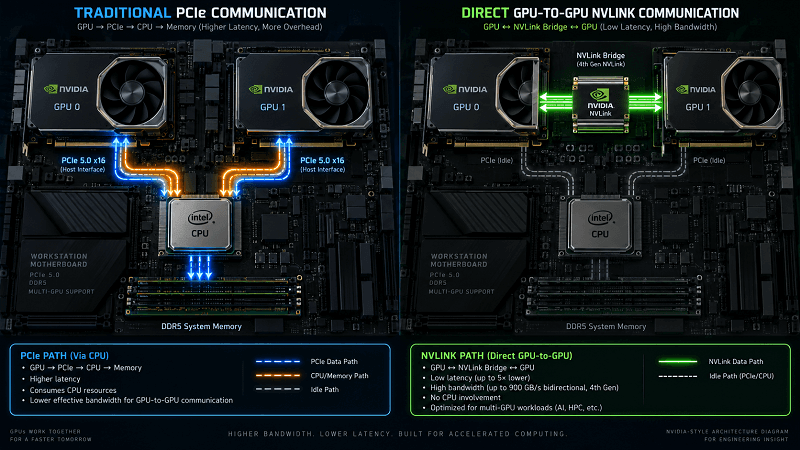
NVLink compatible cards are NVIDIA GPUs fitted with the NVLink interconnect, which lets two or more GPUs exchange data directly instead of routing it through PCIe and host memory. Compatibility is defined by generation. A card supports the NVLink version built into its architecture, and linked cards need matching bridges or matching switch ports.
NVLink exists because PCIe became a bottleneck in multi-GPU systems. With NVLink, GPUs pass data and share memory peer to peer, and the CPU, host memory, and PCIe bus drop out of the path. Across six generations the aggregate bandwidth per GPU has grown from 160 GB/s to 3.6 TB/s. NVIDIA’s NVLink product page tracks the current specifications.
NVLink, NVSwitch, and the Two Kinds of Compatibility
The word “compatible” means two different things depending on the card.
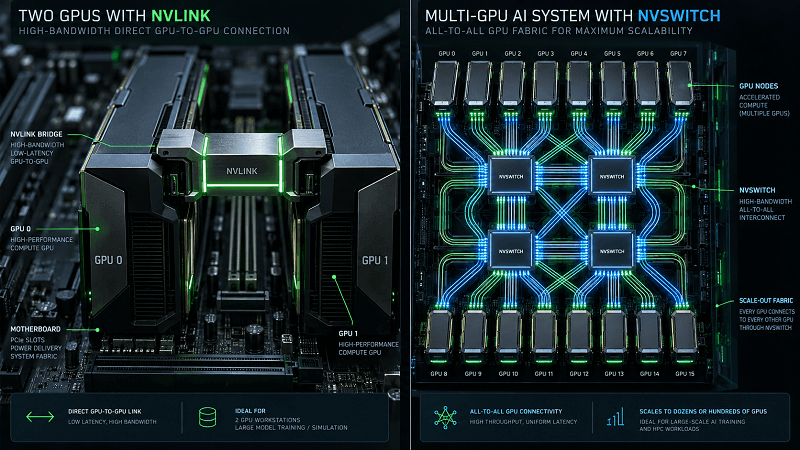
On consumer and workstation cards, NVLink compatibility is physical. Two matching GPUs are joined by a removable NVLink bridge that clips over the top edges of both cards. The bridge comes in 2-slot, 3-slot, and 4-slot spacings so it can span the gap between adjacent cards.
On data-center cards, compatibility is fabric-based. GPUs connect through NVSwitch ASICs, which create an all-to-all fabric so any GPU can reach any other at full NVLink bandwidth. NVIDIA introduced NVSwitch with the DGX-2 in 2018, and a rack-scale domain such as the GB200 NVL72 now treats up to 72 GPUs as one large device. That is roughly 130 TB/s of fabric bandwidth in a single cabinet.
How NVLink Compatibility Differs From SLI
NVLink and SLI are often confused, and the confusion changes what hardware you buy. SLI (Scalable Link Interface) was a rendering technology that combined two or more GeForce cards for gaming. It used its own bridge, the SLI HB bridge on the Turing generation. NVLink is a general-purpose data interconnect for memory sharing and compute workloads.
The two are not interchangeable. An RTX 3090 does not take an SLI HB bridge. It takes an NVLink bridge, in a 3-slot or 4-slot length. If you are enabling NVLink on an RTX 3090, an SLI bridge will not fit the connector and will not work.
Why Bridge Slots Matter on Legacy Cards
Slot spacing is only relevant to the legacy GeForce cards, and it is decided by your motherboard layout rather than by the GPU. A 3-slot bridge spans a one-card gap, while a 4-slot bridge spans a wider gap left by thicker coolers or a riser. Getting this wrong is the most common reason a used RTX 3090 NVLink pair will not link, so measure the gap between the two card edges before ordering.
NVLink Compatible Cards: The Complete 2026 List
The table below is the master compatibility list. Bandwidth is bidirectional aggregate per GPU. “Discontinued” means NVIDIA no longer builds the NVLink connector into that product family, even though used cards still work.
| Card | Architecture and year | NVLink gen | Bandwidth per GPU | NVLink status | Interconnect needed |
| TITAN RTX, RTX 2080 Ti, RTX 2080, RTX 2080 Super | Turing, 2018 | NVLink 2 | ~100 GB/s | Discontinued | 2-slot or 3-slot NVLink bridge |
| RTX 3090 (base model) | Ampere, 2020 | NVLink 3 | 112.5 GB/s | Discontinued, last GeForce | 3-slot or 4-slot NVLink bridge |
| RTX A5000, RTX A6000 | Ampere pro, 2021 | NVLink 3 | ~112.5 GB/s | End of line | 2-slot NVLink bridge |
| RTX PRO 6000 Blackwell | Blackwell, 2025 | NVLink 5 | ~1.8 TB/s | Current | NVLink 5 link between paired cards |
| A100 | Ampere, 2020 | NVLink 3 | 600 GB/s | Legacy | NVSwitch fabric on copper |
| H100, H200 | Hopper, 2022 to 2024 | NVLink 4 | 900 GB/s | Current | NVSwitch 3; 1.6T OSFP between racks |
| B200, GB200, GB300 | Blackwell, 2024 to 2026 | NVLink 5 | 1.8 TB/s | Current | NVSwitch 4; copper in rack, 800G and 1.6T optics between racks |
| Vera Rubin | Rubin, 2026 | NVLink 6 | 3.6 TB/s | Shipping 2H 2026 | NVLink 6 fabric; co-packaged optics on the roadmap |
Consumer GeForce and TITAN Cards With NVLink
Four NVLink compatible cards came from the Turing generation: the TITAN RTX, the RTX 2080 Ti, the RTX 2080, and the RTX 2080 Super. Each links to one partner card over a bridge at roughly 100 GB/s. The RTX 2070 Super is often listed as NVLink capable, but it has no NVLink connector and never did.
The Ampere generation narrowed that to a single card. The RTX 3090 (base model) is the last consumer GeForce GPU with an NVLink connector, offering 112.5 GB/s between two cards. The RTX 3090 Ti shipped with the physical connector but NVIDIA disabled NVLink support in the drivers, so treat the base RTX 3090 as the practical end of the line.
Workstation Cards: RTX A-Series and RTX PRO Blackwell
Professional Ampere cards kept NVLink after GeForce dropped it. The RTX A5000 and RTX A6000 both link over a 2-slot bridge at about 112.5 GB/s, and both are correctly classed as professional Ampere cards rather than GeForce 30-series parts.
The line resumed with the RTX PRO 6000 Blackwell, which brings NVLink 5 to a workstation card at roughly 1.8 TB/s. For studios and labs, this is the only current-generation way to buy NVLink on a single-slot-class card rather than in a server.
Data-Center Cards: A100, H100, B200, GB200, and GB300
The data-center line is where NVLink compatible cards perform at full specification. These cards do not use bridges; they attach to a switch fabric.
- A100 (Ampere, 2020) uses NVLink 3 at 600 GB/s per GPU across 12 links, connected by second-generation NVSwitch into 8-GPU domains.
- H100 and H200 (Hopper) use NVLink 4 at 900 GB/s per GPU across 18 links. Third-generation NVSwitch adds in-network reduction, and external NVLink Switch modules extend a domain to 256 GPUs.
- B200, GB200, and GB300 (Blackwell) use NVLink 5 at 1.8 TB/s per GPU. A GB200 NVL72 rack connects 72 GPUs through nine NVSwitch trays as one domain, and GB300 Blackwell Ultra is the volume platform through 2026.
The 2026 Flagship: Vera Rubin and NVLink 6
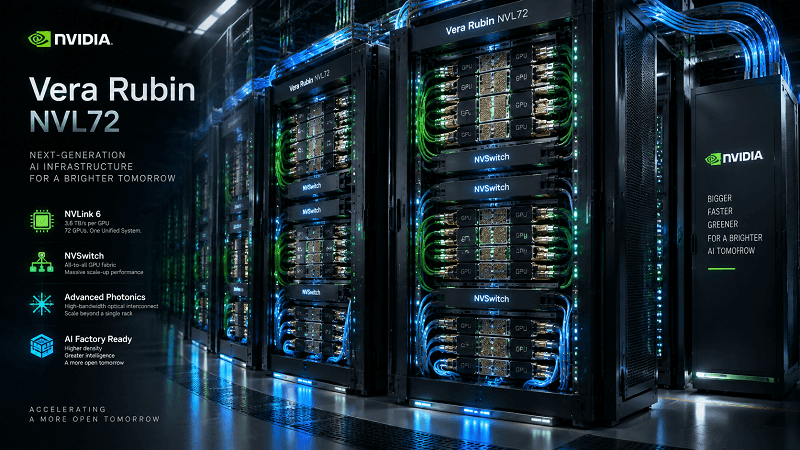
Vera Rubin brings NVLink 6, which doubles per-GPU bandwidth again to 3.6 TB/s across as many as 36 links. The first system, Vera Rubin NVL144, is scheduled to ship in the second half of 2026, and Rubin Ultra adds co-packaged optics to the roadmap. For anyone buying cabling, this is the transition to watch, because NVLink 6 shifts more of the fabric onto high-speed optical and active electrical links. NVIDIA’s NVLink Fusion program opens the fabric to partner silicon and carries it further over optics, which is why the 1.6T OSFP layer matters for future deployments. Our companion guide on NVLink and NVSwitch generations and topology covers the switch fabric history in depth.
Why NVIDIA Dropped NVLink on GeForce After the RTX 3090
The single most useful fact about NVLink compatible cards in 2026 is this: NVIDIA removed NVLink from consumer GeForce cards after the RTX 3090. The RTX 40-series (Ada, 2022) and the RTX 50-series (Blackwell, 2025) have no NVLink connector.
What the RTX 40-Series and RTX 50-Series Changed
NVIDIA reclaimed the die area and board space that NVLink consumed and spent it on Tensor Cores, DLSS hardware, and higher clocks instead. The calculation was simple. Very few GeForce buyers ran two cards in a shared-memory configuration, while every buyer benefits from more compute and better rasterization. NVLink survived only where memory sharing drives the workload: professional, workstation, and data-center silicon.
What This Means If You Still Run RTX 3090s
The RTX 3090 remains a legitimate NVLink card for local AI work in 2026, and it is the last consumer option for a bridged pair. Two RTX 3090s joined by an NVLink bridge expose 48 GB of combined framebuffer, which is enough to hold models that a single 24 GB card cannot. Software support is mature, and tensor parallelism in DeepSpeed and vLLM can split a model across the pair.
If you are building this kind of system, plan the bridge and the intervening cabling together. A 3-slot or 4-slot NVLink bridge is a hard requirement, and the bridge only carries the 112.5 GB/s link. Storage, host traffic, and any multi-node work still travel over PCIe or Ethernet.
NVLink Generations and Bandwidth: Which Card Supports What
Every NVLink compatible card belongs to a generation, and that generation sets its bandwidth ceiling. The generation is fixed by architecture rather than by configuration. NVIDIA has revised the NVLink specification six times since 2016, each time roughly doubling the per-GPU rate. The table below condenses all six.
The NVLink 1 to 6 Bandwidth Table
| Generation | Year | First GPU | Links per GPU | Bandwidth per GPU |
| NVLink 1 | 2016 | Tesla P100 (Pascal) | 4 | 160 GB/s |
| NVLink 2 | 2017 | Tesla V100 (Volta) | 6 | 300 GB/s |
| NVLink 3 | 2020 | A100 (Ampere) | 12 | 600 GB/s |
| NVLink 4 | 2022 | H100 (Hopper) | 18 | 900 GB/s |
| NVLink 5 | 2024 | B200 (Blackwell) | 18 | 1.8 TB/s |
| NVLink 6 | 2026 | Vera Rubin | up to 36 | 3.6 TB/s |
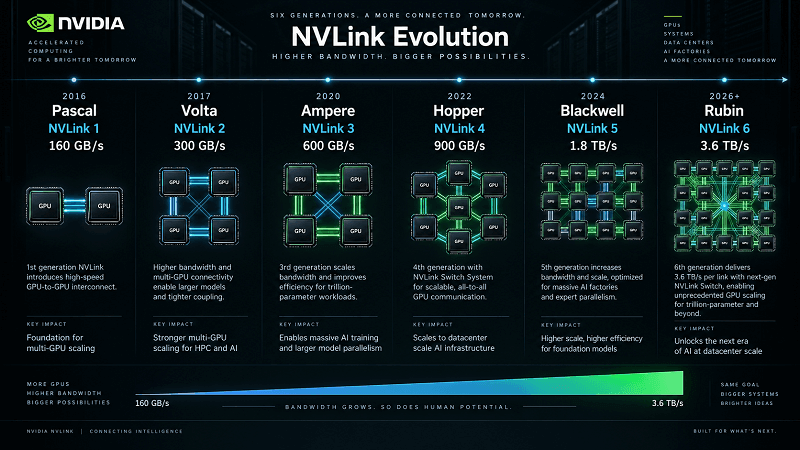
Reading the Numbers: Per-GPU Aggregate vs Per-Link
Two details prevent most misreading of NVLink specs.
First, published bandwidth is bidirectional aggregate, meaning transmit plus receive. A figure of 900 GB/s on an H100 is 450 GB/s in each direction, not 900 GB/s each way.
Second, a card can share a generation without sharing the bandwidth. The RTX 3090 and the A100 both use NVLink 3, yet the RTX 3090 delivers 112.5 GB/s while the A100 delivers 600 GB/s. The consumer card devotes one link pair to the bridge, while the data-center card puts 12 links on a switch fabric. Never assume two cards with the same generation number perform alike.
Scale-Up vs Scale-Out: Where NVLink Ends and Optics Begin
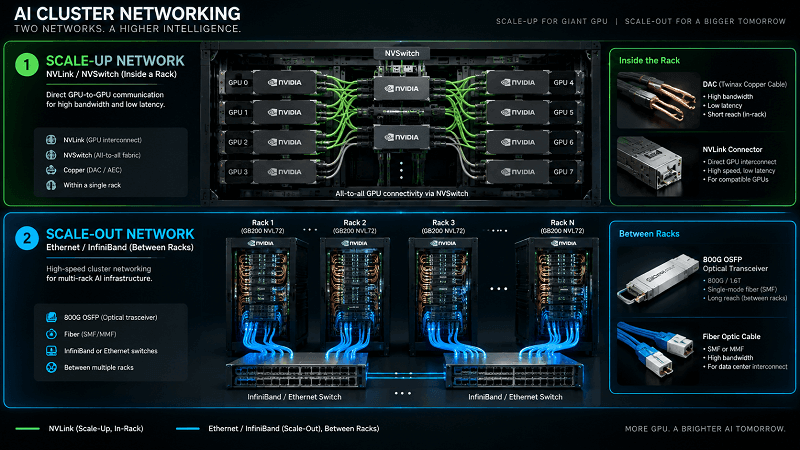
Every NVIDIA AI cluster has two networks, and they use different physical media. The two layers also decide what kind of transceiver, DAC, or copper assembly a given NVLink compatible card needs. Getting the boundary right is the difference between a working fabric and a rack of dropped links.
Inside the Rack: Copper NVLink
Scale-up is NVLink, and inside a rack it runs on copper. A GB200 NVL72 uses copper NVLink at the rear of the cabinet because the distances are short, under a few meters, and the power saving is large. Running that fabric optically would add roughly 20 kW per rack. Those copper runs are high-speed twin-axial assemblies, effectively large DAC cables, that plug into the compute trays and the NVSwitch trays.
Between Racks: InfiniBand NDR and 800G OSFP
Scale-out is the network that carries jobs, storage, and traffic between racks, and it runs on optics. DGX H100 systems use 400G ConnectX-7 InfiniBand, GB300 moves to 800G ConnectX-8, and the switches are Quantum-X800 for InfiniBand or Spectrum-X800 for Ethernet. Where an NVLink domain must cross a rack boundary, as in the two-cabinet GB200 NVL36x2, the NVSwitch trays connect through 1.6T OSFP cages carrying real NVLink traffic.
The practical rule is simple. Keep NVLink on copper where the distance is short and the power budget is tight, switch to optics where reach or density demands it, and standardize on 800G and 1.6T OSFP so the cabling carries across the GB300 and Vera Rubin generations.
The Cabling Each NVLink Compatible Card Needs
This table maps the compatibility list to the physical layer, which is the part a cabling supplier can actually help with.
| NVLink domain | Typical link | Recommended connectivity |
| GeForce RTX 3090 pair | NVLink 3 bridge | 3-slot or 4-slot NVLink bridge (legacy) |
| Workstation pair (A6000, RTX PRO 6000) | NVLink bridge or link | 2-slot NVLink bridge, or NVLink 5 link |
| 8-GPU node (A100, H100) | Copper NVLink on NVSwitch | High-speed DAC and copper backplane runs |
| Rack-scale domain (GB200, GB300 NVL72) | Copper NVLink in rack | Short twin-ax DAC assemblies inside the cabinet |
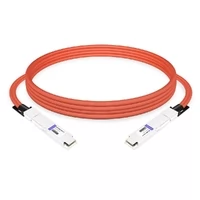
| Rack-to-rack NVLink (NVL36x2) | 1.6T OSFP cages | 800G OSFP optics or 1.6T active electrical cables |
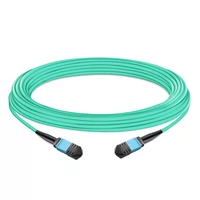
| External NVLink domain | OSFP plus fiber | OSFP optical transceivers and MPO fiber trunks |
| Scale-out InfiniBand (GB300) | 800G ConnectX-8 | 800G OSFP SR8 or DR8 modules, NDR DAC |
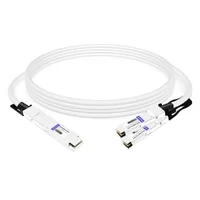
FiberMall builds NVIDIA-compatible modules for every link in that table. On the optical side, the 800G OSFP SR8 module serves short-reach scale-out and NVLink fabrics, while 800G NDR DAC cables handle the short copper hops inside a rack.
The rest of the lineup maps directly onto the fabric layers:
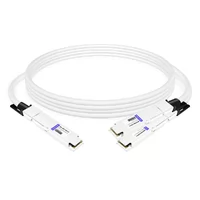
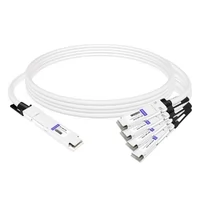
- twin-port OSFP breakout DACs for rack-to-rack NVLink pairs
- MPO fiber trunks for external NVLink domains
- 1.6T OSFP modules for the transition to Vera Rubin
NVLink vs PCIe vs InfiniBand: Choosing an Interconnect
Buyers often weigh three options, and they solve different problems. The comparison below uses bidirectional numbers.
| Interconnect | Typical peak bandwidth | Role |
| PCIe 5.0 x16 | ~128 GB/s per slot | General I/O, host to GPU |
| PCIe 6.0 x16 | ~256 GB/s per slot | Next-generation I/O |
| NVLink 3 (A100) | 600 GB/s per GPU | Scale-up within a node |
| NVLink 4 (H100) | 900 GB/s per GPU | Scale-up within a node |
| NVLink 5 (B200) | 1.8 TB/s per GPU | Scale-up within a rack |
| NVLink 6 (Rubin) | 3.6 TB/s per GPU | Scale-up across racks |
| InfiniBand NDR (400G) | ~50 GB/s per port | Scale-out between racks |
| 800G Ethernet | ~100 GB/s per port | Scale-out between racks |
When NVLink Is Worth the Cost
NVLink wins whenever GPUs must exchange data every step, which describes tensor parallelism, mixture-of-experts routing, and large-model training. NVLink compatible cards cost more than PCIe-only alternatives, so the interconnect has to earn its place. An NVLink domain moves that traffic more than an order of magnitude faster than PCIe, and it does so with coherent memory semantics that remove a layer of software message passing.
InfiniBand and Ethernet remain essential, but they serve a different purpose. They scale a cluster to hundreds of nodes, which NVLink does not do on its own. Plan for both, and size the optical layer for the scale-out traffic rather than for the NVLink fabric.
How to Choose an NVLink Compatible Card in 2026
Work through these steps in order. The card choice determines every cabling decision that follows.
1. Decide whether you need NVLink at all. For single-GPU inference, PCIe is enough. NVLink pays off when a model or workload must be split across GPUs that exchange data constantly.
2. Match the generation to the workload. A legacy RTX 3090 pair covers local fine-tuning and small model serving. A100 and H100 cover mainstream training. B200, GB200, and GB300 cover frontier training and large-scale serving.
3. Confirm the connector still exists. If you are buying GeForce, only the RTX 3090 has NVLink. RTX 40-series and 50-series cards cannot be linked.
4. Size the bridge or the fabric. Bridged pairs need the correct slot length. Switch-based systems need NVSwitch trays and the right number of them for the domain size.
5. Plan the physical layer. Choose copper DAC for in-rack NVLink, 800G or 1.6T OSFP optics for rack-to-rack NVLink, and NDR or 800G modules for the scale-out network.
6. Standardize on 800G and 1.6T OSFP. Reaching for the forward-looking optic now avoids a re-cable when GB300 and Vera Rubin systems arrive.
Frequently Asked Questions
What is an NVLink compatible card?
An NVLink compatible card is an NVIDIA GPU with a built-in NVLink interconnect, which lets it share memory and exchange data directly with another GPU at far higher bandwidth than PCIe allows. Consumer cards link over a physical bridge, while data-center cards link through NVSwitch fabrics.
Which NVIDIA cards support NVLink?
The NVLink compatible cards available in 2026 are the RTX PRO 6000 Blackwell workstation card, the A100, H100, H200, B200, GB200, and GB300 data-center GPUs, and the incoming Vera Rubin generation. On the consumer side, only legacy Turing and Ampere cards qualify, ending with the RTX 3090.
Does the RTX 4090 or RTX 5090 support NVLink?
No. NVIDIA removed NVLink from GeForce with the RTX 40-series in 2022, and the RTX 50-series also ships without the connector. The RTX 3090, released in 2020, is the last consumer GeForce card with NVLink support.
What do I need to enable NVLink on an RTX 3090?
You need two RTX 3090 cards and one NVLink bridge in the correct slot length, either 3-slot or 4-slot depending on the gap between the cards. An SLI HB bridge will not work. The bridge only provides the 112.5 GB/s link; other traffic still uses PCIe.
How many GPUs can NVLink connect?
Two bridged consumer or workstation cards is the practical consumer limit. On data-center systems, NVSwitch scales the domain from 8 GPUs to a 72-GPU NVL72 rack, and external NVLink switches extend Hopper-generation domains to 256 GPUs.
What is the difference between NVLink and SLI?
NVLink is a general-purpose interconnect for memory sharing and compute workloads. SLI was a rendering technology that combined GeForce cards for gaming. They use different bridges, and an SLI bridge cannot be used to enable NVLink on an RTX 3090.
Is NVLink faster than PCIe?
Yes, by a wide margin. NVLink 5 delivers 1.8 TB/s per GPU against roughly 128 GB/s for a PCIe 5.0 x16 slot, which is about 14 times the bandwidth. NVLink also bypasses the CPU and host memory for GPU-to-GPU traffic.
Does NVLink use copper or fiber optic cables?
Both. NVLink runs on copper inside a rack, as in the GB200 NVL72, where copper saves roughly 20 kW per cabinet. It crosses racks through 1.6T OSFP optical modules and active electrical cables, and NVIDIA’s NVLink Fusion roadmap extends NVLink further over optics.
What cables does a GB200 NVL72 rack need?
An NVL72 rack needs short high-speed copper NVLink assemblies between its compute trays and NVSwitch trays, plus 800G OSFP optics and DAC or AEC cables for rack-to-rack and scale-out links. FiberMall carries NVIDIA-compatible options across each of these categories.
Do I need NVLink for AI training?
It depends on model size. Single-GPU training works over PCIe. Once a model must be split across GPUs that exchange gradients every step, NVLink becomes the practical requirement, which is why every major training cluster is built around NVLink domains and NVSwitch.
Conclusion
NVLink compatible cards now describe two markets that were once one. The consumer era ended at the RTX 3090, which remains the last GeForce card with an NVLink connector and still has a role in local AI work. Everything current lives in the data center, where NVLink 4 and NVLink 5 turn a rack into a single 72-GPU accelerator, and NVLink 6 will extend that reach again in late 2026.
The takeaways for anyone specifying hardware or cabling:
- Consumer NVLink compatibility starts and stops with legacy Turing and Ampere cards, ending at the RTX 3090.
- Current NVLink compatible cards are the RTX PRO 6000 Blackwell and the A100, H100, H200, B200, GB200, and GB300 data-center GPUs.
- Bandwidth is tied to generation, but a shared generation number does not mean shared bandwidth. The RTX 3090 and A100 both use NVLink 3, yet one delivers 112.5 GB/s and the other 600 GB/s.
- Scale-up NVLink stays on copper inside the rack, while scale-out traffic and rack-to-rack NVLink run on 800G and 1.6T OSFP optics.
- Standardizing on 800G and 1.6T OSFP now protects your cabling investment through GB300 and into Vera Rubin.
If you are sourcing the connectivity layer for an NVIDIA GPU cluster, start with FiberMall’s 800G OSFP DR8 modules and cables for the optical side. To match modules to your switches, network cards, and NVLink fabric, ask our engineers on the FiberMall questions page.
Related Products:
-
 NVIDIA MMA4Z00-NS400 Compatible 400G OSFP SR4 Flat Top PAM4 850nm 30m on OM3/50m on OM4 MTP/MPO-12 Multimode FEC Optical Transceiver Module
$400.00
NVIDIA MMA4Z00-NS400 Compatible 400G OSFP SR4 Flat Top PAM4 850nm 30m on OM3/50m on OM4 MTP/MPO-12 Multimode FEC Optical Transceiver Module
$400.00
-
NVIDIA MMA4Z00-NS-FLT Compatible 800GBASE 2 x SR4/SR8 OSFP RHS/Flat Top PAM4 850nm 100m DOM Dual MPO-12 MMF Optical Transceiver Module
$600.00
-
NVIDIA MMA4Z00-NS Compatible 800GBASE 2 x SR4/SR8 OSFP PAM4 850nm 100m DOM Dual MPO-12 MMF Optical Transceiver Module
$550.00
-
NVIDIA MMS4X00-NM Compatible 800GBASE 2 x DR4/DR8 OSFP IHS/Closed Finned Top PAM4 1310nm 500m DOM Dual MTP/MPO-12 SMF Optical Transceiver Module
$600.00
-
NVIDIA MMS4X00-NM-FLT Compatible 800GBASE 2 x DR4/DR8 OSFP Flat Top PAM4 1310nm 500m DOM Dual MTP/MPO-12 SMF Optical Transceiver Module
$650.00
-
NVIDIA MMS4X00-NS400 Compatible 400G OSFP DR4 Flat Top PAM4 1310nm MTP/MPO-12 500m SMF FEC Optical Transceiver Module
$450.00
-
NVIDIA(Mellanox) MMA1T00-HS Compatible 200G Infiniband HDR QSFP56 SR4 850nm 100m MPO-12 APC OM3/OM4 FEC PAM4 Optical Transceiver Module
$139.00
-
NVIDIA MFP7E10-N010 Compatible 10m (33ft) 8 Fibers Low Insertion Loss Female to Female MPO Trunk Cable Polarity B APC to APC LSZH Multimode OM3 50/125
$47.00
-
NVIDIA MCP7Y00-N003-FLT Compatible 3m (10ft) 800G Twin-port OSFP to 2x400G Flat Top OSFP InfiniBand NDR Breakout DAC
$260.00
-
NVIDIA MCP7Y70-H002 Compatible 2m (7ft) 400G Twin-port 2x200G OSFP to 4x100G QSFP56 Passive Breakout Direct Attach Copper Cable
$155.00
-
NVIDIA MCA4J80-N003-FTF Compatible 3m (10ft) 800G Twin-port 2x400G OSFP to 2x400G OSFP InfiniBand NDR Active Copper Cable, Flat top on one end and Finned top on other
$600.00
-
NVIDIA MCP7Y10-N002 Compatible 2m (7ft) 800G InfiniBand NDR Twin-port OSFP to 2x400G QSFP112 Breakout DAC
$190.00