Maria powered on a fresh 16-node HPC cluster at 9:00 a.m. Every switch LED glowed green. Every cable clicked home. Yet ibstat showed the same status on every port: Physical state: LinkUp, State: Initializing. MPI tests hung. RDMA traffic refused to move. The culprit was not a bad cable or a dead HCA. Maria had forgotten one piece of software: the InfiniBand subnet manager.
If you have ever stood in front of a brand-new InfiniBand fabric that looks healthy but will not pass traffic, you already know the feeling. The InfiniBand subnet manager is the fabric’s brain. Without it, even a perfectly cabled cluster is just a collection of silent ports. This guide explains what it does, compares the three main ways to run one in 2026, and walks through high availability, configuration, and troubleshooting. We will also look at why physical-layer quality matters, and where FiberMall-compatible cables and optics fit in.
For a broader look at how InfiniBand differs from Ethernet, including why InfiniBand relies on a centralized subnet manager while Ethernet does not, see our guide on the difference between InfiniBand and Ethernet.
What Does the InfiniBand Subnet Manager Do?
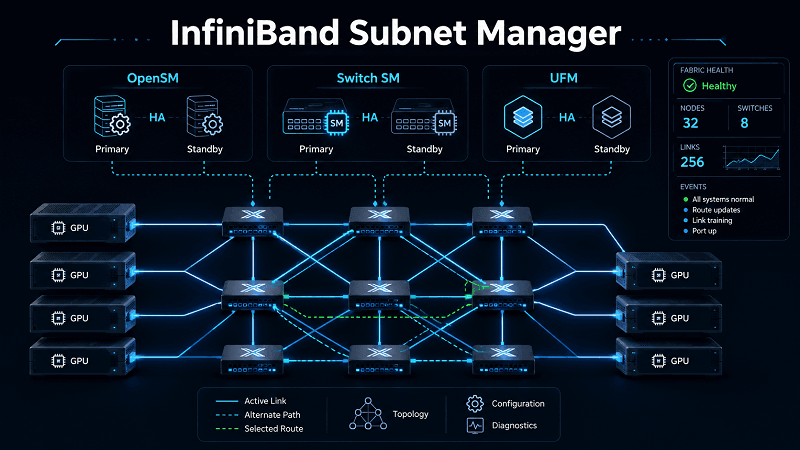
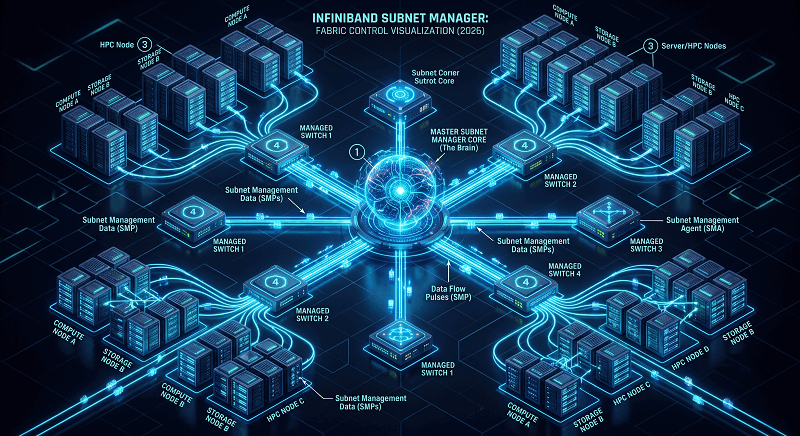
An InfiniBand subnet manager (SM) is the centralized control plane for an InfiniBand fabric. It discovers every device, assigns addresses, computes routes, and keeps the fabric alive as nodes join or leave. You can think of it as the operating system of the network. Every switch, Host Channel Adapter (HCA), and router in the subnet runs a tiny Subnet Management Agent (SMA) that talks back to the SM.
The SM handles several jobs at once:
Topology discovery — It walks the fabric and maps every link, switch, and HCA.
LID assignment — It gives each active port a unique Local Identifier (LID) so packets know where to go.
Routing-table programming, It builds the switch forwarding tables (Linear Forwarding Tables, or LFTs) that move traffic from source to destination.
QoS setup — It configures Service Levels (SLs), Virtual Lanes (VLs), and arbitration so different traffic classes behave differently.
Partitioning — It sets Partition Keys (PKEYs) that isolate traffic, similar to VLANs in Ethernet.
Monitoring — It runs light sweeps for routine health checks and heavy sweeps when the topology changes.
Security — It enforces SM_Key policies and controls which nodes can manage the fabric.
The master SM communicates with each SMA through Subnet Management Packets (SMPs) carried inside Management Datagrams (MADs). That traffic rides Queue Pair 0 on Virtual Lane 15, so it works even before user traffic starts. Only one SM can be master at a time. Additional SMs stay on standby, ready to take over if the master disappears.
Even a two-node direct-attach InfiniBand link needs an SM. Without it, ports never leave the Initializing state. The physical link can be perfect and still useless.
Why InfiniBand Ports Stay “Initializing” Without an SM
A common first-boot mistake is assuming that a green LED means the fabric is ready. It does not. A port showing Physical state: LinkUp only means the SerDes and optics negotiated successfully. The port still needs a LID, a route, and permission to become Active.
When no InfiniBand subnet manager is running, ibstat output looks like this:
State: Initializing
Physical state: LinkUp
Base lid: 0x0
SM lid: 0x0
Base lid: 0x0 is the giveaway. The port has no address because no SM assigned one. The SM lid is also zero, which means the port cannot find the master SM. Once an SM comes online, State flips to Active and the port receives a non-zero LID. At that point, the fabric can carry RDMA, MPI, NVMe-oF, or any other InfiniBand workload. Until then, nothing moves. That is why every InfiniBand deployment, from a lab bench to a 1,000-GPU AI cluster, needs a working SM before anything else.
Three Ways to Run an InfiniBand Subnet Manager
In 2026, you have three practical choices for running an InfiniBand subnet manager: OpenSM on a host, a switch-embedded SM, or NVIDIA UFM. Each fits a different scale, budget, and feature need.
OpenSM: The Free, Host-Based Option
OpenSM is the open-source InfiniBand subnet manager that ships with Linux distributions and the NVIDIA MLNX-OFED / HPC-X stacks. It runs as a daemon on any server with an InfiniBand port, which makes it the default choice for labs, academic clusters, and budget-conscious deployments.
OpenSM is flexible. It supports multiple routing engines, including MinHop, Up/Down, Fat-Tree, and advanced options like Dragonfly+ and adaptive routing (AR). You can tune PKEYs, QoS, and sweep intervals through /etc/rdma/opensm.conf and /etc/rdma/partitions.conf. The trade-off is operational simplicity. OpenSM has no web UI or built-in telemetry dashboard, and high availability is manual. You configure HA by running multiple opensm instances with different priorities. For many teams, that is fine. For others, it becomes a burden as the fabric grows.
Switch-Embedded SM: Convenient but Limited
Many managed InfiniBand switches, including those running NVIDIA MLNX-OS, include an embedded subnet manager. You enable it through the switch CLI and set a priority. There is no extra host to maintain, which makes it attractive for small deployments.
The embedded SM is usually enough for simple topologies and straightforward fabrics. It handles discovery, LID assignment, routing, and basic partitioning. However, it typically lacks support for advanced features such as Dragonfly+ topology, adaptive routing, SHIELD fault routing, SHARP in-network collective offloading, and congestion control.
NVIDIA UFM: Enterprise Fabric Management
NVIDIA UFM (Unified Fabric Manager) is a commercial platform that wraps OpenSM inside a management layer. It adds a web UI, REST API, real-time telemetry, health monitoring, congestion tracking, AI-driven analytics, and easier high availability. UFM is licensed per managed HCA or adapter, usually as a subscription.
James, an AI infrastructure lead, ran OpenSM for his first 64-GPU training cluster. When he scaled to 512 GPUs, he found himself spending more time parsing ibdiagnet output and tuning routing than training models. He moved to UFM because adaptive routing, SHARP support, and a single dashboard became non-negotiable. The switch paid for itself in reduced firefighting.
Here is how the three options stack up:
| Feature | OpenSM | Switch-Embedded SM | NVIDIA UFM |
| Cost | Free | Bundled with switch | Licensed subscription |
| Best scale | Small to medium | Small | Medium to large / AI |
| Routing engines | MinHop, Up/Down, AR, Dragonfly+ | Basic | Advanced + adaptive |
| Management | CLI | Switch CLI | Web UI + REST API |
| High availability | Manual priority setup | Basic | Built-in |
| Telemetry | Limited via ibdiagnet | Limited | Rich dashboards |
| Advanced features | With tuning | Not supported | Supported |
If you are building a lab or a small production cluster, OpenSM or a switch SM is usually enough. If you are running AI-scale workloads, multi-tenant partitions, or 24/7 production traffic, UFM is the safer long-term bet.
InfiniBand Subnet Manager High Availability
A fabric with only one SM has a single point of failure. InfiniBand solves this with master/standby redundancy. Multiple SMs can run in the same subnet, but only one becomes master. The rest monitor the master through heartbeats and take over if it fails. This is the heart of InfiniBand subnet manager high availability.
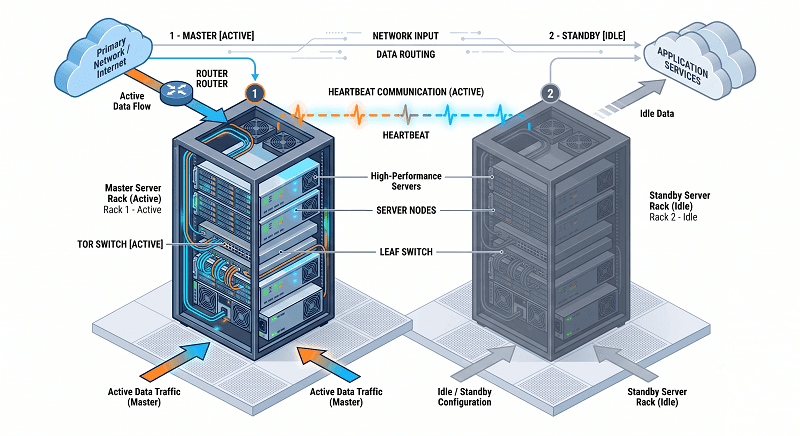
Mastership is decided by priority. The typical priority range is 1 (lowest) to 15 (highest). If two SMs have the same priority, the lower GUID usually wins. To avoid surprise failovers, set the preferred master to the highest priority and keep standby SMs at lower priorities.
A common OpenSM HA setup uses two instances on different hosts:
# Primary
opensm -B -g 0x248a070300a80a80 -p 15 -f /var/log/opensm-ib0.log
# Standby
opensm -B -g 0x248a070300a80a81 -p 1 -f /var/log/opensm-ib1.log
On a switch running MLNX-OS, the syntax looks like this:
switch (config) # ib smnode my-sm enable
switch (config) # ib smnode my-sm sm-priority 15
Failover is usually fast. Existing traffic flows continue because switch forwarding tables stay in place. New connections may pause briefly while the standby rediscovers the fabric. Some admins disable automatic failback to avoid routing churn.
For mission-critical fabrics, run the SM on a dedicated management host or a pair of hosts. Avoid running the only SM on a compute node that might reboot during a job.
Configuring OpenSM: A Practical Walkthrough
OpenSM configuration is not difficult, but the order of steps matters. Here is a practical workflow that works on RHEL, Rocky Linux, SUSE, and Ubuntu.
1. Install the package.
# RHEL / Rocky / Fedora
sudo dnf install opensm
# Ubuntu / Debian
sudo apt install opensm
2. Find your port GUIDs.
ibstat -p
The output lists one GUID per port. Bind OpenSM to the GUID that connects to the fabric you want to manage.
3. Set the GUID and priority. On RHEL-style systems, edit /etc/sysconfig/opensm or /etc/rdma/opensm. On SUSE, edit /etc/rdma/opensm so package upgrades do not overwrite your settings.
# /etc/rdma/opensm
guid 0x248a070300a80a80
priority 15
4. Enable and start the service.
sudo systemctl enable –now opensm
5. Verify the SM is master.
sminfo
ibnetdiscover
ibdiagnet
sminfo shows the master SM’s LID and priority. ibnetdiscover prints the topology. ibdiagnet runs a deeper health check.
6. Check the log. OpenSM logs to /var/log/opensm.log by default. Look for topology changes, heavy sweeps, or bind errors.
If you are managing multiple subnets or fabrics from one host, run separate OpenSM instances with distinct config files such as /etc/rdma/opensm.conf.1 and /etc/rdma/opensm.conf.2. Each instance needs its own GUID, priority, and log file.
InfiniBand Partitioning and PKEYs
Partition Keys (PKEYs) let you isolate traffic inside one InfiniBand fabric. They work like VLANs in Ethernet, but they live in the SM configuration rather than on switch ports. A PKEY is a 16-bit value. The lower 15 bits identify the partition; the most significant bit controls membership type.
0xffff means full membership in the default partition.
0x7fff means limited membership in the default partition.
Custom partitions usually use values between 0x0001 and 0x7fff.
A full member can talk to both full and limited members of the same partition. A limited member can only talk to full members. Every fabric must include the default partition so management traffic can flow.
A simple /etc/rdma/partitions.conf file might look like this:
Default=0x7fff, rate=16, mtu=5, scope=2, defmember=full:
ALL, ALL_SWITCHES=full;
compute=0x8001, ipoib, rate=16, mtu=5:
0x8541c9ffff81406d=full,
0x8540c9ffff8193b1=full,
ALL_SWITCHES=full;
storage=0x8002, ipoib, rate=16, mtu=5:
0x8540c8ffff92a0e5=full,
0x8540c9ffff914085=full,
ALL_SWITCHES=full;
After editing the partition file, restart OpenSM. On the host side, you create IPoIB interfaces on top of each PKEY if you need IP networking. The SM itself enforces which nodes belong to which partition.
InfiniBand Subnet Manager Troubleshooting Checklist
When an InfiniBand fabric misbehaves, the SM is often the first place to check. Here is a practical troubleshooting workflow.
Port stuck in Initializing. Check that an SM is actually running. systemctl status opensm should show active. If no SM is up, start one.
`sminfo` times out. The local node cannot reach the master SM. Verify the physical link with ibstat, confirm the SM is running on a reachable node, and check for firewall rules blocking MAD traffic.
“Another instance of OpenSM is already running.” You tried to start a second SM on the same port. Either stop the duplicate or configure it as a standby with a lower priority on a different GUID.
Frequent heavy sweeps. Heavy sweeps rediscover the entire fabric and reassign LIDs. They should only happen after major topology changes. If they run constantly, look for flapping links, unstable power, or rebooting nodes.
Link layer shows Ethernet. Some ConnectX adapters are VPI cards that can run in InfiniBand or Ethernet mode. If ibstat reports Link layer: Ethernet, reconfigure the port to InfiniBand mode.
Useful diagnostic commands include:
| Command | What it tells you |
| ibstat / ibstatus | Port state, LID, link rate, link layer |
| sminfo | Master SM identity and priority |
| ibhosts / ibnodes / ibnetdiscover | Fabric topology |
| ibroute | Switch forwarding tables |
| ibdiagnet | Comprehensive fabric health report |
| ibcheckerrors / ibclearerrors | Error counters and reset |
| dmesg | grep -iE “mellanox|infiniband” | Kernel driver messages |
How Physical-Layer Quality Affects SM Stability
The InfiniBand subnet manager reacts to whatever the physical layer tells it. A marginal cable or transceiver causes links to flap. Each flap triggers a heavy sweep, LID reassignment, and possibly a failover. A noisy physical layer can keep an SM so busy that the fabric never stabilizes.
We have seen this in the field. A customer swapped in third-party optics to save money. The links came up, but error counters climbed slowly. After a few hours, the SM logged repeated heavy sweeps. Ports cycled between Active and Initializing. The problem was not the SM — it was the physical layer feeding it bad news.
MSA-compatible cables and optics that have been tested for signal integrity reduce these problems. FiberMall tests its InfiniBand-compatible DAC, AOC, and optical transceiver products against major switch platforms before they ship. Stable physical links mean fewer heavy sweeps, faster failover, and a quieter SM log. For more on choosing the right physical layer, see our guide to InfiniBand cables.

If you are building or expanding an InfiniBand fabric, explore FiberMall’s InfiniBand-compatible cables and optics. The right physical layer does not replace a good SM, but it makes the SM’s job a lot easier.
InfiniBand Subnet Manager vs Ethernet
The easiest way to see why an InfiniBand subnet manager matters is to compare it to Ethernet. Ethernet relies on distributed protocols: STP, OSPF, BGP, LLDP, and ARP all run on the switches and hosts themselves. There is no single brain. If one switch reboots, neighboring switches converge around it.
InfiniBand takes the opposite approach. It centralizes control in the SM. That gives InfiniBand two big advantages. First, the fabric boots into a known, optimized state quickly because one entity computes every route. Second, advanced features such as adaptive routing and SHARP collectives become simpler to implement.
The trade-off is dependency. No SM means no fabric. An Ethernet switch can still forward local traffic if the control plane is down; an InfiniBand port cannot become Active without an SM. That is why redundancy matters so much for InfiniBand subnet manager high availability.
When to Upgrade from OpenSM to UFM
OpenSM can scale surprisingly far, but it has limits. At some point, manual CLI management and log parsing stop being fun. Here are the signs that you should consider NVIDIA UFM.
Fabric size. Once you pass roughly 50 nodes, or you run multi-tenant partitions, UFM’s dashboard and REST API save serious time.
AI/HPC production. Workloads that need adaptive routing, SHARP, or congestion control usually need UFM.
24/7 operations. If downtime costs money, UFM’s built-in HA, telemetry, and predictive analytics become worth the license.
Integration. UFM exposes REST APIs and integrates with job schedulers and orchestration tools more cleanly than raw OpenSM.
Licensing is typically per managed HCA, sold as a subscription with support. You will need a quote from NVIDIA or an authorized partner for exact pricing. For large-scale 800G NDR deployments, our 800G NDR InfiniBand deployment guide covers the physical and logical design decisions that affect SM choice.
Conclusion
The InfiniBand subnet manager is not optional. It is the control plane that turns a pile of switches and HCAs into a working fabric. Good InfiniBand fabric management starts with choosing the right SM, then keeping the physical layer stable. Whether you choose OpenSM, a switch-embedded SM, or NVIDIA UFM depends on your scale, budget, and feature needs.
Most small-to-medium clusters run happily on OpenSM or a switch SM. Larger AI/HPC fabrics usually need UFM for adaptive routing, telemetry, and easier operations. In every case, physical-layer quality matters. MSA-compatible, tested cables and optics keep links stable, which keeps the SM calm.
If you are planning an InfiniBand deployment in 2026, start with the SM choice. Then make sure the physical layer can support it. Explore FiberMall’s InfiniBand-compatible cables, optics, and transceivers for your fabric.
Related Products:
-
 NVIDIA MMA4Z00-NS400 Compatible 400G OSFP SR4 Flat Top PAM4 850nm 30m on OM3/50m on OM4 MTP/MPO-12 Multimode FEC Optical Transceiver Module
$400.00
NVIDIA MMA4Z00-NS400 Compatible 400G OSFP SR4 Flat Top PAM4 850nm 30m on OM3/50m on OM4 MTP/MPO-12 Multimode FEC Optical Transceiver Module
$400.00
-
NVIDIA MMS4X00-NS400 Compatible 400G OSFP DR4 Flat Top PAM4 1310nm MTP/MPO-12 500m SMF FEC Optical Transceiver Module
$450.00
-
NVIDIA MMA1Z00-NS400 Compatible 400G QSFP112 VR4 PAM4 850nm 50m MTP/MPO-12 OM4 FEC Optical Transceiver Module
$385.00
-
NVIDIA MMS1X00-NS400 Compatible 400G NDR QSFP112 DR4 PAM4 1310nm 500m MPO-12 with FEC Optical Transceiver Module
$500.00
-
NVIDIA MCP7Y70-H001 Compatible 1m (3ft) 400G Twin-port 2x200G OSFP to 4x100G QSFP56 Passive Breakout Direct Attach Copper Cable
$120.00
-
NVIDIA MCP7Y60-H001 Compatible 1m (3ft) 400G OSFP to 2x200G QSFP56 Passive Direct Attach Cable
$99.00
-
NVIDIA MFA7U10-H003 Compatible 3m (10ft) 400G OSFP to 2x200G QSFP56 twin port HDR Breakout Active Optical Cable
$750.00
-
NVIDIA MMA4Z00-NS Compatible 800GBASE 2 x SR4/SR8 OSFP PAM4 850nm 100m DOM Dual MPO-12 MMF Optical Transceiver Module
$550.00
-
NVIDIA MMA4Z00-NS-FLT Compatible 800GBASE 2 x SR4/SR8 OSFP RHS/Flat Top PAM4 850nm 100m DOM Dual MPO-12 MMF Optical Transceiver Module
$600.00
-
NVIDIA MMS4X00-NM Compatible 800GBASE 2 x DR4/DR8 OSFP IHS/Closed Finned Top PAM4 1310nm 500m DOM Dual MTP/MPO-12 SMF Optical Transceiver Module
$600.00
-
NVIDIA MMS4X00-NM-FLT Compatible 800GBASE 2 x DR4/DR8 OSFP Flat Top PAM4 1310nm 500m DOM Dual MTP/MPO-12 SMF Optical Transceiver Module
$650.00
-
NVIDIA MMS4X50-NM Compatible 800G 2x FR4 OSFP IHS/Closed Finned Top PAM4 1310nm 2km DOM Dual Duplex LC SMF InfiniBand NDR Optical Transceiver Module
$1000.00
-
NVIDIA MCP7Y00-N001 Compatible 1m (3ft) 800Gb Twin-port OSFP to 2x400G OSFP InfiniBand NDR Breakout Direct Attach Copper Cable
$160.00
-
NVIDIA MCA7J60-N004 Compatible 4m (13ft) 800G Twin-port OSFP to 2x400G OSFP InfiniBand NDR Breakout Active Copper Cable
$800.00
-
NVIDIA MMS4A00 (980-9IAH1-00XM00) Compatible 1.6T 2 x DR4/DR8 OSFP224 PAM4 1311nm 500m IHS/Finned Top Dual MPO-12 SMF Optical Transceiver Module
$1500.00
-
NVIDIA MMS4A50 Compatible 1.6T 2xFR4/FR8 OSFP224 PAM4 1310nm 2km IHS/Finned Top Dual Duplex LC SMF Optical Transceiver Module
$1800.00
-
NVIDIA MMS4A00-RHS Compatible 1.6T 2xDR4/DR8 OSFP224 PAM4 1311nm 500m RHS/Flat Top Dual MPO-12/APC InfiniBand XDR SMF Optical Transceiver Module
$2000.00
-
NVIDIA MCA7K20-X001 Compatible 1m (3ft) Twin-port 2x800Gb/s OSFP224 IHS/Finned Top to 4x400Gb/s OSFP224 RHS/Flat Top InfiniBand XDR Active Copper Splitter Cable
$2059.00