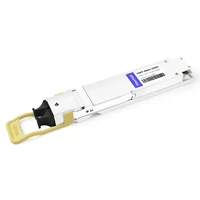
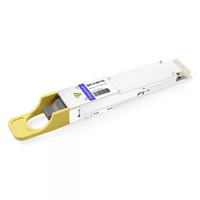
Alex, a hardware designer in Austin, watched his first 40G board pass every SI simulation. Then lane 3 refused to train. The schematic matched the datasheet. The layout matched the schematic. The problem? He had read the qsfp pinout msa sff-8436 from the module’s point of view, but his PCB connector was labeled from the host side. One inverted pair swapped places. Two days of debugging could have been avoided with a clear, host-centric pinout reference.
If you’re laying out a QSFP+ or QSFP28 interface, you’ve probably stared at the same 38-pin edge connector and wondered which side is “up.” This guide gives you a practical, board-designer view of the qsfp pinout msa sff-8436, the signals that matter, and the layout mistakes that turn a good schematic into a delayed prototype. For the bigger picture on cages and connectors, see FiberMall’s complete guide to QSFP cages.
Need a FiberMall QSFP module that matches your pinout? Explore our optical transceiver solutions or contact our networking experts for a compatibility review.
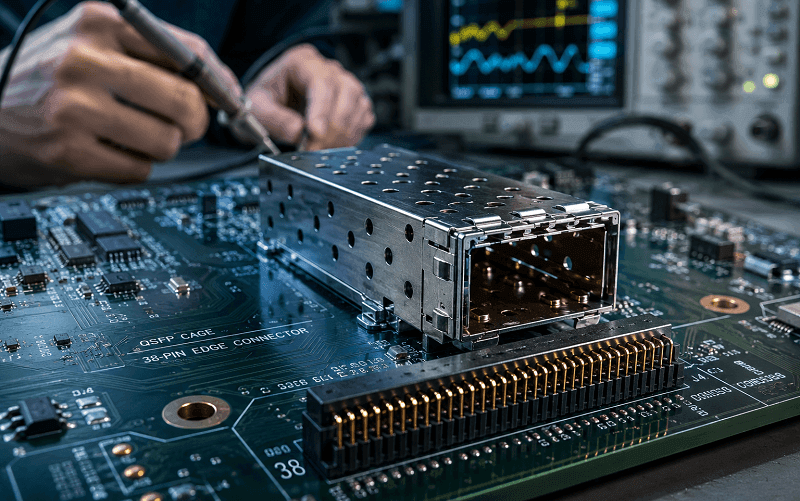
What the QSFP Pinout MSA SFF-8436 Actually Defines
The original qsfp msa specification defined the mechanical envelope: the size of the module, the cage, and the basic connector position. SFF-8436, maintained by the SFF Committee, turned that envelope into a real electrical specification. It describes the 38-pin edge connector, the high-speed lane mapping, the 3.3 V power rails, the I²C management interface, and the control/status signals used by 40G QSFP+ modules. For a deeper look at how the mechanical pieces fit together, see FiberMall’s complete guide to QSFP connectors, cages, and ports.
The latest widely referenced revision is SFF-8436 Rev 4.9. It also defines the memory map the host reads over I²C to identify the module, check digital diagnostics, and control certain functions. Later standards such as SFF-8665 and SFF-8661 reused the same 38-pin footprint for QSFP28, which is why a 100G QSFP28 module fits into the same cage and connector as a 40G QSFP+ module.
Key point: SFF-8436 is not just a pinout drawing. It’s the contract between the module and the host. Violate the pinout and the module may still slide in. It just won’t link.
The Full QSFP Pinout MSA SFF-8436 38-Pin Table
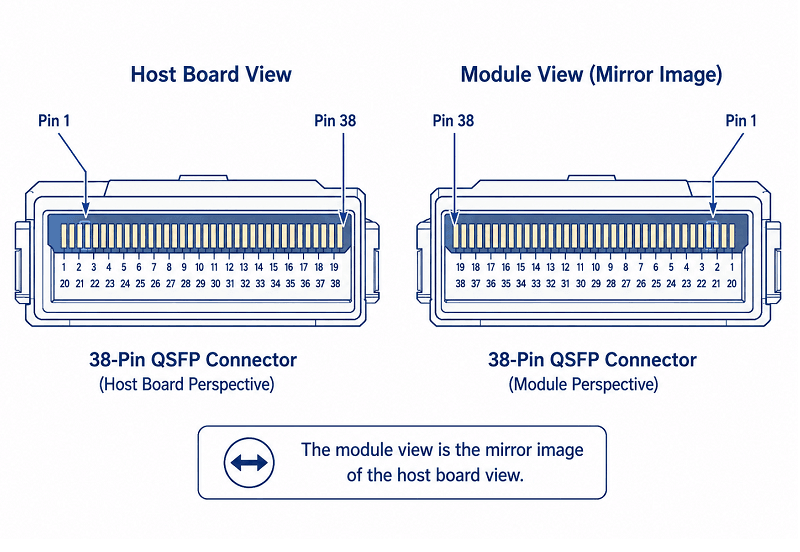
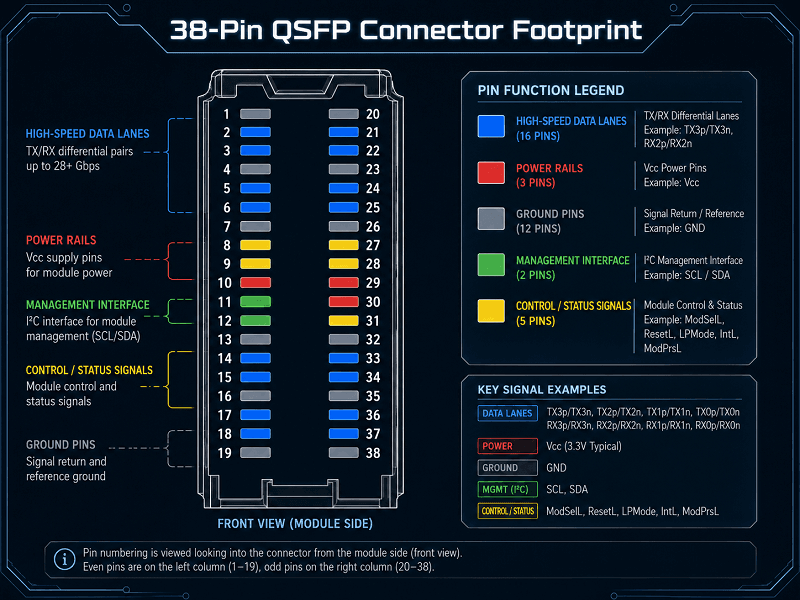
The table below follows the qsfp pinout msa sff-8436 host-board view, looking into the connector from the front panel toward the PCB. The module-side view is a mirror image, which is exactly where most pinout mistakes start.
| Pin | Signal | Type | Description |
| 1 | GND | Power | Ground |
| 2 | Tx2n | CML-I | TX lane 2 negative |
| 3 | Tx2p | CML-I | TX lane 2 positive |
| 4 | GND | Power | Ground |
| 5 | Tx4n | CML-I | TX lane 4 negative |
| 6 | Tx4p | CML-I | TX lane 4 positive |
| 7 | GND | Power | Ground |
| 8 | ModSelL | LVTTL-I | Module select, active low |
| 9 | ResetL | LVTTL-I | Module reset, active low |
| 10 | VccRx | Power | +3.3 V receiver supply |
| 11 | SCL | LVCMOS-I/O | I²C serial clock |
| 12 | SDA | LVCMOS-I/O | I²C serial data |
| 13 | GND | Power | Ground |
| 14 | Rx3p | CML-O | RX lane 3 positive |
| 15 | Rx3n | CML-O | RX lane 3 negative |
| 16 | GND | Power | Ground |
| 17 | Rx1p | CML-O | RX lane 1 positive |
| 18 | Rx1n | CML-O | RX lane 1 negative |
| 19 | GND | Power | Ground |
| 20 | GND | Power | Ground |
| 21 | Rx2n | CML-O | RX lane 2 negative |
| 22 | Rx2p | CML-O | RX lane 2 positive |
| 23 | GND | Power | Ground |
| 24 | Rx4n | CML-O | RX lane 4 negative |
| 25 | Rx4p | CML-O | RX lane 4 positive |
| 26 | GND | Power | Ground |
| 27 | ModPrsL | LVTTL-O | Module present, active low |
| 28 | IntL | LVTTL-O | Interrupt, active low |
| 29 | VccTx | Power | +3.3 V transmitter supply |
| 30 | Vcc1 | Power | +3.3 V power |
| 31 | LPMode | LVTTL-I | Low power mode |
| 32 | GND | Power | Ground |
| 33 | Tx3p | CML-I | TX lane 3 positive |
| 34 | Tx3n | CML-I | TX lane 3 negative |
| 35 | GND | Power | Ground |
| 36 | Tx1p | CML-I | TX lane 1 positive |
| 37 | Tx1n | CML-I | TX lane 1 negative |
| 38 | GND | Power | Ground |
Pin numbering in this qsfp 38 pin pinout assumes you are looking at the host connector from the front of the chassis, with the module insertion slot facing you. The module’s edge card is the mirror. If your datasheet labels pins from the module side, flip the table horizontally.
Signal Groups Breakdown
A qsfp connector pinout can look crowded, but the 38 pins of the qsfp pinout msa sff-8436 fall into five clean groups. Once you see the pattern, the layout becomes straightforward. For more on the connector mechanics behind these signals, see this QSFP connector deep dive.
High-speed data lanes. Pins 2–7, 33–37 carry four TX differential pairs. Pins 14–18, 21–25 carry four RX differential pairs. Each pair runs at 10 Gbps NRZ in QSFP+ and 25 Gbps NRZ in QSFP28. The pairs are interleaved with ground pins to maintain impedance and reduce crosstalk.
Power rails. VccRx, VccTx, and Vcc1 are all +3.3 V. Most host designs tie these rails together at the connector. A QSFP+ module can draw up to about 3.5 W; QSFP28 modules commonly draw 3.5–5 W, with some high-power variants drawing more. Size your power delivery and decoupling accordingly.
Ground pins. Roughly one-third of the connector is dedicated ground. These pins are not just for power return; they provide the reference plane for the high-speed differential pairs and shielding for the cage. Never leave ground pins floating or route them through narrow necks.
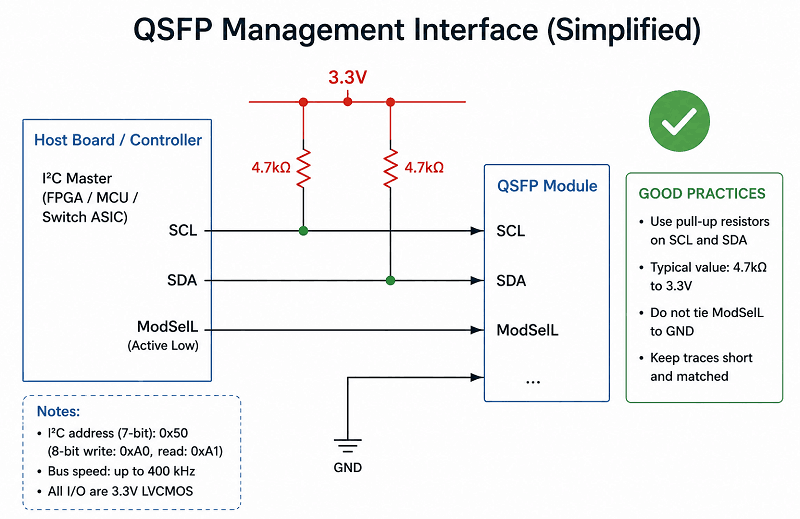
Management interface. SCL and SDA form the I²C bus. The host uses this bus to read the module EEPROM, access the SFF-8436 memory map, and poll digital diagnostics. Both lines need pull-up resistors on the host board, typically 4.7 kΩ to 10 kΩ to 3.3 V.
Control/status signals. ModSelL, ResetL, LPMode, ModPrsL, and IntL handle selection, reset, power state, presence detection, and fault reporting. These are active-low, LVTTL-level signals. Get the polarity wrong and your firmware will never see the module.
Control and Status Signals in Action
Each control pin has a specific job during enumeration and operation. Understanding them keeps your firmware from polling a module that thinks it isn’t selected, or ignoring an interrupt that says the laser is faulting.
ModSelL (pin 8, active low). When the host pulls this line low, the module responds on the shared I²C bus. With multiple QSFP ports sharing SCL and SDA, ModSelL acts like a chip-select. The host must drive each port’s ModSelL low individually before reading that module’s memory. Leave all ModSelL lines low at once and you’ll get bus collisions.
ResetL (pin 9, active low). Asserting ResetL returns the module management interface to its power-on state. It doesn’t necessarily cut off the high-speed data path, but it resets the memory-map state machine. Most hosts assert ResetL briefly at power-up, then release it before enumeration.
LPMode (pin 31, active high). When the host drives LPMode high, the module enters a low-power state. This is useful for power sequencing and hot-plug events. During normal operation the host holds LPMode low so the module can run at full power. Some older datasheets label pin 9 as a combined LPMode/ResetL function; always verify against your specific module vendor.
ModPrsL (pin 27, active low). The module pulls this pin low through a resistor to indicate it is physically inserted. Host firmware typically monitors ModPrsL to trigger enumeration. A missing or weak pull-up on the host side can make insertion look intermittent.
IntL (pin 28, active low). The module asserts IntL when it needs the host’s attention, for example after a temperature alarm, TX fault, or RX loss-of-signal condition. The host reads the interrupt flags over I²C to determine the cause.
Maria, a firmware engineer in Berlin, once debugged a board where two QSFP ports never appeared simultaneously. Both ModSelL lines were tied low in the schematic. Each module answered every I²C transaction. The checksums failed, the EEPROM reads looked corrupted, and the link never came up. Adding a one-hot ModSelL sequence in the device tree fixed it in an hour. The qsfp pinout msa sff-8436 had been right; the host implementation had not.
The Management Interface and Memory Map
SCL and SDA are not just for reading a serial number. They are part of the qsfp pinout msa sff-8436 management interface and give the host access to the module’s full identity and health data through the SFF-8436 memory map.
The memory map is split into lower and upper address space. The lower 128 bytes contain static information: identifier, connector type, transceiver type, encoding, nominal bit rate, and vendor name. The upper address space, when supported, contains thresholds and real-time digital diagnostic monitoring values such as temperature, supply voltage, TX bias current, TX optical power, and RX optical power.
The host reads the memory map using a two-wire serial interface that is compatible with I²C. The module’s device address is typically 0xA0 for the lower memory page and 0xA2 for the upper diagnostic page, though some vendors implement additional pages. Because multiple modules can share the same bus, ModSelL must be asserted for exactly one module before any read or write.
For the complete register definitions, refer to the SFF-8436 specification PDF. The original QSFP MSA PDF is also useful for historical context and mechanical details.
Pinout in Layout and Bring-Up
A good schematic is only half the battle. The PCB layout determines whether the qsfp+ pinout and the full qsfp pinout msa sff-8436 actually work at 10 Gbps or 25 Gbps per lane.
Host-side vs. module-side numbering. This is the most common mistake. The connector footprint on your PCB uses host-side numbering. The module datasheet may show module-side numbering. The two are mirror images. When in doubt, count from the keying feature and confirm which side of the connector the datasheet is describing.
Lane polarity. SFF-8436 defines the positive and negative pins for each differential pair, but board-level routing can still swap p and n if you are not careful. Most SerDes blocks support polarity inversion in firmware, but it is better to get it right in copper. Label every differential pair on the silkscreen.
Power decoupling. Place 0.1 µF and 1 µF ceramic capacitors close to each Vcc pin. Use multiple vias to the ground plane. The 3.3 V rail can see current spikes during hot-plug; local capacitance keeps the rail stable.
I²C pull-ups. Use 4.7 kΩ to 10 kΩ pull-ups on SCL and SDA. With many ports on one bus, the total pull-up current matters. Some designs use a separate I²C buffer or level shifter for each port to keep rise times within spec.
Shared bus isolation. If you route SCL and SDA to multiple connectors, remember that only one ModSelL can be low at a time. Some hosts add a small series resistor near each connector to dampen reflections on the shared lines.
Alex’s board needed a mirror-flipped connector footprint. Once he redid the swap, lane 3 trained immediately. He now adds a host-side pin-1 indicator on every QSFP footprint before routing.
QSFP+ vs. QSFP28 vs. QSFP-DD Pinout Comparison
The 38-pin footprint is one of the best features of the QSFP family. Because the qsfp pinout msa sff-8436 defines the same connector for QSFP+ and QSFP28, it creates a migration path from 40G to 100G without changing the connector or cage. This backward compatibility also makes QSFP breakout cables a popular way to split a single 40G or 100G port into four lower-speed links. QSFP-DD changed the rules by doubling the lane count.
| Feature | QSFP+ | QSFP28 | QSFP-DD |
| Specification | SFF-8436 | SFF-8665 | SFF-TA-1002 / QSFP-DD MSA |
| Total pins | 38 | 38 | 76 |
| Lanes | 4 TX + 4 RX | 4 TX + 4 RX | 8 TX + 8 RX |
| Per-lane rate | 10 Gbps NRZ | 25 Gbps NRZ | 25/50/100 Gbps PAM4 |
| Aggregate | 40 Gbps | 100 Gbps | 200/400/800 Gbps |
| Power rail | +3.3 V | +3.3 V | +3.3 V |
| Backward compatibility | N/A | Fits QSFP+/QSFP28 cage | Fits QSFP+/QSFP28/QSFP56 electrically |
QSFP28 keeps the same pinout as QSFP+ but runs the lanes faster. The same host connector can accept either module, assuming the SerDes supports the target rate. QSFP-DD adds a second row of contacts below the first, so it needs a different connector and cage even though the face dimensions look similar.
For a broader comparison of these form factors, read FiberMall’s QSFP-DD vs QSFP28 vs OSFP comparison.
Common Pinout Mistakes to Avoid
Even experienced designers slip on the same details when working from the sff-8436 pinout. Here are the errors we see most often in the field.
| Mistake | Why It Happens | The Fix |
| Using module-side pinout on the host footprint | Datasheets are not always clear about viewing direction | Add a host-side pin-1 marker and cross-check with SFF-8436 |
| Swapping Tx/Rx lane polarity | Auto-routing or mirrored footprint | Verify p/n pairs against the table and enable polarity inversion only as backup |
| Missing pull-ups on SCL/SDA | Assumption the module provides them | Place 4.7 kΩ–10 kΩ pull-ups on the host board |
| All ModSelL lines low at once | Simpler firmware | Use one-hot ModSelL sequencing during I²C access |
| Undersized 3.3 V rail | Forgetting inrush and high-power modules | Size power delivery for worst-case module draw plus margin |
| Floating ground pins | Connector footprint error | Tie every ground pin solidly to the ground plane |
FAQ
What’s the difference between the QSFP MSA and SFF-8436?
The qsfp msa specification defined the original mechanical form factor and basic electrical interface. SFF-8436 is the SFF Committee specification that standardized the 38-pin electrical pinout, management interface, and memory map for 40G QSFP+ modules.
Does QSFP28 use the same pinout as QSFP+?
Yes. QSFP28 reuses the 38-pin qsfp pinout msa sff-8436 footprint defined in SFF-8665. The connector and cage are the same; the per-lane data rate increases from 10 Gbps to 25 Gbps.
What voltage do QSFP modules use?
QSFP/QSFP+/QSFP28 modules operate from a single +3.3 V supply delivered on VccTx, VccRx, and Vcc1.
How does the host know a QSFP module is inserted?
The module pulls ModPrsL (pin 27) low. The host detects this through a pull-up resistor and begins enumeration over the I²C bus.
What is the I²C address of a QSFP module?
The lower memory page is typically at address 0xA0 and the upper diagnostic page at 0xA2. ModSelL must be asserted for the specific module before accessing it on a shared bus.
Can a QSFP-DD module fit in a QSFP+ cage?
No. QSFP-DD uses a 76-pin connector with a second row of contacts. It requires a QSFP-DD cage and connector, although it can electrically support legacy QSFP modules in the same port.
Conclusion
The qsfp pinout msa sff-8436 is not complicated once you see it as five signal groups: four TX lanes, four RX lanes, 3.3 V power, I²C management, and a handful of control/status pins. The details that trip people up are almost always mechanical: host-side versus module-side numbering, lane polarity, and shared-bus ModSelL handling.
Get the footprint right. Add solid pull-ups. Sequence the ModSelL lines. Decouple the 3.3 V rail. Do those four things and your QSFP+ or QSFP28 interface will come up cleanly.
If you’re sourcing MSA-compliant QSFP+ or QSFP28 modules, explore FiberMall’s optical transceiver and cable solutions or contact our networking experts for a pinout compatibility review before your next layout.
Related Products:
-
 QSFP28-100G-SR4 100G QSFP28 SR4 850nm 100m MTP/MPO MMF DDM Transceiver Module
$40.00
QSFP28-100G-SR4 100G QSFP28 SR4 850nm 100m MTP/MPO MMF DDM Transceiver Module
$40.00
-
QSFP28-112G-SR4 112G OTU4 QSFP28 SR4 850nm 100m MTP/MPO MMF DDM Transceiver Module
$50.00
-
H3C QSFP-100G-eSR4-MM850 Compatible 100G QSFP28 eSR4 850nm 200m on OM3/300m on OM4 MTP/MPO MMF DDM Transceiver Module
$75.00
-
QSFP28-100G-IR4 100G QSFP28 IR4 1310nm (CWDM4) 2km LC SMF DDM Transceiver Module
$110.00
-
FiberMall QSFP112-400G-VR4 Compatible 400G QSFP112 VR4 PAM4 850nm 50m MTP/MPO-12 OM4 FEC Optical Transceiver Module
$385.00
-
QSFP112-400G-LR4 400G QSFP112 LR4 PAM4 CWDM 10km Duplex LC SMF FEC Optical Transceiver Module
$1000.00
-
QSFP112-400G-FR4 400G QSFP112 FR4 PAM4 CWDM 2km Duplex LC SMF FEC Optical Transceiver Module
$600.00
-
QSFP112-400G-FR1 4x100G QSFP112 FR1 PAM4 1310nm 2km MTP/MPO-12 SMF FEC Optical Transceiver Module
$800.00
-
QSFP112-400G-DR4 400G QSFP112 DR4 PAM4 1310nm 500m MTP/MPO-12 with KP4 FEC Optical Transceiver Module
$500.00
-
QSFP112-400G-SR4 400G QSFP112 SR4 PAM4 850nm 100m MTP/MPO-12 OM3 FEC Optical Transceiver Module
$400.00
-
OSFP-800G-DR8D-FLT Compatible 800GBASE 2 x DR4/DR8 OSFP Flat Top PAM4 1310nm 500m DOM Dual MTP/MPO-12 SMF Optical Transceiver Module
$650.00
-
OSFP-800G-SR8D-FLT Compatible 800G 2 x SR4/SR8 OSFP RHS/Flat Top PAM4 850nm 100m DOM Dual MPO-12 MMF Optical Transceiver Module
$600.00
-
OSFP-800G-SR8D Compatible 800GBASE 2 x SR4/SR8 OSFP PAM4 850nm 100m DOM Dual MPO-12 MMF Optical Transceiver Module
$550.00
-
OSFP-800G-2FR4L 800G 2 x FR4 OSFP IHS/Closed Finned Top PAM4 1310nm 2km DOM Dual Duplex LC SMF InfiniBand NDR Optical Transceiver Module
$1000.00
-
OSFP-800G-DR8D Compatible 800GBASE 2 x DR4/DR8 OSFP PAM4 1310nm 500m DOM Dual MTP/MPO-12 SMF Optical Transceiver Module
$550.00
-
QSFP-DD-800G-DR8 800G-DR8 QSFP-DD PAM4 1310nm 500m DOM MTP/MPO-16 SMF Optical Transceiver Module
$1000.00