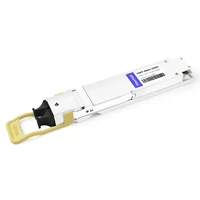
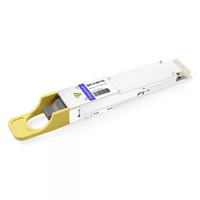
David, a hardware designer in San Jose, once watched a 400G switch prototype miss its build date by two weeks. The BOM said “QSFP port, qty 32.”
Procurement ordered cages. The PCB team ordered connectors. Nobody ordered the right heatsinks.
That’s when David learned that a qsfp connector cage port is not one part. It’s three.
If you’re designing switches, NICs, or AI fabric hardware, you’ve probably seen the same confusion. “QSFP port” gets used for the cage, the connector, and the functional interface. Mix them up and you’ll get mechanical fit issues, thermal throttling, or a module that physically slides in but never links up. This guide will show you how each piece works, which form factors share cages, and how to specify the right assembly for 400G and 800G designs.
In the sections below, I’ll break the QSFP receptacle into its real components. I’ll compare QSFP+, QSFP28, QSFP56, QSFP112, QSFP-DD, and OSFP requirements, and give you a compatibility matrix you can actually use. If you want the broader foundation first, see FiberMall’s complete guide to QSFP cages.
At a glance:
- A QSFP cage/connector/port assembly combines three parts: the metal cage, the electrical connector, and the ASIC-driven functional port.
- QSFP-DD cages accept legacy QSFP+, QSFP28, and QSFP56 modules; QSFP112 and OSFP need their own cages or specific ASIC support.
- Always match the cage, connector, heatsink, and module power envelope to the form factor you’re using.
What Is a QSFP Connector Cage Port?
A complete QSFP receptacle is the front-panel assembly that lets a pluggable module mate with a switch or NIC. But the term hides three separate components, and each one has its own part number and specification.
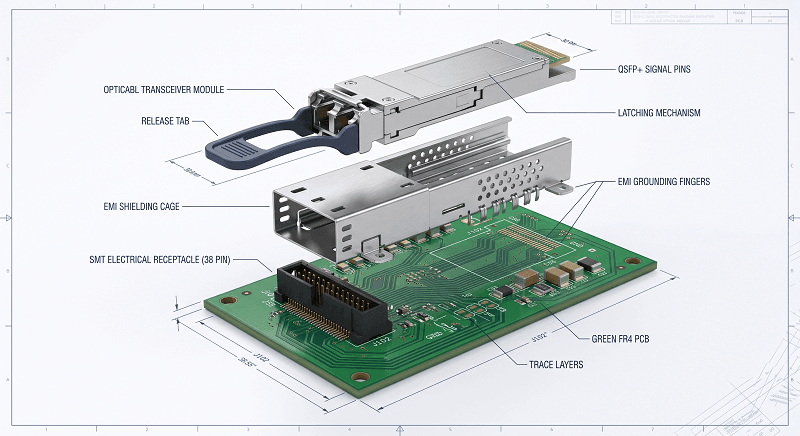
QSFP Cage vs Port vs Connector
The cage is the metal shell that guides and retains the module. It provides EMI shielding, a grounding path, and a mounting point for the heatsink. Without the cage, the module would wobble, radiate noise, and overheat.
The connector is the electrical receptacle behind the cage. It contains the signal contacts that mate with the module’s edge card. A standard QSFP connector has 38 positions at 0.8 mm pitch. A QSFP-DD connector stacks two rows to reach 76 contacts.
The port is the functional whole: cage + connector + ASIC lanes + firmware support. When a datasheet says “32× QSFP ports,” it means 32 complete assemblies that can accept pluggable modules at a specific speed.
Think of it like a USB socket on a laptop. The metal frame around the opening is the cage. The plastic tongue with pins is the connector. The USB interface you actually use is the port. They work together, but they aren’t interchangeable.
QSFP Family Form Factors and Cage/Port Requirements
Not every QSFP port is built the same. The form factor determines the cage depth, connector pin count, power envelope, and whether older modules fit. Choose the wrong one and you’ll find a module that slides in but can’t negotiate a link. Same name. Different part numbers.
QSFP+ (40G)
QSFP+ was the first widely adopted quad-lane form factor. It carries four 10G NRZ lanes for 40G total. The cage is about 73 mm long and uses a 38-position connector. QSFP+ cages are still common on legacy aggregation switches and storage controllers.
QSFP28 (100G)
QSFP28 bumps the per-lane rate to 25G NRZ for 100G aggregate. The external cage dimensions are identical to QSFP+, so the same port accepts both. This backward compatibility is why QSFP28 became the dominant 100G form factor in data centers.
QSFP56 (200G)
QSFP56 keeps the same 4-lane cage but moves to 50G PAM4 signaling. The module draws more power than QSFP28, so heatsink selection matters more. Not all QSFP28-rated cages can handle repeated QSFP56 thermal cycles without degradation.
QSFP112 (400G)
QSFP112 is a 4-lane form factor running 112G PAM4 per lane for 400G total. It uses the same face dimensions as QSFP28 and QSFP56, but the electrical signaling is much more demanding. QSFP112 is popular in NVIDIA AI environments with ConnectX-7 adapters. NVIDIA’s connectors and cages documentation details the physical and electrical requirements for these high-speed ports.
For more on how QSFP112 differs from QSFP-DD, read FiberMall’s QSFP-DD vs QSFP112 comparison.
QSFP-DD / QSFP-DD800 (400G / 800G)
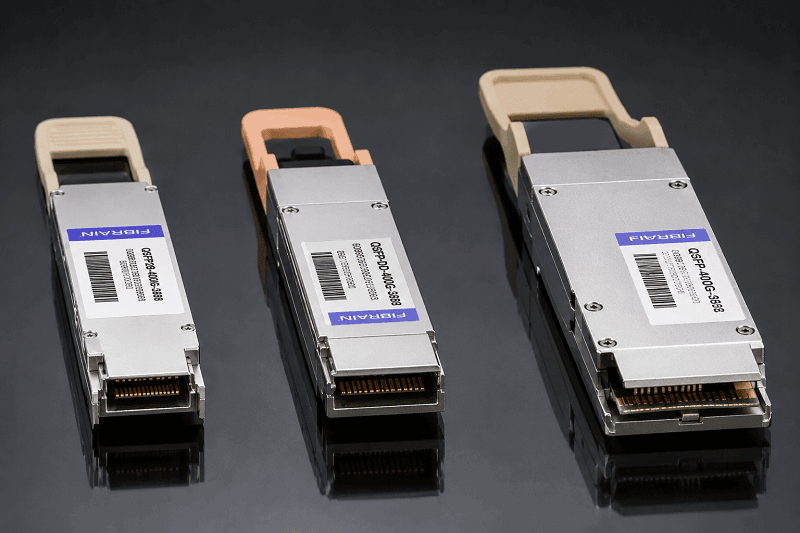
QSFP-DD doubles the lane count to eight while keeping the same face width as legacy QSFP modules. The qsfp-dd connector cage is longer, roughly 89.4 mm versus 73.1 mm for legacy QSFP, to accommodate the extra row of contacts. The Molex QSFP-DD connector system defines the 76-contact stacked receptacle used in these cages. QSFP-DD is backward compatible with QSFP+, QSFP28, and QSFP56 modules. QSFP-DD800 extends the same form factor to eight 100G PAM4 lanes for 800G.
OSFP (400G / 800G / 1.6T)
OSFP is a different animal. The osfp connector cage is wider than the QSFP family, roughly 22.58 mm versus 18.35 mm for QSFP-DD, and deeper at about 107.8 mm. OSFP has its own 60-pin connector and built-in thermal management. It isn’t backward compatible with any QSFP module.
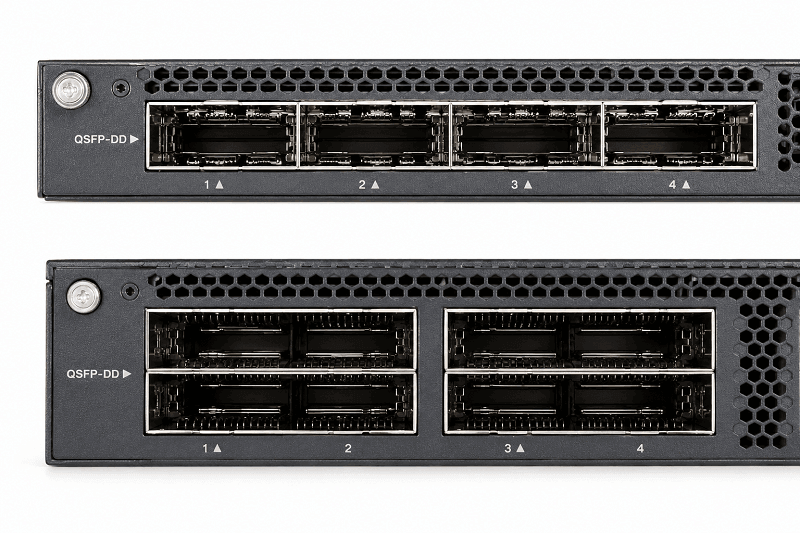
For a direct size and compatibility comparison, see FiberMall’s QSFP-DD vs QSFP28 vs OSFP comparison.
| Form Factor | Lanes | Per-Lane Rate | Total Rate | Cage Length | Backward Compatible |
| QSFP+ | 4 | 10G NRZ | 40G | ~73.1 mm | N/A |
| QSFP28 | 4 | 25G NRZ | 100G | ~73.1 mm | QSFP+ |
| QSFP56 | 4 | 50G PAM4 | 200G | ~73.1 mm | QSFP+, QSFP28 |
| QSFP112 | 4 | 112G PAM4 | 400G | ~73.1 mm | QSFP+, QSFP28, QSFP56 (ASIC-dependent) |
| QSFP-DD | 8 | 50G PAM4 | 400G | ~89.4 mm | QSFP+, QSFP28, QSFP56 (not QSFP112 electrically) |
| QSFP-DD800 | 8 | 100G PAM4 | 800G | ~89.4 mm | QSFP-DD, QSFP28, QSFP56 |
| OSFP | 8 | 50G/100G PAM4 | 400G/800G | ~107.8 mm | None |
Common QSFP Connector Cage Port Configurations and Port Types
Cages come in several port layouts. The right one depends on how much faceplate density you need and how the switch handles airflow. These qsfp port types determine both mechanical density and thermal strategy.
Single-Port and Ganged Layouts
- 1×1: One cage, one port. Common on NICs and line cards.
- 1×2 and 1×4: Multiple cages in a single row. Used when switches need horizontal port density without stacking.
- 1×6: High-density single-row layout, often on compact 1U switches.
Stacked Layouts
- 2×1: Two cages stacked vertically. Good for belly-to-belly PCB designs.
- 2×2 and 2×6: Even higher density, common on spine switches where every millimeter of faceplate matters.
Heatsink Options
Heatsink height affects how much power the cage can handle. Common heights include 4.2 mm, 6.5 mm, and 13.5 mm. A QSFP-DD module at 12–15 W needs more heatsink mass than a QSFP28 module at 3.5 W. OSFP modules, which can exceed 20–25 W, typically rely on integrated or larger heatsinks.
Sarah, a data center engineer in Frankfurt, learned this the hard way. Her team populated QSFP-DD cages with low-profile 4.2 mm heatsinks to save vertical space. When 400G modules hit 14 W under load, the switches throttled. They had to redesign the faceplate for 13.5 mm heatsinks and rerun thermal validation.
Compatibility Matrix: Which Module Fits Which Cage/Port
This is where most design mistakes happen. Physical fit does not mean electrical compatibility.
| Port / Cage Type | QSFP+ Module | QSFP28 Module | QSFP56 Module | QSFP112 Module | QSFP-DD Module | OSFP Module |
| QSFP+ / QSFP28 / QSFP56 cage | Yes | Yes | Yes | Physical only | No | No |
| QSFP112 cage | Physical only | Physical only | Physical only | Yes | No | No |
| QSFP-DD cage | Yes | Yes | Yes | Physical only / ASIC-dependent | Yes | No |
| OSFP cage | No | No | No | No | No | Yes |
Key Compatibility Notes
A QSFP28 module will link up in a QSFP-DD cage because the ASIC can drive the four lanes the module expects. A QSFP-DD module will not fit in a legacy QSFP28 cage because the extra row of contacts hits the back of the shorter cage.
QSFP112 in a QSFP-DD cage is the trickiest case. The module physically inserts because the face dimensions match. But QSFP112 uses 4×112G PAM4, while most QSFP-DD ports are wired for 8×50G PAM4. Link-up only works if the switch ASIC and firmware explicitly support 4×100G PAM4 mode.
OSFP has no backward compatibility. Its wider body and different connector pinout mean it only mates with OSFP cages. Some 800G switches use OSFP because the larger envelope handles higher power and future 1.6T modules.
If you’re deciding between form factors for an AI cluster, FiberMall’s QSFP breakout cable guide for AI data centers covers how port choices affect fan-out and migration.
How to Choose the Right QSFP Connector Cage Port
Selecting the right QSFP port assembly comes down to five practical decisions. Get any of them wrong and the module either won’t fit or won’t run reliably.
1. Match the Form Factor to the ASIC Lane Plan
Start with the switch or NIC ASIC, not the cage catalog. The ASIC determines how many lanes are available and at what speed. An 8-lane 400G ASIC points to QSFP-DD. A 4-lane 400G ASIC points to QSFP112. An 800G ASIC could use QSFP-DD800 or OSFP depending on thermal and density targets.
2. Select Cage Density for the Faceplate
Once you know the form factor, pick the cage layout. A 32-port 1U switch needs high-density 1×2 or 2×1 cages. A 4-port NIC can use simple 1×1 cages. Remember that denser layouts reduce airflow per port, which pushes you toward lower-power modules or better heatsinks.
3. Specify Connector Termination
Connectors terminate to the PCB with either press-fit or solder tails. Press-fit is faster to assemble and easier to rework. Solder termination can offer slightly better signal integrity for the highest speeds. Most 400G/800G designs use press-fit for manufacturing efficiency.
4. Size the Heatsink for Module Power
Check the maximum power of the modules you plan to support. A QSFP-DD port rated for 15 W needs a different heatsink than one rated for 8 W. OSFP ports often need integrated heatsinks or active airflow. Undersizing here creates thermal throttling and field failures.
5. Plan EMI Grounding and Airflow
The cage’s EMI fingers must make solid contact with the module shell. Airflow needs a clear path from the heatsink through the cage and out of the chassis. Skip either detail and you’ll see excessive bit errors or hot modules.
Marcus, a procurement manager in Singapore, once saved $0.40 per cage by switching vendors. The replacement cages had shorter EMI fingers. Six months later, field returns spiked because 400G modules lost link under heavy traffic. The “savings” cost more than the original parts.
Installation and Design Considerations
Even the right QSFP port assembly can fail if the PCB layout or assembly process is wrong.
PCB Keep-Out Zones
Cages need clear space around the opening for the EMI spring fingers and heatsink retention clips. The QSFP-DD MSA defines specific keep-out zones for the cage and connector. Ignore them and the cage won’t seat flush, or the module shell won’t ground properly.
Press-Fit Insertion Force
A 1×1 QSFP cage needs about 780 N of insertion force. A 2×1 QSFP-DD stacked assembly can need 3,000 N. Make sure your PCB thickness and press equipment can handle the load without damaging the board.
Belly-to-Belly Mounting
Some switches mount cages on both sides of the PCB facing each other. The minimum belly-to-belly distance for 1×N cages is typically 2.35 mm. Less than that and the heatsinks collide.
Thermal Interface Material
High-power cages use thermal interface material between the cage and the module shell to improve heat transfer. The TIM thickness and compressibility matter. Too thick, and heat transfer suffers. Too thin, and the module won’t insert smoothly.
Light Pipes and LEDs
Many cages include light-pipe openings for port-status LEDs. If your design uses them, verify the light-pipe alignment with the connector and PCB placement. Misaligned light pipes make front-panel diagnostics useless.
Common Mistakes to Avoid
Even experienced designers slip up on QSFP port details. Here are the errors we see most often in the field.
| Mistake | Why It Happens | The Fix |
| Ordering “QSFP port” without specifying cage, connector, and heatsink | Procurement treats it as one SKU | Split the BOM into cage, connector, heatsink, and light-pipe sub-items |
| Using a QSFP28 cage for QSFP56 modules | Same face dimensions hide higher power | Verify the cage and heatsink are rated for the module’s thermal load |
| Assuming QSFP112 works in any QSFP-DD port | Physical fit looks correct | Confirm ASIC support for 4×100G PAM4 before qualifying |
| Skipping belly-to-belly clearance checks | Focus on faceplate density | Leave at least 2.35 mm between opposing cages for heatsinks |
| Forgetting EMI finger contact verification | Cage vendor swap to save cost | Test grounding continuity under vibration and thermal cycling |
FAQ
What’s the difference between a QSFP cage, connector, and port?
The cage is the metal housing. The connector is the electrical socket behind it. The port is the complete functional interface, including the ASIC lanes that drive the connector.
Can I plug a QSFP28 module into a QSFP-DD cage?
Yes. QSFP-DD cages are backward compatible with QSFP+, QSFP28, and QSFP56 modules. The module will use four of the eight available lanes.
Will a QSFP112 module work in a QSFP-DD port?
It depends on the ASIC. QSFP112 physically fits in a QSFP-DD cage, but 400G link-up only works if the host supports 4×100G PAM4 signaling. Most QSFP-DD switches do not.
What’s the difference between 1×4 and 2×2 cage layouts?
A 1×4 layout places four cages in one horizontal row. A 2×2 layout stacks two cages vertically and places two side by side. Stacked layouts save faceplate width but need more vertical clearance.
How much power can a standard QSFP cage dissipate?
It depends on the heatsink. A basic QSFP28 cage with a small heatsink handles 3.5–5 W. A QSFP-DD cage with a 13.5 mm heatsink can dissipate 12–15 W. OSFP cages are designed for 20–25 W or more.
Are OSFP and QSFP-DD cages interchangeable?
No. OSFP modules are wider and use a different connector. They cannot fit in QSFP-DD cages, and QSFP-DD modules cannot fit in OSFP cages.
Conclusion
A qsfp connector cage port is three things working together. The cage gives you mechanical retention and EMI shielding. The connector gives you the electrical interface. The port is the complete system, and its capabilities are set by the ASIC, firmware, and thermal design behind it.
Getting it right means specifying each component for the form factor you actually need. QSFP-DD protects your QSFP28 investment. QSFP112 fits the same cage but needs ASIC support. OSFP gives you more thermal headroom but locks you out of the QSFP ecosystem.
Before you finalize your next switch or NIC design, double-check the cage length, connector pin count, heatsink height, and module power envelope. The wrong combination won’t show up on a schematic review, but it’ll show up in production. Test early. Validate thermals. Avoid the two-week delay.
If you’re sourcing cages, connectors, or compatible transceivers for a 400G or 800G QSFP port project, explore FiberMall’s optical transceiver and cable solutions or contact our networking experts for a compatibility review.
Related Products:
-
 QSFP28-100G-SR4 100G QSFP28 SR4 850nm 100m MTP/MPO MMF DDM Transceiver Module
$40.00
QSFP28-100G-SR4 100G QSFP28 SR4 850nm 100m MTP/MPO MMF DDM Transceiver Module
$40.00
-
QSFP28-112G-SR4 112G OTU4 QSFP28 SR4 850nm 100m MTP/MPO MMF DDM Transceiver Module
$50.00
-
H3C QSFP-100G-eSR4-MM850 Compatible 100G QSFP28 eSR4 850nm 200m on OM3/300m on OM4 MTP/MPO MMF DDM Transceiver Module
$75.00
-
QSFP28-100G-IR4 100G QSFP28 IR4 1310nm (CWDM4) 2km LC SMF DDM Transceiver Module
$110.00
-
FiberMall QSFP112-400G-VR4 Compatible 400G QSFP112 VR4 PAM4 850nm 50m MTP/MPO-12 OM4 FEC Optical Transceiver Module
$385.00
-
QSFP112-400G-LR4 400G QSFP112 LR4 PAM4 CWDM 10km Duplex LC SMF FEC Optical Transceiver Module
$1000.00
-
QSFP112-400G-FR4 400G QSFP112 FR4 PAM4 CWDM 2km Duplex LC SMF FEC Optical Transceiver Module
$600.00
-
QSFP112-400G-FR1 4x100G QSFP112 FR1 PAM4 1310nm 2km MTP/MPO-12 SMF FEC Optical Transceiver Module
$800.00
-
QSFP112-400G-DR4 400G QSFP112 DR4 PAM4 1310nm 500m MTP/MPO-12 with KP4 FEC Optical Transceiver Module
$500.00
-
QSFP112-400G-SR4 400G QSFP112 SR4 PAM4 850nm 100m MTP/MPO-12 OM3 FEC Optical Transceiver Module
$400.00
-
OSFP-800G-DR8D-FLT Compatible 800GBASE 2 x DR4/DR8 OSFP Flat Top PAM4 1310nm 500m DOM Dual MTP/MPO-12 SMF Optical Transceiver Module
$650.00
-
OSFP-800G-SR8D-FLT Compatible 800G 2 x SR4/SR8 OSFP RHS/Flat Top PAM4 850nm 100m DOM Dual MPO-12 MMF Optical Transceiver Module
$600.00
-
OSFP-800G-SR8D Compatible 800GBASE 2 x SR4/SR8 OSFP PAM4 850nm 100m DOM Dual MPO-12 MMF Optical Transceiver Module
$550.00
-
OSFP-800G-2FR4L 800G 2 x FR4 OSFP IHS/Closed Finned Top PAM4 1310nm 2km DOM Dual Duplex LC SMF InfiniBand NDR Optical Transceiver Module
$1000.00
-
OSFP-800G-DR8D Compatible 800GBASE 2 x DR4/DR8 OSFP PAM4 1310nm 500m DOM Dual MTP/MPO-12 SMF Optical Transceiver Module
$550.00
-
QSFP-DD-800G-DR8 800G-DR8 QSFP-DD PAM4 1310nm 500m DOM MTP/MPO-16 SMF Optical Transceiver Module
$1000.00