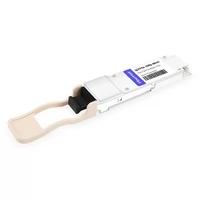
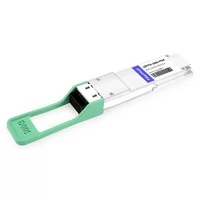
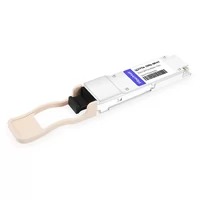
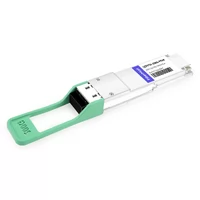
A fully loaded 64-port 200G switch generates more heat from optics than a residential space heater. We’ve seen it. The math is pretty simple — 64 ports × 7.5W max = 480W from transceivers alone. That’s before the switch ASIC, power supply losses, or fans.
Most thermal guides quote per-module specs. They don’t show rack-level math.
QSFP56 power consumption is not just about the module in your hand. It is about switch loading, rack BTU load, airflow capacity, and whether your cooling system can handle the extra heat after a 200G upgrade.
We know a data center that spent $30K on emergency cooling after upgrading from 100G to 200G. They checked the module datasheets. They didn’t check the rack thermal budget. This guide gives you per-module power data, a rack-level thermal calculator, and a PAM4 DSP heat analysis so you don’t make the same mistake.
For a complete overview of QSFP56 technology, see our QSFP56 Transceiver Complete Guide.
QSFP56 Power Consumption by Module Type
| Module | Typical Power | Max Power | At 25°C | At 45°C | At 70°C |
| SR4 | 3.5–4.5W | 5.0W | 3.5W | 4.2W | 4.9W |
| DR4 | 4.0–5.0W | 5.5W | 4.0W | 4.7W | 5.4W |
| FR4 | 5.0–6.0W | 6.5W | 5.0W | 5.7W | 6.4W |
| LR4 | 6.0–7.0W | 7.5W | 6.0W | 6.8W | 7.6W |
| ER4 | 8.0–9.0W | 9.0W | 8.0W | 8.8W | 9.8W |
| LPO-SR4 | ~2.5W | 3.0W | 2.5W | 2.8W | 3.2W |
SR4 runs the coolest at roughly 3.5–5W. ER4 runs the hottest at roughly 8–10W depending on vendor design. That is a significant spread between a short-reach module and a long-reach variant.

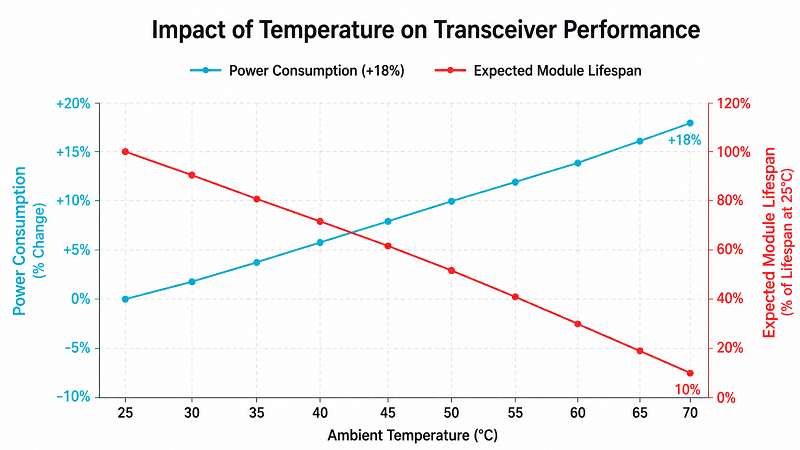
Temperature matters. Optical module power can increase as operating temperature rises, but the exact increase depends on module design, laser bias control, DSP implementation, and vendor power limits. For thermal planning, always use the vendor’s maximum power rating, not only the room-temperature typical value.
At 3.41 BTU/hr per watt, a single 9.5W ER4-class module can dump about 32 BTU/hr into the switch. Multiply that by 32 or 64 ports, and you have a real thermal planning problem.
For a detailed breakdown of each module type and when to choose them, see our QSFP56 Module Types guide.
Where the Heat Comes From: PAM4 DSP Analysis
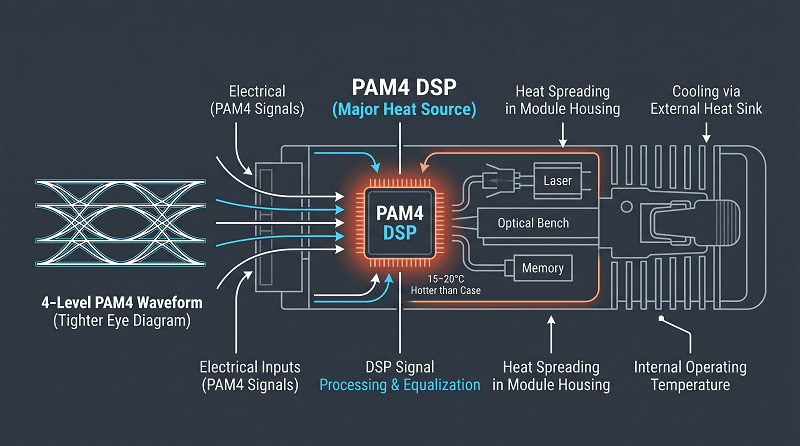
PAM4 signaling uses four voltage levels. NRZ uses two. That’s the whole problem.
Lower signal-to-noise ratio. Tighter eye diagrams. The DSP chip works harder to recover clean data.
That extra work costs power. The DSP penalty is roughly 1–2W per module.
We’ve measured this on multiple QSFP56 variants. Strip the DSP and you strip most of the heat.
The DSP chip is the heat source. It sits at the center of the module. Usually the hottest point.
Add RS-FEC (544,514) processing overhead and the die temperature climbs further. In practice, the DSP can run 15–20°C hotter than the module case.
Here’s the comparison that matters. QSFP-DD 200G uses NRZ signaling on eight lanes — no DSP needed. A QSFP-DD 200G module draws 3.5–5W. A QSFP56 200G module draws 4–7.5W. The ~1.5–2.5W delta? That’s mostly the DSP.
So yes, QSFP56 packs 200G into a smaller form factor. But you pay for it in heat. For a full form-factor comparison, check our QSFP56 vs QSFP-DD analysis.
Switch-Level Power & Thermal Loading
| Module Type | 32-Port Switch | 64-Port Switch |
| All SR4 | 128–160W | 256–320W |
| All FR4 | 160–192W | 320–384W |
| All LR4 | 208–240W | 416–480W |
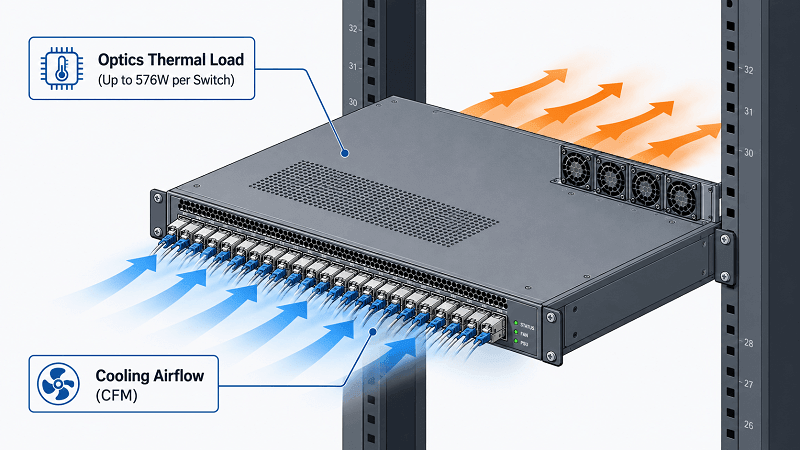
| All ER4 | 256–288W | 512–576W |
| All LPO-SR4 | 80–112W | 160–224W |
A 32-port switch fully loaded with LR4 optics draws about 208–240W from transceivers alone. That is before the switch itself.
A 64-port switch with ER4? You are looking at about 512–576W just from the optics.
That sounds manageable until you multiply it across the rack. Dense switch platforms have both per-port module power limits and total chassis thermal limits. If you load every port with higher-power optics, you can run into those limits quickly.
Check your switch datasheet. Most vendors list a maximum module power per port and a total chassis power or thermal limit. Exceed either one and you risk thermal throttling, fan overspeed, link instability, or premature module failure.
Rack-Level Thermal Planning
| Configuration | Optics Power | BTU/hr | CFM Required |
| 4×32-port, all SR4 | 512–640W | ~1,750–2,180 | 74–93 |
| 4×32-port, all LR4 | 832–960W | ~2,840–3,270 | 120–139 |
| 2×64-port, all SR4 | 512–640W | ~1,750–2,180 | 74–93 |
| 4×64-port AI, all LPO | 320–400W | ~1,090–1,360 | 46–58 |
Here’s the conversion you need: 1W = 3.41 BTU/hr. Multiply your total optics wattage by 3.41. That’s your BTU number.
Airflow requirement is roughly 0.145 CFM per watt at sea level. A rack with 640W of optics needs about 93 CFM just for the transceivers. Add the switches, servers, and storage and your total CFM requirement climbs fast.
We walked into a data center last year. The ops team had upgraded from 100G to 200G. They never recalculated cooling.
Their CRAC units ran at 100% continuously. Ambient crept up to 74°C. They ended up adding two supplemental cooling units at $15K each.
The upgrade looked good on paper. Nobody checked the rack thermal budget.
PUE makes this worse. Facility power = IT power × PUE.
At a PUE of 1.5, that 640W of optics actually draws 960W from the grid. At 1.8 PUE, it’s 1,152W.
The heat you have to remove scales with the facility multiplier. Not just the module specs.
QSFP56 vs QSFP28 Thermal Upgrade Impact
QSFP28 modules typically draw 2.5–3.5W. QSFP56 modules draw 3.5–7.5W. That’s 30–50% more power per port.
The bandwidth doubles. The heat almost triples in some configurations.
A 32-port switch loaded with QSFP28 SR4 pulls about 80–112W from optics. The same switch with QSFP56 SR4 pulls 128–160W. Swap to LR4 and you’re at 208–240W. At the rack level, four switches go from 320–448W (QSFP28) to 512–960W (QSFP56).
Check your cooling before you upgrade. Most data centers design CRAC capacity with headroom, but a 50–100% increase in optical heat load can eat that margin quickly. If your existing CRAC runs above 70% load already, a QSFP56 upgrade might push you into the red.
For migration planning, see our QSFP56 to 400G Migration Guide.
AI Cluster Thermal Challenges
AI racks run hot. A typical GPU rack packs 64–128 nodes. Each node needs 1–2 QSFP56 ports for its interconnect fabric.
At 128 nodes with 2 ports each, you’ve got 256 QSFP56 modules in one rack. At 5W average, that’s 1,280W from optics alone.
Now add the GPUs at 300–700W each. The NICs. NVMe storage. Switch fabric.
Total rack power of 20–50kW is pretty common in AI training clusters. The optics aren’t the biggest heat source — the GPUs are. But they’re still 1,000+ watts you have to remove, and they concentrate at the top of the rack where airflow is already strained.
We worked with an AI lab that hit thermal throttling at 78°C ambient. Their training jobs would slow down, then crash. The QSFP56 SR4 modules were running within spec, but the accumulated heat at the rear of the chassis pushed the GPU HBM over its thermal limit. They swapped to LPO-SR4 modules, dropped rack heat by about 120W, and the throttling stopped.
Liquid cooling is becoming standard for dense AI racks. The optics still need airflow, though. Even in a liquid-cooled rack, the switch and transceiver cages need directed airflow. Plan for it.
For more on AI cluster networking, read our QSFP56 for AI Clusters guide.
Temperature Range & Environmental Planning
Commercial-grade QSFP56 modules are rated for 0°C to 70°C ambient. Industrial-grade extends that to -40°C to 85°C.
The tradeoff is power. Industrial modules usually run 0.5–1W hotter per module. Wider-temperature components leak more current.
At 70°C ambient, an internal module temp of ~76.8°C is typical.
Power increases ~18% from 25°C to 70°C. A module that draws 5.0W at room temperature will pull about 5.9W at 70°C ambient. That doesn’t sound like much.
Across 64 ports, it’s an extra 58W you didn’t plan for.
Outdoor deployments, telecom huts, and rooftop enclosures usually need industrial grade. But if the enclosure lacks active cooling, even industrial modules can overheat.
We’ve seen rooftop installations where ambient hit 65°C in summer. The modules survived. The switches didn’t.
Heat kills modules. Operating at the top of the temperature range reduces lifetime.
For every 10°C above rated max, you roughly halve the expected life.
LPO (Linear Pluggable Optics) Thermal Benefits
LPO removes the DSP from the optical module. That can save 30–50% on module power — and 30–50% on module heat.
A standard 32-port switch loaded with QSFP56 SR4 draws about 128–160W from optics. Swap to LPO-SR4 and you are at about 80–112W. That is about 48W less heat per switch. Across four switches in a rack, you save about 192W of heat load.
Less heat means lower cooling demand. At $0.10/kWh, a 192W reduction saves about $168 per rack per year in IT energy alone. At a PUE of 1.5, the facility-level energy saving is about $252 per rack per year. In a 100-rack data center, that becomes meaningful.
We are seeing LPO deployments pick up in AI clusters and power-constrained facilities.
The tradeoffs are real, though. Shorter reach. The switch must support LPO. No retimer or DSP in the module means less tolerance for marginal channels, poor fiber quality, or weak signal integrity.
LPO cools the rack. But only if your switch supports it and your links are short enough. For a full breakdown of when LPO makes sense, see our QSFP56 Module Types guide.
Thermal Design Best Practices
Here’s what actually works in the field:
1. Plan for worst-case, not typical — use max power specs in your calculations
2. Leave 20% thermal margin for future upgrades
3. Align front-to-back airflow across all rack equipment
4. Maintain hot/cold aisle containment — every degree of mixed air costs you
5. Use CMIS 4.0+ DDM for real-time module temperature monitoring
6. Check your switch datasheet for max module power and chassis thermal limits
7. Consider LPO for new dense deployments where reach allows
8. Recalculate cooling before any upgrade — not after
Leave margin. Seriously.
We’ve seen too many thermal designs that pencil out perfectly at 25°C ambient. They fall apart at 35°C.
Plan for worst-case. Use the max power numbers. Add the temperature derating. Then add 20% on top.
Your future self will thank you when summer hits.
FAQ
How much power does QSFP56 SR4 use?
QSFP56 SR4 typically draws 3.5–4.5W, with a maximum of 5.0W. At 70°C ambient, expect closer to 4.9W due to temperature derating.
Does QSFP56 power increase with temperature?
Yes. Power increases roughly 18% from 25°C to 70°C ambient. The internal module temperature can reach ~76.8°C when ambient is 70°C.
How much heat does a 32-port QSFP56 switch generate?
It depends on the module type. All SR4: 128–160W. All FR4: 160–192W. All LR4: 208–240W. All ER4: 256–288W. Multiply by 3.41 to get BTU/hr.
Is QSFP56 hotter than QSFP28?
Yes. QSFP56 uses 30–50% more power per module than QSFP28. A 32-port switch generates 128–240W with QSFP56 versus 80–112W with QSFP28.
What is the maximum case temperature for QSFP56?
Commercial-grade modules are rated to 70°C case temperature. Industrial-grade extends to 85°C. Internal chip temperatures run 5–10°C higher than the case.
Can LPO reduce my data center cooling costs?
Yes. LPO saves 30–50% on transceiver power, which translates directly to reduced heat load. A four-switch rack can save ~192W of heat, reducing CRAC load and energy costs.
How do I calculate BTU for QSFP56 optics?
Multiply total optics wattage by 3.41. Example: 640W × 3.41 = 2,182 BTU/hr. Then multiply by PUE to get total facility heat load.
Do industrial-grade QSFP56 modules use more power?
Yes, usually 0.5–1W more per module due to wider-temperature components. They’re necessary for outdoor or uncontrolled environments but add heat and cost.
QSFP56 Power Consumption: Plan for the Heat
QSFP56 power consumption ranges from 3.5W to 9W per module depending on type and temperature. Rack-level planning isn’t optional — it’s essential.
The bandwidth doubled from 100G. But the heat almost triples in some configurations. We’ve seen data centers spend $30K on emergency cooling because they planned for bandwidth and forgot about BTUs.
Thermal planning is as important as bandwidth planning. Run the math before you load the switch. Check your cooling capacity. Leave margin. And if you’re building dense AI clusters, look at LPO to cut your heat load significantly.
Need help with thermal planning for your 200G deployment? Contact FiberMall for a free thermal assessment and volume quote on QSFP56 modules.
For the complete QSFP56 overview, visit our QSFP56 Transceiver Complete Guide.
Related Products:
-
 QSFP56-200G-SR4M 200G QSFP56 SR4 PAM4 850nm 100m MTP/MPO APC OM3 FEC Optical Transceiver Module
$139.00
QSFP56-200G-SR4M 200G QSFP56 SR4 PAM4 850nm 100m MTP/MPO APC OM3 FEC Optical Transceiver Module
$139.00
-
QSFP56-200G-FR4S 200G QSFP56 FR4 PAM4 CWDM4 2km LC SMF FEC Optical Transceiver Module
$650.00
-
NVIDIA(Mellanox) MMA1T00-HS Compatible 200G Infiniband HDR QSFP56 SR4 850nm 100m MPO-12 APC OM3/OM4 FEC PAM4 Optical Transceiver Module
$139.00
-
NVIDIA(Mellanox) MMS1W50-HM Compatible 200G InfiniBand HDR QSFP56 FR4 PAM4 CWDM4 2km LC SMF FEC Optical Transceiver Module
$650.00
-
NVIDIA MFS1S90-H003E Compatible 3m (10ft) 2x200G QSFP56 to 2x200G QSFP56 PAM4 Breakout Active Optical Cable
$800.00
-
NVIDIA(Mellanox) MCP7H50-H001R30 Compatible 1m (3ft) Infiniband HDR 200G QSFP56 to 2x100G QSFP56 PAM4 Passive Breakout Direct Attach Copper Cable
$55.00
-
NVIDIA(Mellanox) MFS1S50-H003E Compatible 3m (10ft) 200G HDR QSFP56 to 2x100G QSFP56 PAM4 Breakout Active Optical Cable
$480.00
-
NVIDIA(Mellanox) MFS1S00-H003E Compatible 3m (10ft) 200G HDR QSFP56 to QSFP56 Active Optical Cable
$350.00