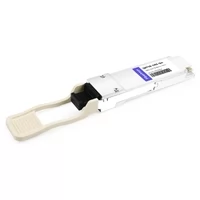
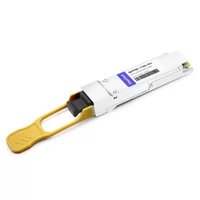
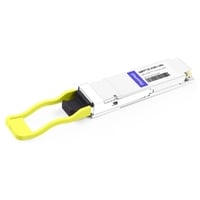
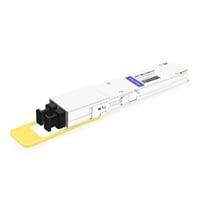
At 2:17 a.m., Priya’s phone buzzed. A 400G spine link in her Singapore data center had flapped. She logged into the switch and ran ethtool -m eth0/1. The output was there: a QSFP-DD module, vendor name, serial number, and a line that read Module State: 0x02 (ModuleLowPwr). The link wasn’t down because of a bad fiber. It was down because the module hadn’t made it past its own power-up handshake. That’s the moment she needed the full qsfp cmis ddm eeprom picture, not just a cable tester.
If you’ve ever stared at transceiver diagnostics and wondered what the numbers actually mean, you’re not alone. Every modern QSFP, QSFP28, and QSFP-DD module carries a small EEPROM that holds its identity, its capabilities, and a stream of real-time health data called DDM. The way you read that EEPROM depends on whether the module speaks the older SFF-8636 protocol or the newer CMIS protocol. This guide breaks down both so you can read, interpret, and act on module diagnostics with confidence.
Need QSFP modules with reliable DDM support? Explore FiberMall’s optical transceiver solutions or contact our networking experts for a compatibility review.
Quick Verdict
If you just need the bottom line, here’s what matters:
- QSFP+/QSFP28 modules use the SFF-8636 management interface. EEPROM is paged at I²C address 0xA0.
- QSFP-DD, OSFP, and 800G modules use CMIS. EEPROM uses a lower page plus banked upper pages at the same I²C address.
- DDM reports temperature, voltage, TX/RX power, and bias current in real time.
- EEPROM decode errors usually mean a firmware or CMIS-version mismatch, not a dead module.
What CMIS, DDM, and EEPROM Actually Do
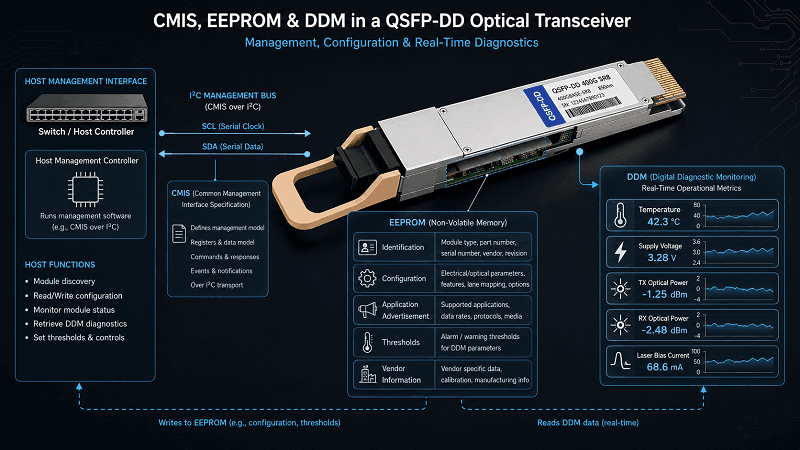
CMIS (Common Management Interface Specification)
CMIS is the standardized protocol a host switch uses to talk to a modern pluggable module.
It was developed by the QSFP-DD MSA and is now maintained by the Optical Internetworking Forum (OIF). CMIS handles identification, power negotiation, application selection, alarms, and firmware updates. Without it, a switch wouldn’t know whether a QSFP-DD module is a 400G SR8, a 2×200G breakout, or an 800G FR4.
DDM / DOM (Digital Diagnostic Monitoring)
DDM is the live telemetry stream. It tells you the module’s temperature, supply voltage, laser bias current, transmitted optical power, and received optical power, usually per lane. Some vendors call it DOM; it’s the same idea. DDM is what turns a dumb optic into a sensor you can monitor.
EEPROM
EEPROM is the module’s non-volatile storage. It holds the serial ID, vendor name, part number, date code, capability bits, alarm thresholds, and sometimes user-writable fields. When you run ethtool -m, you’re reading bytes out of this EEPROM.
For a broader look at the QSFP family, see FiberMall’s QSFP transceiver guide.
Standards Map: SFF-8472, SFF-8636, and CMIS
Not every form factor uses the same management spec. The table below maps the common standards to the modules you’re likely to see in 2026.
| Form Factors | Management Spec | Typical Speeds | EEPROM Model |
| SFP, SFP+, SFP28 | SFF-8472 | 1G–25G | Two 256-byte blocks at 0xA0 and 0xA2 |
| QSFP+, QSFP28, QSFP56 | SFF-8636 | 40G–200G | 256-byte window with paged upper 128 bytes |
| QSFP-DD, OSFP, QSFP112 | CMIS | 200G–800G+ | Lower 128 bytes + banked upper pages |
The jump from SFF-8636 to CMIS wasn’t just a bigger address space. CMIS added dynamic application advertisement, power-mode control, and a state machine the host must follow before traffic can flow. LINK-PP has a useful SFF-8636 vs CMIS comparison if you want the full evolution story.
QSFP28 and the SFF-8636 EEPROM Layout
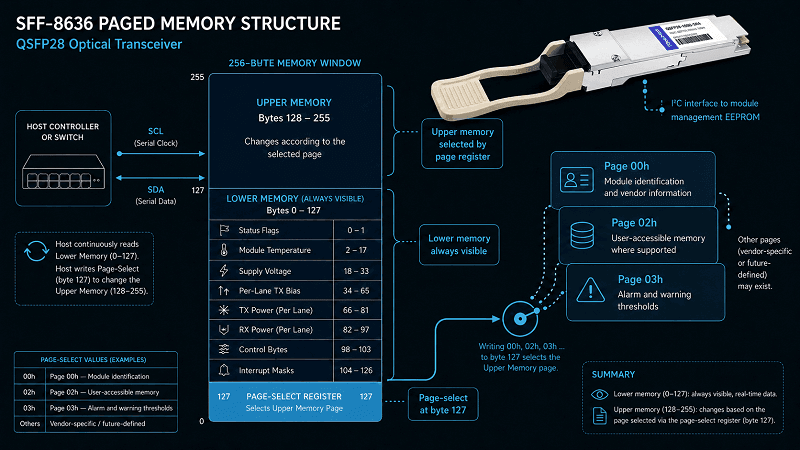
A QSFP28 module exposes a single I²C address: 0xA0 for reads. The memory is organized as a 256-byte window with a fixed lower half and a selected upper half.
Lower Page (0x00–0x7F)
The lower page holds time-critical data:
- Bytes 0–2: Identifier and status bytes.
- Bytes 3–21: Interrupt flags.
- Bytes 22–33: Module-wide monitors (temperature, Vcc).
- Bytes 34–81: Channel monitors (per-lane TX/RX power, TX bias).
- Bytes 86–99: Control bytes.
- Bytes 100–106: Interrupt masks.
- Byte 127: Page-select byte.
Upper Pages
To read the upper pages, you write a page number to byte 127 and then read addresses 0x80–0xFF:
- Page 00h: Serial ID fields (vendor name, OUI, part number, serial number, date code, power class).
- Page 01h: Application / option table.
- Page 02h: User-writable EEPROM.
- Page 03h: Alarm and warning thresholds.
Real-time diagnostics live in the lower page, so a switch can poll temperature and optical power without constantly changing pages.
For the exact electrical pinout behind that I²C bus, see FiberMall’s QSFP pinout and MSA guide.
QSFP-DD and the CMIS EEPROM Layout
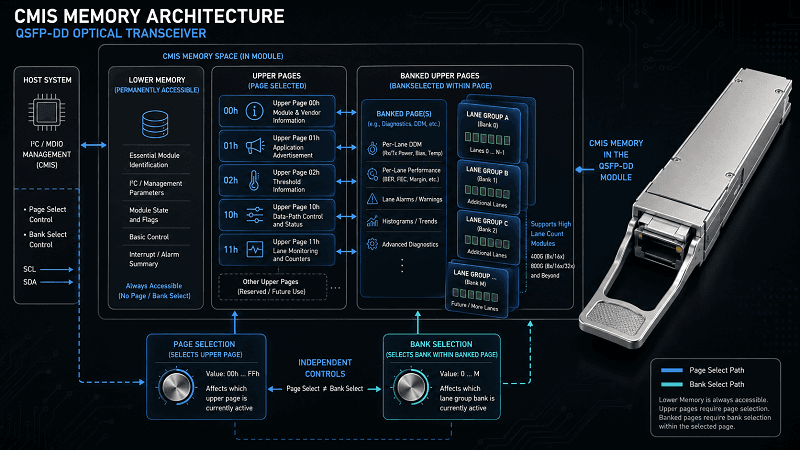
CMIS keeps the same 0xA0 I²C address but reorganizes the memory into a lower page that is always visible and upper pages that are banked.
Lower Page (0x00–0x7F)
The lower page contains the data a host needs most often:
- Byte 0: Identifier.
- Byte 3: Module state (the bits Priya was staring at).
- Bytes 14–25: Module-level monitors (temperature, Vcc, auxiliary monitors).
- Bytes 26–81: Lane-specific monitors (TX/RX power, TX bias, per-lane flags).
- Bytes 86–99: Control fields.
- Byte 127: Page-select byte.
Upper Pages
- Page 00h: Administrative information (vendor name, OUI, part number, serial number, date code, power characteristics, connector type).
- Page 01h: Application advertising table.
- Page 02h: Thresholds.
- Pages 10h–11h: Data-path control and status.
- Banked pages: Additional lanes and advanced diagnostics for 800G/1.6T modules.
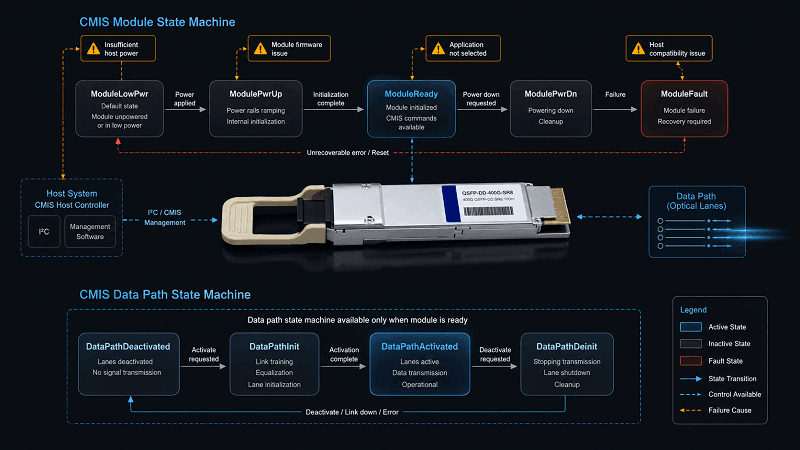
CMIS also introduces an explicit state machine. The module won’t move data until the host walks it from ModuleLowPwr through ModuleReady and into DataPathActivated. Skipping that handshake is a common reason a module is detected but the link stays dark.
Reading QSFP EEPROM: A CLI Cheat Sheet
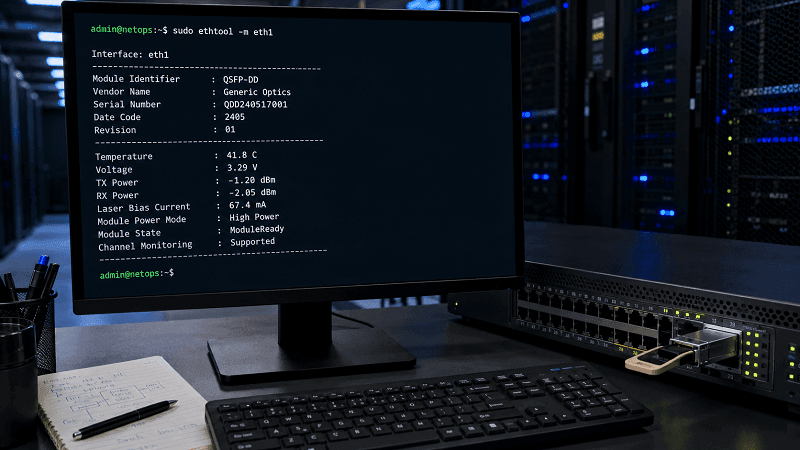
Linux: ethtool -m
On most Linux switches and servers, this is the fastest check:
ethtool -m eth1
Add –verbose or use ethtool –show-module eth1 on newer kernels to see power-mode policy and CMIS state. Wolontek’s practical EEPROM guide notes that a “Connection timed out” error usually means an I²C bus hang; re-seat the module first.
SONiC / Broadcom: sfputil
sfputil show eeprom -p Ethernet0 –dom
The –dom flag includes DDM values. Omit it for a clean serial-ID dump.
Cisco IOS-XR / NX-OS
show interface transceiver detail
show controllers optics R0/RP0/CPU0
Mellanox / NVIDIA: mlxlink
mlxlink -d /dev/mst/mt52100_pciconf0 -c –show_module –cable –dump
mlxlink gives raw page dumps and state-machine status, which is invaluable when a module is stuck.
Arista EOS
show interfaces transceiver eeprom
show interfaces transceiver dom
Keep this cheat sheet handy. When a link fails at 2 a.m., the right command saves a lot of guesswork.
Understanding DDM Thresholds and Alarms
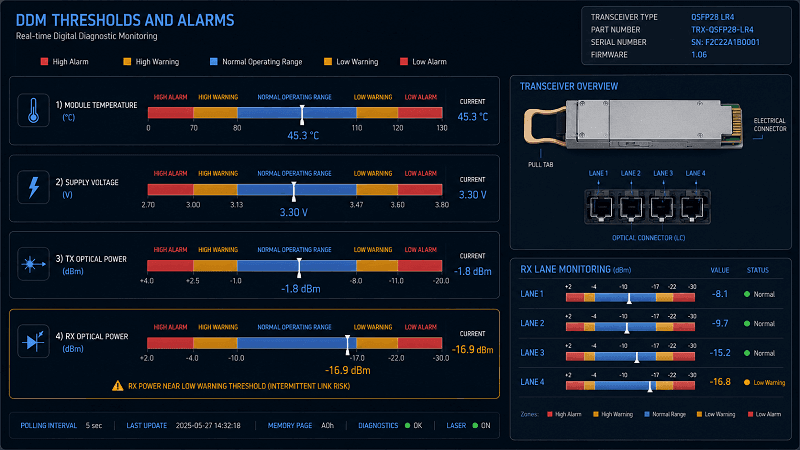
DDM isn’t just numbers. Every monitored parameter has four thresholds: high alarm, high warning, low warning, and low alarm. The exact values are vendor- and module-specific, stored in the EEPROM.
A typical QSFP+ threshold set from NVIDIA’s MFT documentation looks like this:
| Parameter | High Alarm | High Warning | Low Warning | Low Alarm |
| Temperature | 80°C | 70°C | 0°C | –10°C |
| Voltage | 3.500 V | 3.465 V | 3.135 V | 3.100 V |
| RX Power | +5.4 dBm | +2.4 dBm | –10.3 dBm | –13.3 dBm |
| TX Power | +5.4 dBm | +2.4 dBm | –8.4 dBm | –11.4 dBm |
Marcus, a network engineer in Frankfurt, once chased a “flapping” 100G link for an hour. The RX power looked fine at –6 dBm. Then he noticed the low-warning threshold was –10.3 dBm and the value was bouncing between –10.2 and –10.5 dBm. A dirty MPO connector was the culprit. A cleaning pen fixed it in 30 seconds. DDM didn’t just show a problem; it showed which problem.
For modules running hotter than expected, FiberMall’s QSFP power consumption guide explains how thermal budget affects reliability.
How Alarms Reach the Host
Most switches don’t sit and poll every byte of the EEPROM continuously. Instead, they rely on interrupt flags and masks. In SFF-8636, the lower page contains flag bytes that flip when a monitored value crosses a threshold. The host can mask individual flags so it only gets alerted for the conditions it cares about.
CMIS uses a similar model. The lower page carries summary flags, and the upper banked pages expose lane-specific alarm bits. When a flag asserts, the host reads the relevant monitor bytes to find the offending lane or parameter. That’s why a good NMS integration maps DDM thresholds to actionable tickets rather than just logging raw numbers.
If you’re writing automation, expose the alarm bits first and the raw telemetry second. An alarm bit tells you that something needs attention; the raw value tells you how much attention it needs.
CMIS State Machine and Common Failures
CMIS modules don’t simply power on and pass traffic. They run a handshake:
1. Reset → module boots.
2. MgmtInit → module prepares the management interface.
3. ModuleLowPwr → low-power mode, safe to insert.
4. ModuleReady → high-power mode available.
5. DataPathActivated → the selected application is running.
A module can get stuck at any step. Common causes include:
- Power-class mismatch: The switch doesn’t supply enough current for a Class 8 QSFP-DD module.
- CMIS version mismatch: A CMIS 5.0 module behind a CMIS 4.0-aware host may expose registers the host doesn’t parse correctly.
- Application not selected: The host never sent the correct Application Code, so the module never enters DataPathActivated.
- Vendor lock-in: Some switches reject third-party optics by checking vendor OUI fields in Page 00h.
Priya’s ModuleLowPwr state turned out to be a firmware bug. The switch’s power-mode policy defaulted to low power for new third-party modules. A single ethtool –set-module eth0/1 power-mode-policy high command nudged the module into ModuleReady, and the spine link came up. The EEPROM data was correct the whole time; the host just hadn’t finished the handshake.
Ascent Optics covers more CMIS troubleshooting patterns in its QSFP-DD problem-resolution guide.
Advanced Diagnostics: VDM and FEC
CMIS 5.0 and later add VDM, or Versatile Diagnostic Monitoring. VDM exposes richer per-lane data than traditional DDM:
- Pre-FEC bit error ratio
- Post-FEC frame error count
- Electrical SNR
- PAM level transition parameter (LTP)
- Equalizer settings
These values matter most in AI training clusters and hyperscale fabrics, where a link can look healthy by optical power but still produce silent packet errors. FEC monitoring lets you catch degradation before it becomes packet loss.
For 400G/800G modules, VDM is becoming as important as temperature and RX power. If you’re building AI infrastructure, you need optics that expose these registers cleanly.
2026 Outlook: CMIS 5.4, 800G, and 1.6T
CMIS 5.3 is the current revision, released by the OIF in September 2024, with Errata 1.0 following in February 2025. CMIS 5.4 is expected in 2026. Each revision adds support for higher speeds, more lanes, and richer diagnostics.
In 2026, QSFP-DD800 modules are mainstream, and 1.6T OSFP-XD modules are entering early deployment. Both rely on CMIS 5.x. The days of treating transceivers as simple plug-and-play parts are ending; they’re now managed peripherals with firmware, state machines, and telemetry.
Vitex Tech’s EEPROM guide for AI data centers makes the same point: understanding EEPROM and CMIS is no longer optional for engineers building high-speed networks.
If you’re evaluating 400G or 800G modules, FiberMall’s QSFP-DD vs QSFP28 vs OSFP comparison walks through the form-factor trade-offs.
Conclusion
The qsfp cmis ddm eeprom stack is simpler than it looks once you separate the pieces. CMIS is the conversation between host and module. DDM is the live health data. EEPROM is the module’s identity and configuration store. SFF-8636 handles 40G–200G QSFP modules; CMIS handles 200G–1.6T QSFP-DD and OSFP modules.
When a link misbehaves, start with ethtool -m or your platform’s equivalent. Check the module state. Compare live DDM values against thresholds. If the module is detected but the link won’t come up, suspect the CMIS handshake before you suspect the fiber.
If you need QSFP28, QSFP-DD, or OSFP modules with full DDM and CMIS compliance, explore FiberMall’s optical transceiver solutions or contact our networking experts for a deployment review.
Related Products:
-
 QSFP28-100G-SR4 100G QSFP28 SR4 850nm 100m MTP/MPO MMF DDM Transceiver Module
$40.00
QSFP28-100G-SR4 100G QSFP28 SR4 850nm 100m MTP/MPO MMF DDM Transceiver Module
$40.00
-
QSFP28-112G-SR4 112G OTU4 QSFP28 SR4 850nm 100m MTP/MPO MMF DDM Transceiver Module
$50.00
-
H3C QSFP-100G-eSR4-MM850 Compatible 100G QSFP28 eSR4 850nm 200m on OM3/300m on OM4 MTP/MPO MMF DDM Transceiver Module
$75.00
-
QSFP28-100G-IR4 100G QSFP28 IR4 1310nm (CWDM4) 2km LC SMF DDM Transceiver Module
$110.00
-
FiberMall QSFP112-400G-VR4 Compatible 400G QSFP112 VR4 PAM4 850nm 50m MTP/MPO-12 OM4 FEC Optical Transceiver Module
$385.00
-
QSFP112-400G-LR4 400G QSFP112 LR4 PAM4 CWDM 10km Duplex LC SMF FEC Optical Transceiver Module
$1000.00
-
QSFP112-400G-FR4 400G QSFP112 FR4 PAM4 CWDM 2km Duplex LC SMF FEC Optical Transceiver Module
$600.00
-
QSFP112-400G-FR1 4x100G QSFP112 FR1 PAM4 1310nm 2km MTP/MPO-12 SMF FEC Optical Transceiver Module
$800.00
-
QSFP112-400G-DR4 400G QSFP112 DR4 PAM4 1310nm 500m MTP/MPO-12 with KP4 FEC Optical Transceiver Module
$500.00
-
QSFP112-400G-SR4 400G QSFP112 SR4 PAM4 850nm 100m MTP/MPO-12 OM3 FEC Optical Transceiver Module
$400.00
-
OSFP-800G-DR8D-FLT Compatible 800GBASE 2 x DR4/DR8 OSFP Flat Top PAM4 1310nm 500m DOM Dual MTP/MPO-12 SMF Optical Transceiver Module
$650.00
-
OSFP-800G-SR8D-FLT Compatible 800G 2 x SR4/SR8 OSFP RHS/Flat Top PAM4 850nm 100m DOM Dual MPO-12 MMF Optical Transceiver Module
$600.00
-
OSFP-800G-SR8D Compatible 800GBASE 2 x SR4/SR8 OSFP PAM4 850nm 100m DOM Dual MPO-12 MMF Optical Transceiver Module
$550.00
-
OSFP-800G-2FR4L 800G 2 x FR4 OSFP IHS/Closed Finned Top PAM4 1310nm 2km DOM Dual Duplex LC SMF InfiniBand NDR Optical Transceiver Module
$1000.00
-
OSFP-800G-DR8D Compatible 800GBASE 2 x DR4/DR8 OSFP PAM4 1310nm 500m DOM Dual MTP/MPO-12 SMF Optical Transceiver Module
$550.00
-
QSFP-DD-800G-DR8 800G-DR8 QSFP-DD PAM4 1310nm 500m DOM MTP/MPO-16 SMF Optical Transceiver Module
$1000.00